

What is a yottabyte?

From smartphone to hard drive to your digital camera’s memory card – we store and access vast quantities of data on different devices each day. The demand for storage capacity continues to grow each year. At the same time, we’re increasingly making use of services that require access to huge volumes of data, such as video streaming services which have become firmly established as part of our daily lives and account for a large proportion of the world's data volumes.
Storage capacities are often specified with the unit byte and its multiples. The largest unit is the yottabyte. Although the unit of information isn’t of great importance in our day-to-day life just yet, the yottabyte provides information about the amount of data used globally and makes for an exciting glimpse into the future of data storage and increasing capacities.
What is a yottabyte?
The yottabyte is the largest existing unit for storage capacities of devices and cloud services. To understand just how big a yottabyte is, it helps to get to know the smallest units.
The smallest possible storage unit for data is one bit. This unit has two possible states: 0 or 1. But how does a bit relate to a yottabyte? To understand the relationship between the two sizes, it’s helpful to convert them to a byte which is made up of 8 bits. Since each bit can take on two different states, there are already 28, i.e., 256 states for one byte. This helps to display a character that’s readable by humans.
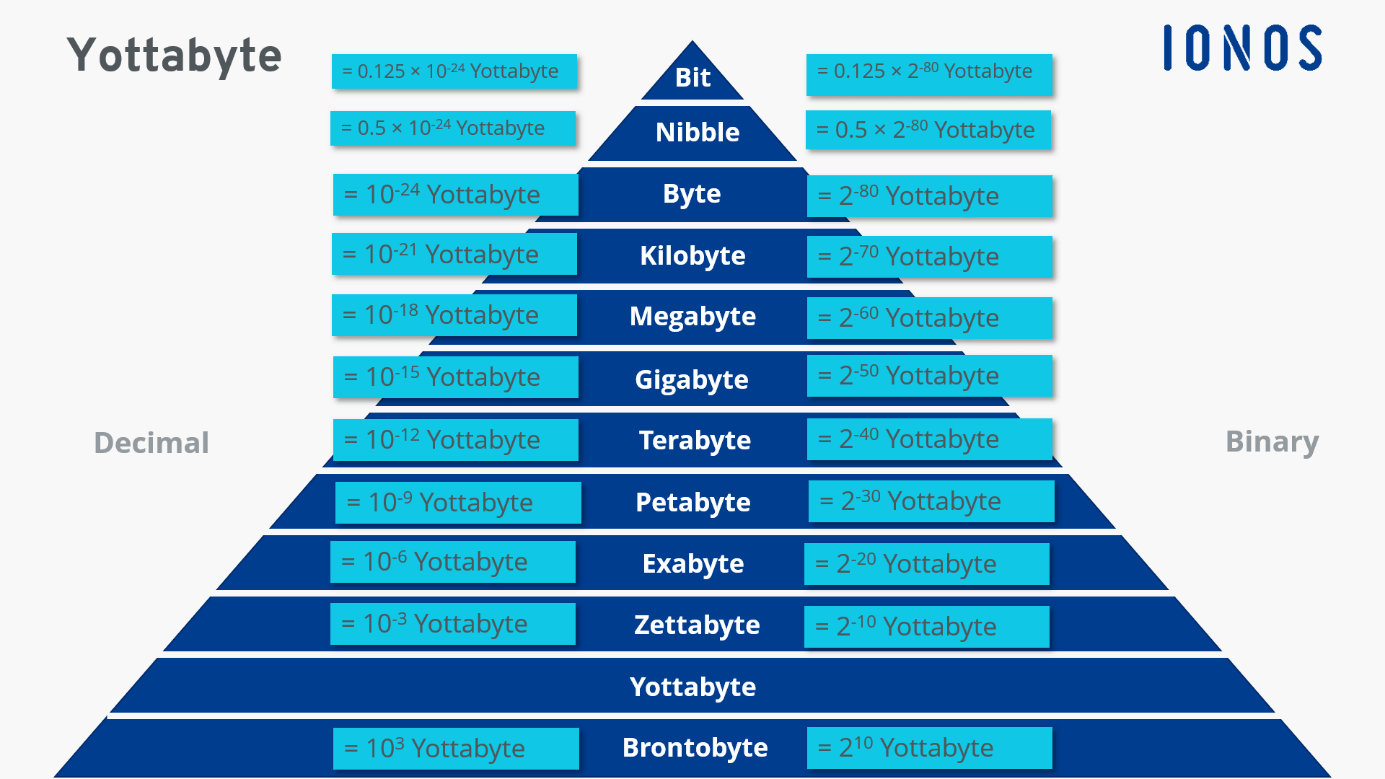
The byte is followed by the units kilo-, mega-, giga-, tera-, peta-, exa-, zetta- and finally the yottabyte. Each unit is 1,024 times larger than its predecessor. A yottabyte is therefore a multiple of a byte. According to the decimal system, one yottabyte is 1024 (1,000,000,000,000,000,000,000,000) bytes. However, since computers use binary values to calculate, a more precise conversion is carried out according to the binary system. This is based on the powers of two instead of the powers of ten, which is why one yottabyte corresponds to 280 bytes. Separate prefixes with the intermediate syllable ‘bi’ exist for the binary system. The binary unit corresponding to the yottabyte is called the yebibyte. However, these terms (according to the binary system) have not yet established themselves.
Conversion to the decimal system seems easier but leads to a deviation that increases in direct proportion to the amount of data. The difference between a yottabyte and a yebibyte is more than 20 percent.
Yottabyte and yottabit – what’s the difference?
The unit byte and its multiple indicate storage capacities, typically used to denote volumes of external hard drives, USB sticks, or memory cards. The storage space of cloud providers is also specified in bytes. Conversion to bits is more common for transmission rates. Most users are well-acquainted with specs such as ‘100 Mbit/s’ to make sense of Internet speeds. The abbreviation stands for a transmission of 100 megabits per second.
In general, yottabytes can be converted to yottabits. However, this is a theoretical figure right now. The fastest Internet speed achieved so far is 178 terabits per second which is still far below the performance of a yottabyte.
What multiples of yottabytes exist?
Most sources refer to the yottabyte as the largest possible unit of data. While this is correct, and the yottabyte is currently the largest byte unit recognised by the International Bureau of Weights and Measures – a designation for the subsequent unit already exists: the brontobyte which corresponds to 1,024 times the yottabyte. The ‘Internet of Things’ and sensor data are emerging as potential areas where this unit may come in handy.
To convert common memory capacities such as megabyte or gigabyte to yottabyte, the factor 1/1,024 is used. The following table is an overview of the conversion from yottabytes to common units of information:
| Data quantity | In yottabyte | In byte |
| 1 Bit | 1/9,671,406,556,917,033,397,649,408 | 1/8 |
| 1 Nibble | 1/2,417,851,639,229,258,349,412,352 | 1/2 |
| 1 Byte (B) | 1/1,208,925,819,614,629,174,706,176 | 1 |
| 1 Kilobyte (KB) | 1/1,180,591,620,717,411,303,424 | 1,024 |
| 1 Megabyte (MB) | 1/1,152,921,504,606,846,976 | 1,0242 |
| 1 Gigabyte (GB) | 1/1,125,899,906,842,624 | 1,0243 |
| 1 Terabyte (TB) | 1/1,099,511,627,776 | 1,0244 |
| 1 Petabyte (PB) | 1/1,073,741,824 | 1,0245 |
| 1 Exabyte (GB) | 1/1,048,576 | 1,0246 |
| 1 Zettabyte (ZB) | 1/1,024 | 1,0247 |
| 1 Yottabyte (YB) | 1 | 1,0248 |
| 1 Brontobyte (BB) | 1,024 | 1,0249 |
Tera- and yottabyte are examples of units of storage capacity for very large volumes of data which means that the units appear even more abstract. Comparing the storage capacity to real sizes can be helpful to get a better idea of their size. For example, a 1 TB hard drive offers space for around 200,000 MP3 songs. To store 1 yottabyte of data on hard drives, 100 billion pieces of 10 terabytes each would be required. This corresponds to 1.4 quadrillion CDs.
How and since when have yottabytes been in use?
Day to day, hard drives offer some of the largest storage capacities. But most commercially available hardware offers storage capacities in the terabyte range. This is completely sufficient for private use. Cloud providers and server farms work with even larger dimensions. What’s more, global data volumes continue to increase each year. Streaming services are an important driver of this growth. It’s estimated that they’re responsible for around 15 percent of all Internet traffic. In addition to the number of users, the quality of the image material continues to expand. Experts assume that global data volumes will grow to 175 zettabytes by 2025.
Yottabytes too are more than just a theoretical quantity. The American secret service NSA, for example, collects huge data quantities. The exact capacity is at least as top secret as the NSA data itself. However, experts assume that the storage capacity of the NSA data centercentre is in the yottabyte range.
Common storage media have one major disadvantage. Users need hardware such as hard drives or USB sticks to access the data. Damage to storage devices, loss, or theft are just a few of the risks involved. You can protect yourself by using HiDrive Cloud storage from IONOS and access your data anytime and from anywhere. Your data remains safe and secured from unauthorised access by third parties.