

Replacing SSL (Secure Socket Layer) Certificates affected by browser distrust

The popular internet browsers Google Chrome and Mozilla Firefox have recently announced their plans to distrust any SSL certificates issued by the company Symantec before 1st December, 2017. An SSL certificate is an important aspect of a website that handles sensitive, personal information. Symantec’s Web Security and other PKI solutions have been taken over by the company DigiCert – this acquisition will result in DigiCert updating and modernising several aspects of the Symantec model. However, in the meantime, Chrome and Mozilla have decided to remove trust in Symantec SSL certificates until these updates are completed.
Why are these SSL certificates being targeted?
Chrome and Mozilla’s decision to distrust SSL certificates results from a small number of discrepancies in SSL certificates issued by them between 2015 and now. The main criticism was about Symantec’s ability to ensure a proper authentication process for SSL certificates. Debates between Symantec and the browser community have spread over several months and have concluded with two main action points laid down by Google Chrome and later confirmed by Mozilla:
- Symantec must partner up with another Certificate Authority to run the SSL authentication and issuance processes from a new infrastructure.
- All SSL certificates issued from prior Symantec roots will be distrusted and need to be replaced without extra cost following phased timeline.
Shortly after this decision, Symantec sold their SSL business to Digicert and started issuing fully compliant SSLl certificates from their new CA infrastructure on 1st December, 2017.
Whilst Chrome and Mozilla may be acting in the interest of their customers safety, there are a number of browsers such as Internet Explorer, Safar and Opera who are choosing not to display warning messages to visitors, as they do not believe the threat to be as serious as Chrome and Mozilla claim. Regardless of severity of the security risk, plenty of website operators may have their website affected by this campaign of distrust.
When will SSL certificates be affected?
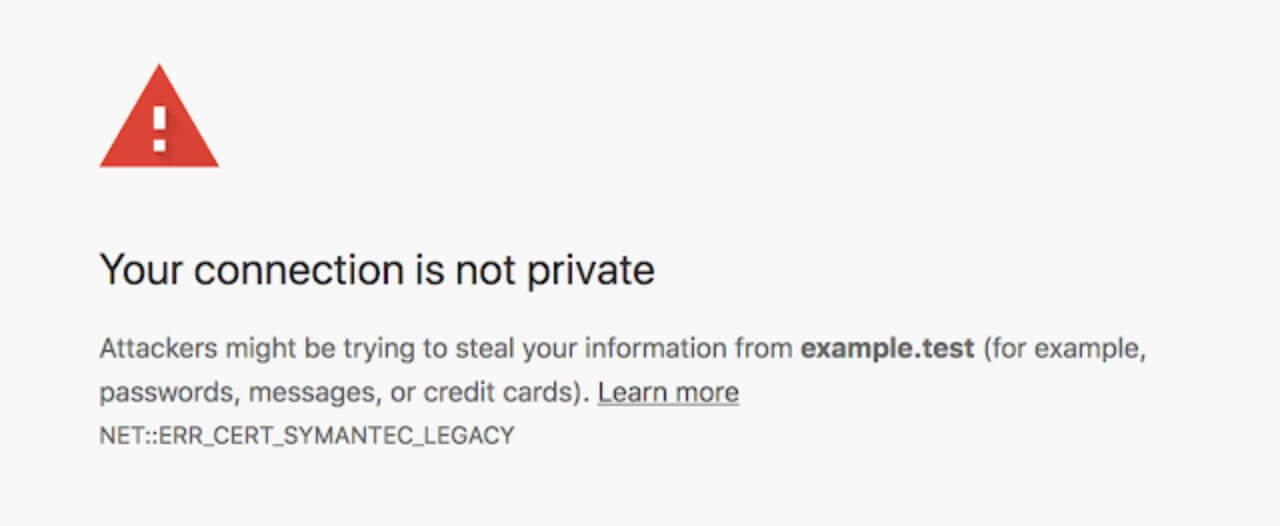
Chrome will begin issuing security warnings on the 16th April, 2018 to Chrome 66 (and later) users when they try to access a Symantec SSL-encrypted website. This warning will appear on all Symantec SSL certificates issued before the 1st June, 2016. From October 2018, Chrome 70 (and above) users will also receive the message on all sites that contain Symantec SSL certificates issued before 1st December, 2017. The warning message simply states that the data exchange may be unsafe. Visitors can accept the warning and continue on to the website unimpeded: the website’s functionality will remain unaffected. There is no risk to any data on your website being compromised.
How do I know if my certificate is affected?
In order to work out whether or not your website’s SSL certificates will be affected by this change, you will need to check the validity of the certificate. There are a number of online tools that can help you assess the validity of your SSL certificates – simple research, select and download your program to check their certificate validity. Alternatively, checking the validity through your own browser is quite straightforward. Here, we will show you how to check whether your SSL certificates are in date or not on Google Chrome and Mozilla Firefox.
Google Chrome
To check the status of your SSL certificate on Chrome, select the icon next to the URL. This may be a green lock (connection secure), a yellow exclamation mark (no certificate provided), a blank page symbol (this website does not need prior authentication), a lock symbol with a yellow triangle (certificate provided, but security standard is low) or a red padlock (site has certificate issues). Click on the symbol present and a window will pop up with an option to view the certificate:
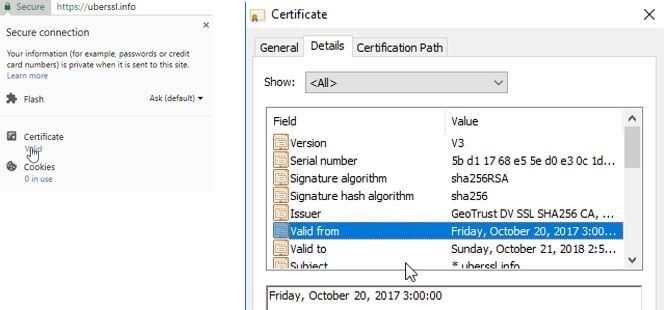
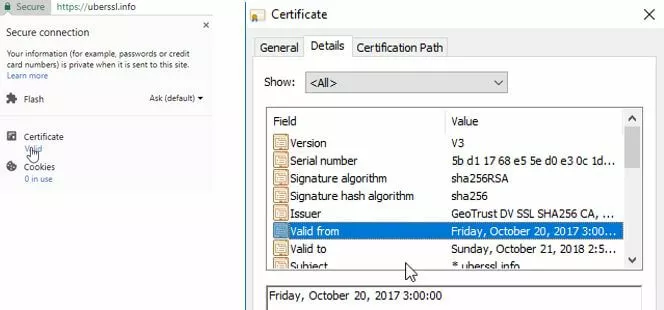
Go to the “Details” tab in the second popup window and you will be able to find the validity period dates for the website’s certificate.
Mozilla Firefox
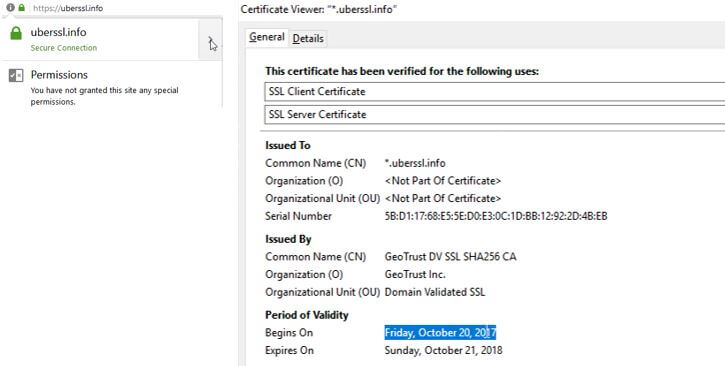
The process for checking the validity of an SSL certificate on Mozilla Firefox is more or less the same as checking on Chrome. Next to the URL should be a security symbol – either a green padlock (secure), grey padlock with a yellow exclamation triangle (connection may not be secure) or a grey packlock with a red line through it (connection not secure). Clicking on the security symbol will bring up a small pop up window:
 Asha SreenivasShutterstock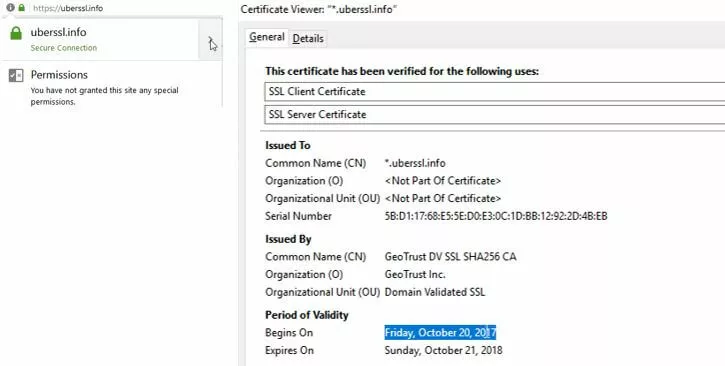
Simply click on the arrow next to the website connection information and another window will pop open. In the General tab of the pop up window, the Period of Validity will be on display at the bottom.
Replacement Timeline & Actions Required
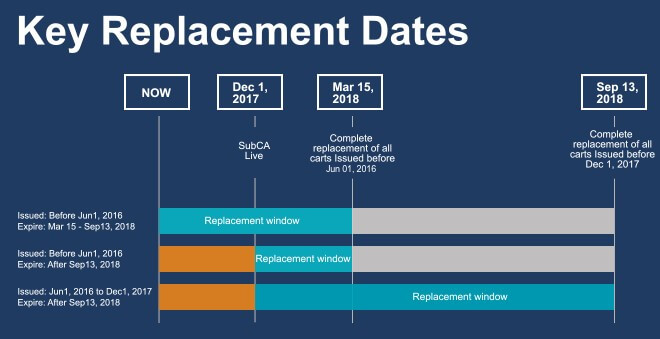
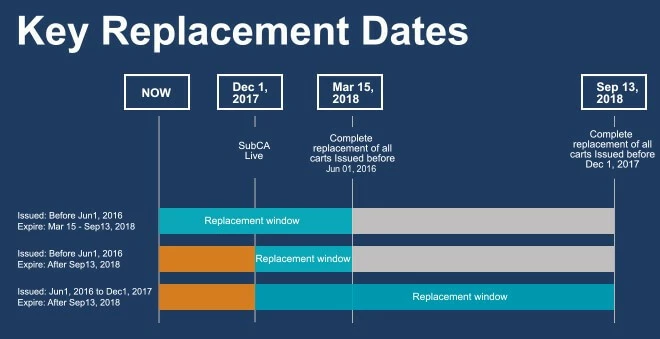
The timeline consists of two phases which match Google Chrome 66 & 70 version releases:
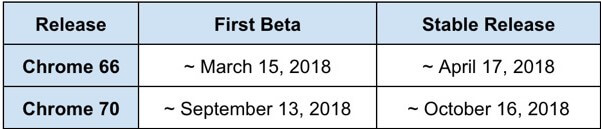
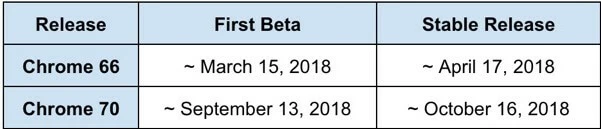
Phase I –Certificates issued before 1st June, 2016 will be distrusted by Chrome 66. You will need to renew SSL certificates issued before this date on before 15th March, 2018.
Phase II – If your SSL certificate was issued after 1st December, 2017 then there is no need to reissue it. Certificates issued before 1st December, 2017 will be distrusted by Chrome 70. Any SSL certificates issued before this date will need to be replaced by 13th September, 2018. With Chrome 66 you may already notice a warning in Chrome Developer Tools:


If the SSL certificate is not replaced before Chrome 70 is released, then your customers will no longer be able to access your site:
Taking Action
All affected SSL certificates need to be replaced through a Reissue operation. This provides a new certificate for the same domain, with the same expiration date as the one replaced.
If your certificate expires before the 13th September, 2018 (Chrome 70 beta), there’s no need to take any action.
Symantec/DigiCert are offering affected customers a new SSL certificate free of charge. You will need to create a CSR (Certificate Signing Request) for each of the certificates you wish to replace/have reissued, which is a standard procedure for sending DigiCert your public key, information about your company and your domain name. Submit your request, and once DigiCert have revalidated your domains and organisations, you will receive the new certificate which you can install.