

What is an SSL certificate? Definition, validity, and costs

An SSL certificate is a digital file that confirms a website’s identity and enables an encrypted connection between the server and browser. It protects sensitive data like passwords from third-party access. Websites with an SSL certificate can be identified by the ‘https’ in the URL and a small padlock icon in the browser.
What is an SSL certificate?
Modern SSL certificates no longer use the outdated SSL (Secure Sockets Layer) but instead rely on the newer and more secure TLS (Transport Layer Security). In practice, however, ‘SSL certificates’ is still the common term when referring to securing a website and server with encryption technology. The certificate itself is a simple data record: the file contains numerous details, such as the issuer’s name, the serial number, and the so-called fingerprint for encryption. Certificates come in various file formats and must be installed on the server for use.
To obtain an SSL certificate, website operators must contact a certification authority. These organisations are authorised to issue an SSL certificate but typically charge a fee for their service. But why can’t just anyone set up their own organisation? The reason for this is that browser manufacturers, like Microsoft, Mozilla, or Google, must accept the certificates; otherwise, the certificate would be utterly useless.
How long is an SSL certificate valid?
A certificate accepted by browsers is not valid indefinitely. Each SSL certificate has an expiration date between 1 and 13 months. By 2029, SSL certificates are expected to be valid for a maximum of 47 days. When this occurs, website operators must replace their expired SSL certificates and have them renewed; otherwise, the respective sites will no longer be marked as particularly secure. Although renewing certificates on a regular basis can be both time-consuming and costly, it remains essential. Only by having certification authorities repeatedly verify integrity, identity, and the encryption methods in use can user security be reliably ensured.
The SSL certificate not only states its expiration date but also indicates the effective start date.
How does encryption work for SSL certificates?
There are several methods for encrypting data transfers. Traditionally, a single key is used for both encryption and decryption, meaning the exact same key is required to make a message readable again. On the internet, however, this approach is impractical since users often connect with people or organisations they have never interacted with outside the web. As a result, there is no secure way to exchange a key without sending it unencrypted over a public channel. For this reason, SSL certificates rely on a different encryption method.
In a Public Key Infrastructure (PKI), two keys are generated: one public and one private. Messages encrypted with the public key can only be decrypted with the private key. The public key is transmitted to the browser via the SSL certificate and used for encryption. Alongside this, the certificate also provides the browser with details about the supported encryption methods.
A widely used method today is AES (Advanced Encryption Standard) combined with the SHA256 cryptographic hash function. However, encryption standards evolve constantly—a method considered secure today may be cracked tomorrow and deemed unreliable.
What SSL certificates are there?
There are different types of SSL certificates. While issuers may vary in their verification processes, these differences are not the main criteria. Instead, SSL certificates are primarily distinguished by the level of applicant verification and the scope of coverage. Certificates in the Domain Validation category are now often available for free, but the costs of an Extended Validation certificate are usually too high for individuals and small businesses.
Domain Validation (DV)
Domain Validation represents the most basic level of SSL certificates, with verification of the website owner being rather minimal. In many cases, the certification authority simply sends an email to the address listed in the WHOIS entry. The applicant may then be asked to modify a DNS record or upload a specific file to their server to confirm control over the domain.
Organization Validation (OV)
OV SSL certificates are one level higher in terms of visitor security. The certification authority requests documents from the website owners during the validation process—usually after the automated Domain Validation has taken place. The specific documents required depend on the issuing organisation—often, a business registration is requested.
Additionally, some certification authorities contact the website operators via phone. OV SSL certificates thus provide more security because there is more thorough vetting of who is truly behind the website. They also offer the advantage of keeping this information visible to users within the certificate itself.
Extended Validation (EV)
SSL certificates offered under the ‘Extended Validation’ label represent the highest level of security. This type of certificate involves verification of the domain and the associated organisation, as well as the applicant. It checks whether the applicant is indeed employed by the specified organisation or company and whether they are authorised to request such a certificate.
Additionally, the certification authority must also be authorised to conduct Extended Validation. To become authorised, the authority must pass a review by the CA/Browser Forum, which is a voluntary association of certification authorities and browser vendors.


What does an SSL certificate cost? Free SSL vs paid SSL
A significant factor in categorising and selecting an SSL certificate is the costs associated with its acquisition. Relating this aspect directly to the three preceding verification types, it can be generally stated that the more extensive the certification check, the more one must pay for the certificate in the end. Since 2015, Let’s Encrypt has even been a certification authority providing certificates completely free of charge.
Differences between free and paid certificates
For the basic security of a website, ensuring it can be accessed via HTTPS instead of standard HTTP, a free certificate is just as effective as a paid one. Both types rely on SSL or TLS protocols, making secure data transfer mandatory between clients and servers.
In some aspects, however, free and paid certificates differ significantly from each other:
-
Validation level: For SSL certificate issuance, verification of the website owner is usually minimal—Domain Validation is the standard here. Certificates with higher security levels always require payment.
-
Domain scope: A free SSL certificate is typically issued for a single domain without additional technical effort and remains tied to it. Paid SSL/TLS solutions, however, also support cross-domain certificates that can secure multiple websites.
The advantages of paid SSL
Paid SSL certificates provide several advantages over free alternatives, as already outlined in the previous section. Depending on the provider and package, they can cover multiple domains with minimal effort. This not only improves flexibility but also reduces the overall administrative workload. In case of issues, providers or certification authorities typically include personalised support—a service that free SSL certificate users usually don’t receive.
Which cost model is the right one?
A paid SSL certificate with EV verification is without doubt the optimal encryption solution for a web project. However, this type of certification is usually only affordable for larger companies, which are also the main target group in this case. More affordable certificates are generally sufficient for web projects in the SME sector, as long as no highly sensitive data—such as in online banking—is transmitted. For smaller projects where the transfer of personal data plays little or no role, free SSL certificates are a good alternative to paid options. In any case, when choosing your SSL certificate, you should pay attention to the following points:
- Scope: Check how far the SSL certificate extends—for example, whether subdomains are also covered.
- Single name: A standard certificate only applies to a single domain. This means that
www.example.comand all subpages of this website are covered, but not subdomains. - Wildcard: These certificates use a wildcard (placeholder). Instead of only covering
www.example.com, they also apply to all subdomains. - Multi-domain: Multi-domain certificates (also called SAN certificates) go far beyond the coverage of single-name or wildcard certificates. Many certification authorities offer certificates that can cover up to 100 domains.
How can you recognise an SSL certificate?
If you are using a modern browser, it’s easy to check whether a website is secured with SSL/TLS: just look at the address bar! Two indicators show that encryption is active:
- a lock icon
- the address starts with
https://instead of the usualhttp://
The additional ‘S’ stands for Secure and signals to users that an additional SSL/TLS layer has been added to the Hypertext Transfer Protocol. In the TCP/IP protocol stack, an extra encryption layer has been inserted—between TCP and HTTP.
The lock icon is primarily an obvious signal from your browser that the website you’re visiting has a valid certificate. What many users don’t realise is that it’s also a button that leads to additional security information about the website. Clicking it opens a pop-up window with details about the certificate issuer, the encryption method used, and the certificate’s validity period.
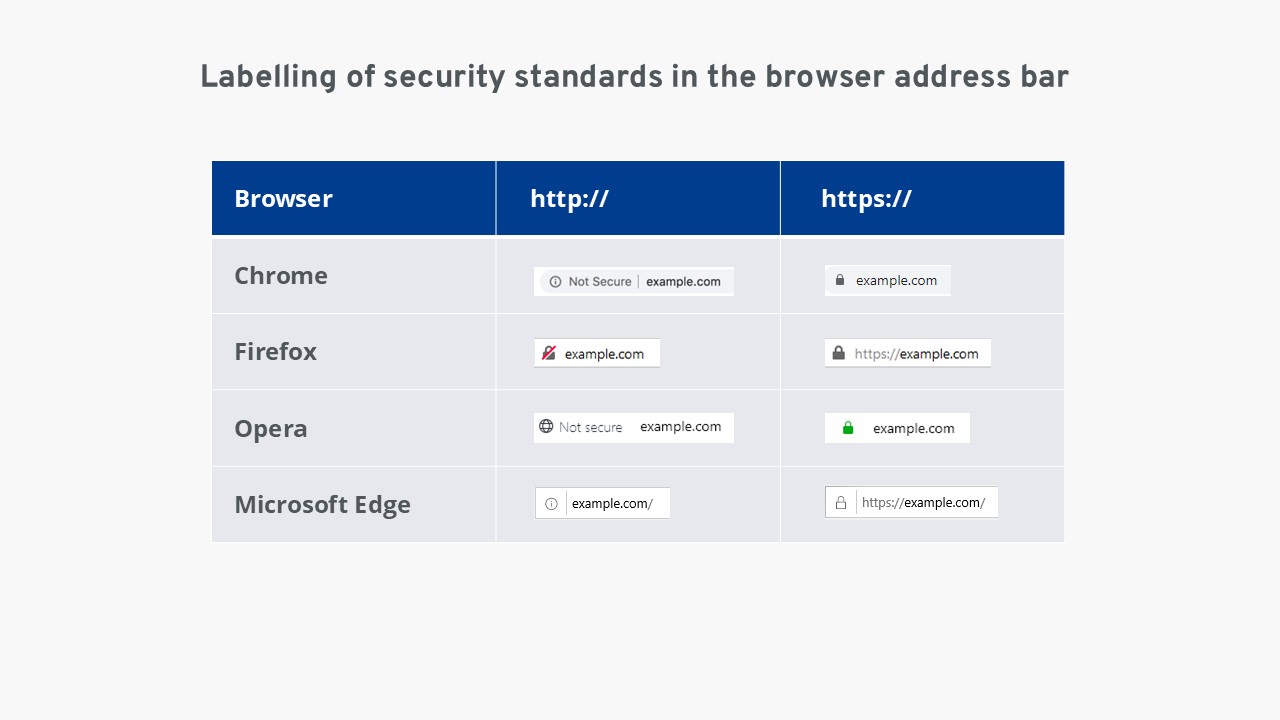
If the website you are visiting does not have a valid SSL certificate, you will see neither a lock icon nor https:// in the address bar. In addition, some browsers display warnings if users attempt to submit passwords or other sensitive data on such websites. The browser then alerts them that the data could be intercepted by third parties.
Just because a website does not have an SSL certificate does not necessarily mean it is a fraudulent site. However, the risk of criminal third parties stealing important personal data from you is higher on such sites than on those with an SSL certificate. Therefore, HTTPS is indispensable, especially when transmitting sensitive data.