

Joomla – The open source CMS

The content management system, Joomla, originally stemmed from the open source program Mambo. After differences about commercial marketing, a large part of the Mambo development team turned their backs and concentrated instead on developing Joomla as a new CMS. The first version was published in 2005, and the free content management system has been steadily growing ever since – several million downloads and a vast user base speaks for itself. Joomla, whose name comes from the Swahili word jumla (meaning ‘all together’, or ‘as a whole’), is written in the PHP scripting language and relies on MySQL for its database. Due to its great popularity and very active community, Joomla has already seen thousands of extensions added – components, modules, plugins, and templates. This makes even the most complex of projects possible with Joomla.
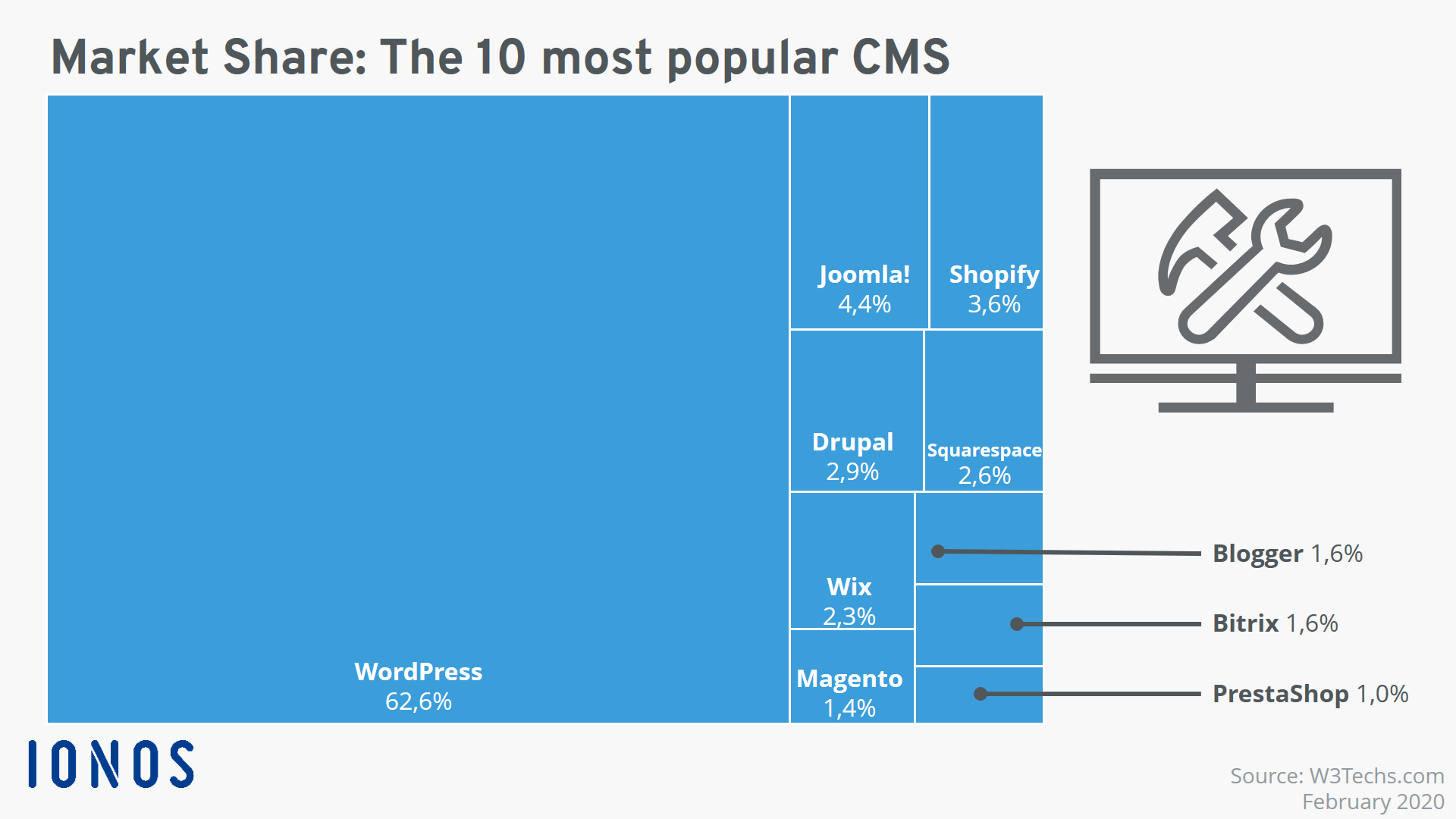
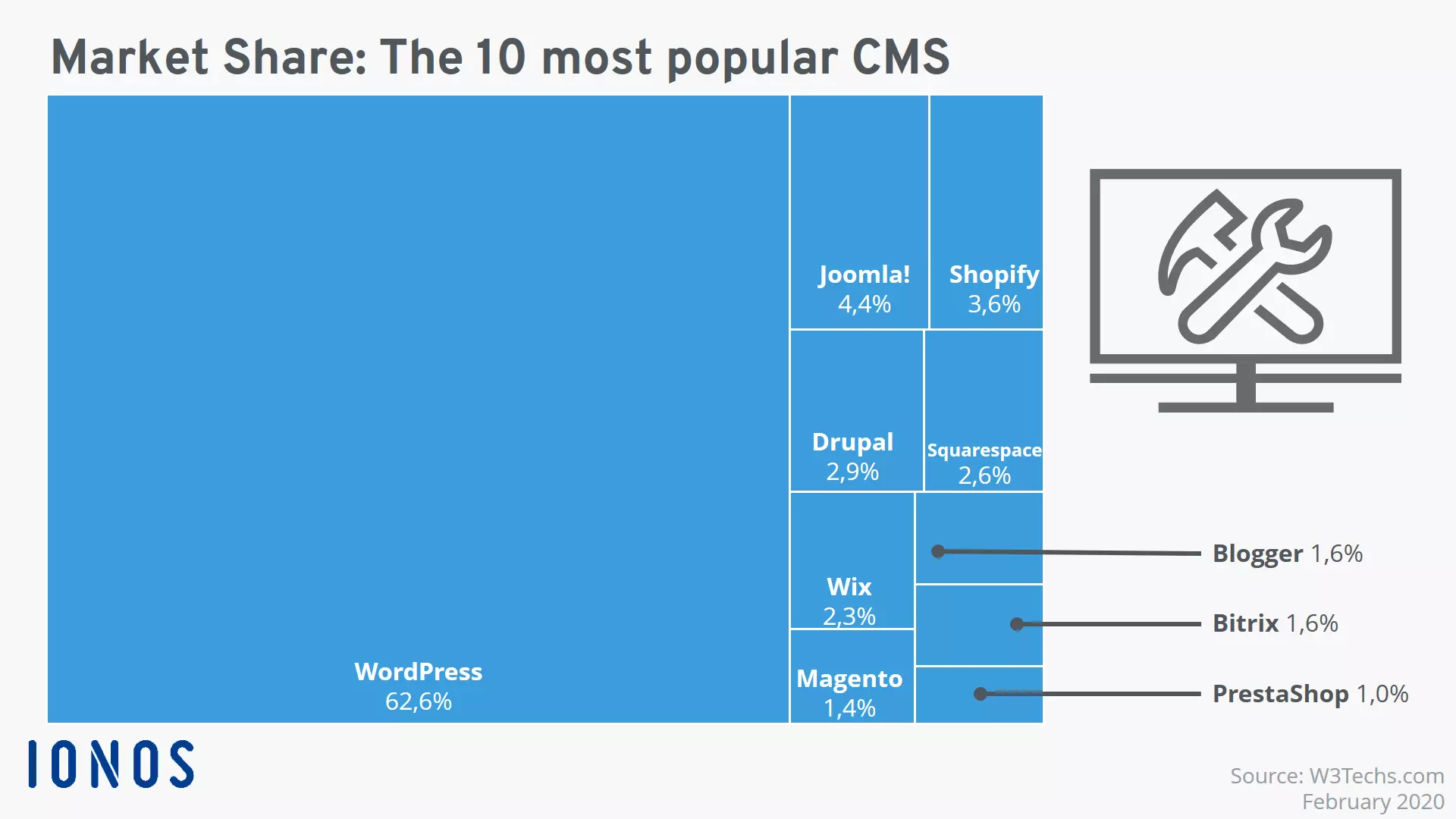
Click here to download the infographic on CMS market shares.
With the web hosting packages from IONOS, you can create the optimal basis for your Joomla! hosting.
Joomla CMS: easy to use and expand
One of the main reasons for Joomla’s popularity is that getting to grips with the software is relatively easy. It’s possible to operate the CMS and create your own website with basic knowledge and a short induction. Joomla has the following advantages:
- Very good, intuitive usability
- Works with almost all web hosting solutions
- Numerous free tutorials and a helpful community
- Easy and flexible plugins
- System is always up to date – quick responses to security breaches
- Valid (correct) HTML and CSS
Joomla has four extension types available – components, modules, plugins, and templates. There is also a distinction made according to whether the extension is for the front end or the back end. Components add features like dynamic content or administration tools to a Joomla site. These include forums, image galleries, guest books, maps, statistics, and back up features. Modules are small units that enable data from the Joomla core or other extensions to be displayed in the front end. Plugins include a code that can be integrated into specific locations within the Joomla framework and add specific content or functionality. Templates are a little different to the other Joomla extensions. Joomla templates are prefabricated structures and designs that serve as a basis for your site and consist of at least an HTML and CSS file. By integrating one of these templates, you can save a lot of work in designing your website.
Some extensions are free, while others aren’t. To use an extension, simply download it as a zip file and open it directly in Joomla – the installation will follow automatically. If you have the know-how, it’s also possible to create your own extensions.
Review of Joomla features
Through the variety of features that Joomla has available, you can create diverse concepts and designs. There are plenty of extensions for every purpose, but the basic version also has an extensive range of functions. Here are just some of Joomla’s many features:
- Multilingualism: over 64 available languages, multilingual websites
- Simple updates: one-click updates available at all times
- Banner management: simple ad placement, compatible with various tracking systems
- Search function: integrated search index, automatically suggested search terms, etc.
- Simple content management: WYSIWYG editor, many pre-installed modules for content presentation, lots of layouts
- Front end editing: minor changes can be made directly at the front end
- Responsive web design: standard Joomla templates based on Bootstrap are optimized for many devices
- Scalable MVC structure: separate layout and database for more freedom in design
- Free choice of font: no fixed default font, easy integration of personal fonts
- User management: user groups, rights management etc.
- Cloud storage APIs: interfaces enable a simple connection to cloud services such as Amazon S3, Google Cloud Storage, or Dropbox
Joomla and SEO
Even without additional extensions, Joomla offers you everything that you need for basic onpage optimisation. In the admin section, you will find the configuration menu for search engine optimisation. Here, you can active the URL rewriting option or search engine-friendly URLs. You can also define the global metadata – meaning that if you forget the information for one article, descriptions and other important metadata won’t appear empty (though it is still best to fill out metadata for each page individually). Through the GZIP compression, you can reduce the loading time of your site significantly. But this page speed optimisation requires the support of the web server. Additionally, you have the chance to designate menu titles independent from the URL, by using the URL Alias tool. The same applies to individual page titles, which can be specified separately in the settings of the page display. But remember that all these improvements will only show their full effect if your content is also good.
The best Joomla extensions
Even though the standard package from Joomla offers an impressive range of design options compared to other free CMSs, it’s Joomla’s extensions that make it so flexible. There are plugins to improve the usability, appearance, or security of a web project, while others increase the application and performance of the content management system. Here are five popular Joomla extensions:
- Akeeba Backup: free and simple backup function for your Joomla project
- Easy Frontend SEO: free, metatags are displayed in a box on the front end where they can be edited directly. In the back end, a summary table of all tags is visible
- VirtueMart: free, extensive online store component for e-commerce
- EasyBlog: a fee-based extensive blog component that directly links to social networks like Facebook
Joomla: the all-rounder CMS
The Joomla CMS can be used for small and large dynamic web projects. By combining the numerous extensions available, users can create well-structured websites as well as powerful web applications. E-commerce components like VirtueMart also make Joomla suitable as a content management system for a webstore. If your online presence is international, Joomla’s impressive multilingualism makes it an excellent choice. Additionally, the simple SEO options can help optimise your project for search engines.
However, the vast variety of Joomla extensions does bring clear disadvantages too: firstly, simply selecting and implementing suitable extensions is very difficult with Joomla, because each must be incorporated separately. Security issues have also been associated with many of these plugins.
To trial Joomla, simply enter your email address for a 90-day free Joomla demo account. To use Joomla, you will need a current PHP version; the CMS supports databases MySQL, SQL Server, and PostgreSQL as well as the web servers Apache, Nginx, and Microsoft IIS.