

What are worthwhile Keyword Planner alternatives?

After the Google Keyword Planner provided detailed results for free for a long time, these important values are now reserved for paying customers of the ad service Google Ads. Without a running ad campaign, it only delivers approximate range values instead of specific numbers. Additionally, since June 2016, Google’s Keyword Tool has combined many comparable terms (singular vs plural, word variants with acronyms, etc.), which has generally made SEO analysis significantly more challenging. In this article, we present the best alternatives to the Google Keyword Planner.
- Our experts run your campaign
- Increase your online visibility
- Save money thanks to greater efficiency
KeywordTool.io
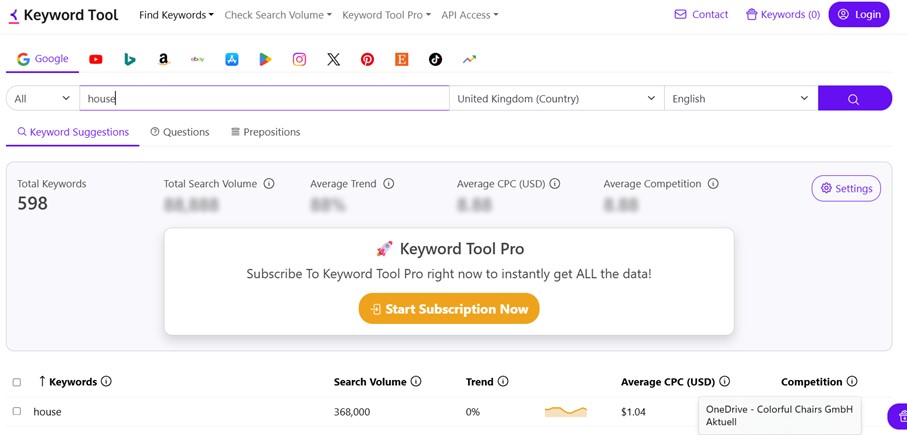
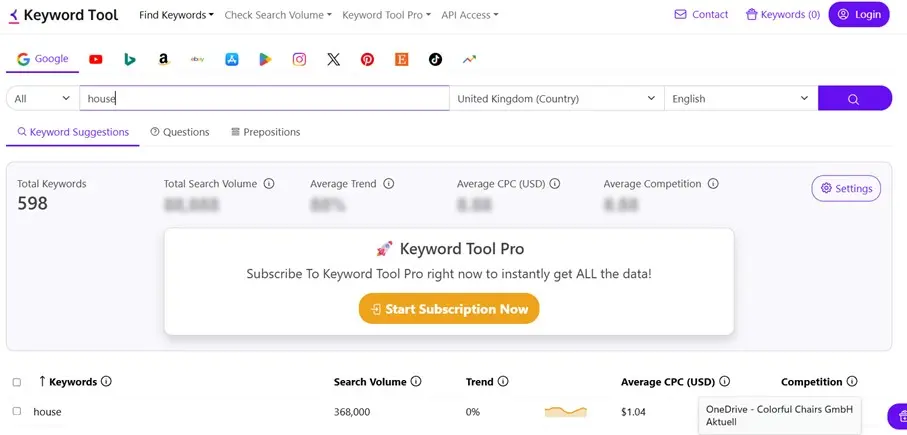
The Keyword Tool, accessible through the website keywordtool.io, is managed by the Chinese company Key Tools Limited, which describes the online tool itself as the best Keyword Planner Alternative. The developers provide three reasons for this statement: Firstly, the free version delivers up to 750 suggestions for long-tail keywords for each searched term. Secondly, the free use is available at any time – with a 99.99 percent availability – and without requiring registration. The Keyword Tool derives its data from Google Autocomplete, the feature for auto-completing entered search queries, and Google Suggest, the topic-related suggestions that users receive when entering a search term. Over 190 Google domains and more than 80 languages are supported.
In addition to the ability to generate new keywords for the Google search engine and export them in a CSV or Excel file, the web service’s offerings include various research functions:
- YouTube: SEO is becoming increasingly important on YouTube. A keyword-optimised channel, meaningful tags, and strategic video titles and descriptions are among the most crucial elements. Keyword Tool extracts over 750 suggestions from YouTube Autocomplete, helping you enhance your videos accordingly.
- Bing: As a search engine supported by Microsoft, the significance of Bing shouldn’t be underestimated, even if the number of users is considerably lower than Google. Key Tools Limited also offers a research function for Bing queries, where Bing Autosuggest serves as the basis for around 600 generated keywords by default. You can choose from over 40 different languages.
- Amazon: Amazon’s keyword research tool generates suggestions based on the product recommendations automatically shown by the online sales platform for a particular keyword. This results in over 380 new keyword combinations for your query, which can be used not only to optimise sales listings on Amazon but also for enhancing search engine optimisation in online stores.
- App Store: The autocomplete of search queries is also the foundation of this Keyword Tool feature, with which you can find over 1,000 theme-relevant keywords for Apple’s App Store. The results form the basis for formulating app titles and descriptions, greatly supporting the marketing of your own mobile app.
- Google Play Store: Similar to the Apple App Store, the tool extracts keywords from Google Play Autocomplete. The results help developers optimise their app descriptions and metadata.
- eBay: The tool analyses product searches on eBay, finding keywords buyers use. These keywords can be used to optimise product listings specifically and achieve better rankings.
- Instagram: Keyword Tool uses Instagram search suggestions to identify popular hashtags and search terms. This helps to increase reach and engagement.
- X: The tool shows popular search terms and hashtags that users engage with on X. These keywords are ideal for trend analyses and optimised posts.
- Pinterest: Based on Pinterest Autocomplete, Keyword Tool provides keyword suggestions for pins and boards. This aids in Pinterest SEO and visibility enhancement.
- TikTok: The tool analyses TikTok search suggestions to generate relevant keywords for titles, descriptions, and hashtags. This helps influencers and brands better position their videos.
- Etsy: Keyword Tool displays various keyword suggestions based on Etsy search queries used by buyers. This enables sellers to optimise their product tags and descriptions.
You can also view the most frequently asked questions from Google, YouTube, and Bing users, relating to the desired search term. Use the filter function to search for the results or certain words or terms. In the free version, it is also possible to exclude up to five keywords from the search (‘negative keywords’).
When it comes to the search volume of the respective keywords, the Keyword Planner alternative behaves similarly to the Google model in that you only receive the exact number of monthly searches if you opt for the paid packages, which are ‘Pro Business’, ‘Pro Plus’, or ‘Pro Basic’. Otherwise, Keyword Tool does not show any search volume. If you use one of the paid subscriptions, you receive twice as many keyword results. The ‘Pro Plus’ and ‘Pro Business’ packages additionally display competition and cost per click, based on the values from Google Ads.
Overview of Keywordtool.io as a Keyword Planner alternative
| Advantages | Disadvantages |
|---|---|
| ✓ Considers autocomplete and generates long-tail keywords that are hidden in the Keyword Planner | ✗ No display of search volume, click costs, and competition in the free version |
| ✓ Easy export of results as CSV or Excel file | ✗ Provides no information about websites that already rank well for the respective keywords |
| ✓ Additionally provides insight into search behaviour on Bing, Amazon, YouTube, and the App Store | ✗ No option to determine regional differences in search behaviour |
Moz Pro: Keyword Explorer
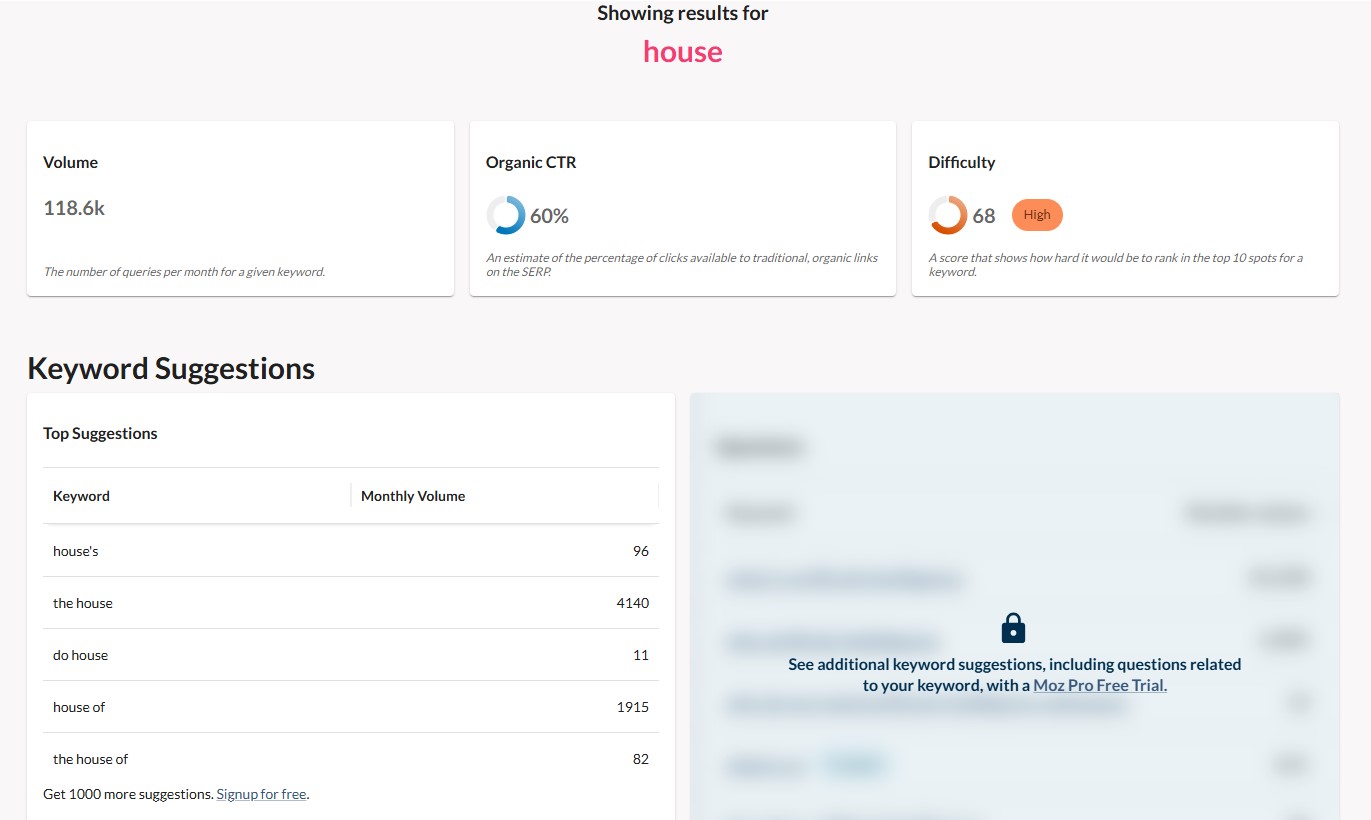
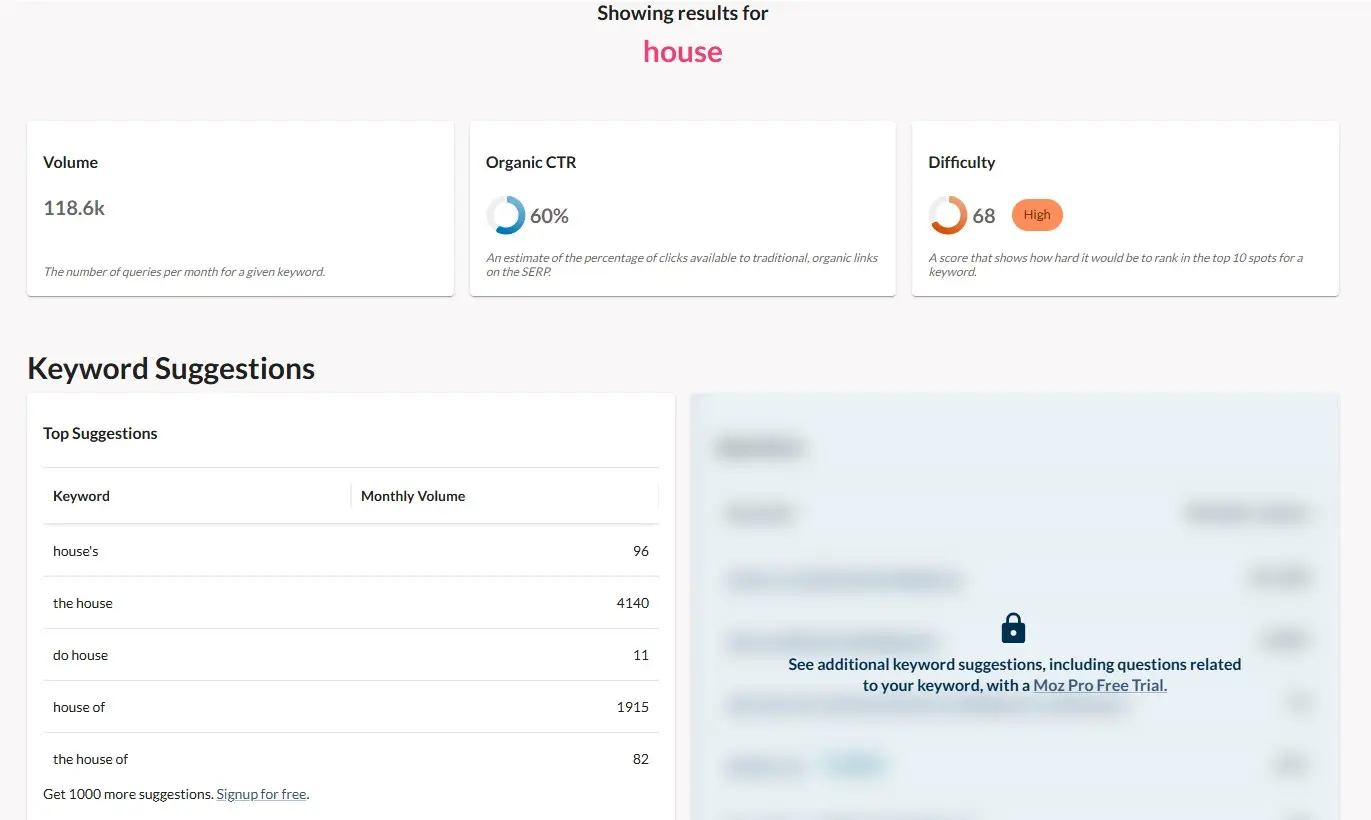
An excellent paid alternative to the Keyword Planner is the Keyword Explorer, a component of the SEO suite Moz Pro, which also includes tools for backlink and error analysis as well as ranking tracking (own and other websites). You can test the suite for free for 30 days before needing to subscribe to one of four packages for continued use. Depending on the chosen package, the amount of daily or monthly keyword research with Keyword Explorer is limited (between 50 to 3,000 per month). Aside from the paid version, you can use the research service on the Moz website up to three times a day for free.
To find potential keywords for a topic area, the tool accesses a database of over 180 million ranking keywords, which is continuously expanded. Additionally, data from 170 search engines is incorporated into the keyword research.
The research on a search term or topic is summarised by Keyword Explorer on three pages.
- Overview: The general overview page provides a summary of all the information captured by the Moz Pro tool research. This includes data on search volume, the chance of ranking with the respective keyword, and the overall difficulty of the search term. Additionally, the page lists the top five entries of new keyword suggestions and the top three positions of Google search results. It concludes with three topic-specific reports compiled by the Fresh Web Explorer.
- Keyword Suggestions: In the keyword suggestions, you receive up to 1,000 related search terms and long-tail keywords for the selected search term. Each suggestion includes the monthly search volume and a relevance rating from the Keyword Planner alternative. The results can be specified using a filter function. For example, you can display only suggestions with a certain search strength or those that are questions. The entire list can be exported as a CSV file with a single click.
- SERP Analysis: In this section, Keyword Explorer provides insights into the first results page of Google Search, showing you the top results along with valuable additional information. This includes the trustworthiness of the page and the entire domain, as well as the number of external domains linking to the respective page or the entire domain. The number of Facebook shares is also displayed. The SERP analysis can also be exported as a CSV file.
Like the free version of the Keyword Planner, the research tool of the Moz Pro suite displays all search volumes only in approximate range values. The values for competition and potential of the search terms are given in percentages.
Overview of MOZ Keyword Explorer as a Keyword Planner alternative
| Advantages | Disadvantages |
|---|---|
| ✓ User-friendly presentation of research results | ✗ No information on CPC of keywords |
| ✓ Excellent filtering options for structuring suggested keywords | ✗ Search volume of previous months not visible, also given only in range values |
| ✓ Free trial version (30 days) | ✗ No option to determine regional differences in search behaviour |
Wordtracker
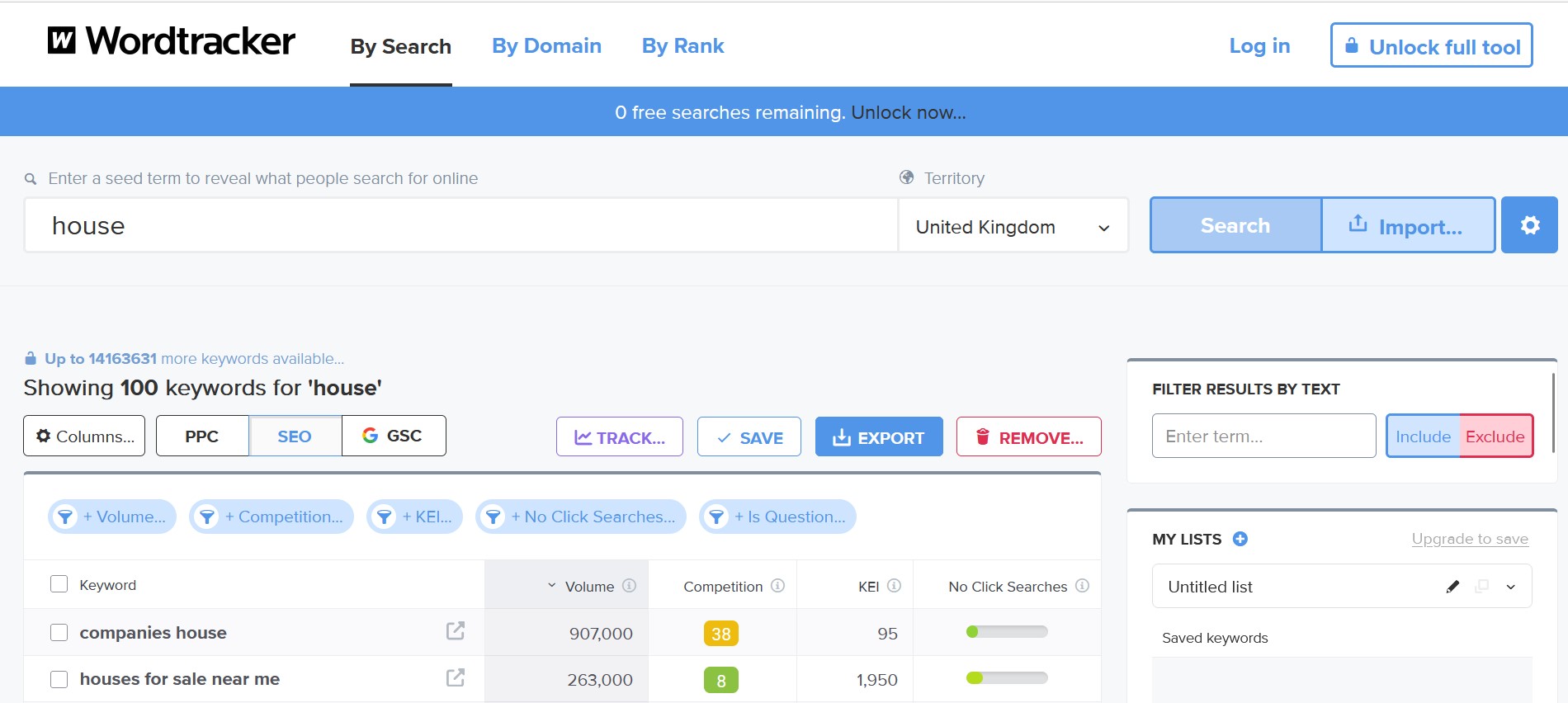
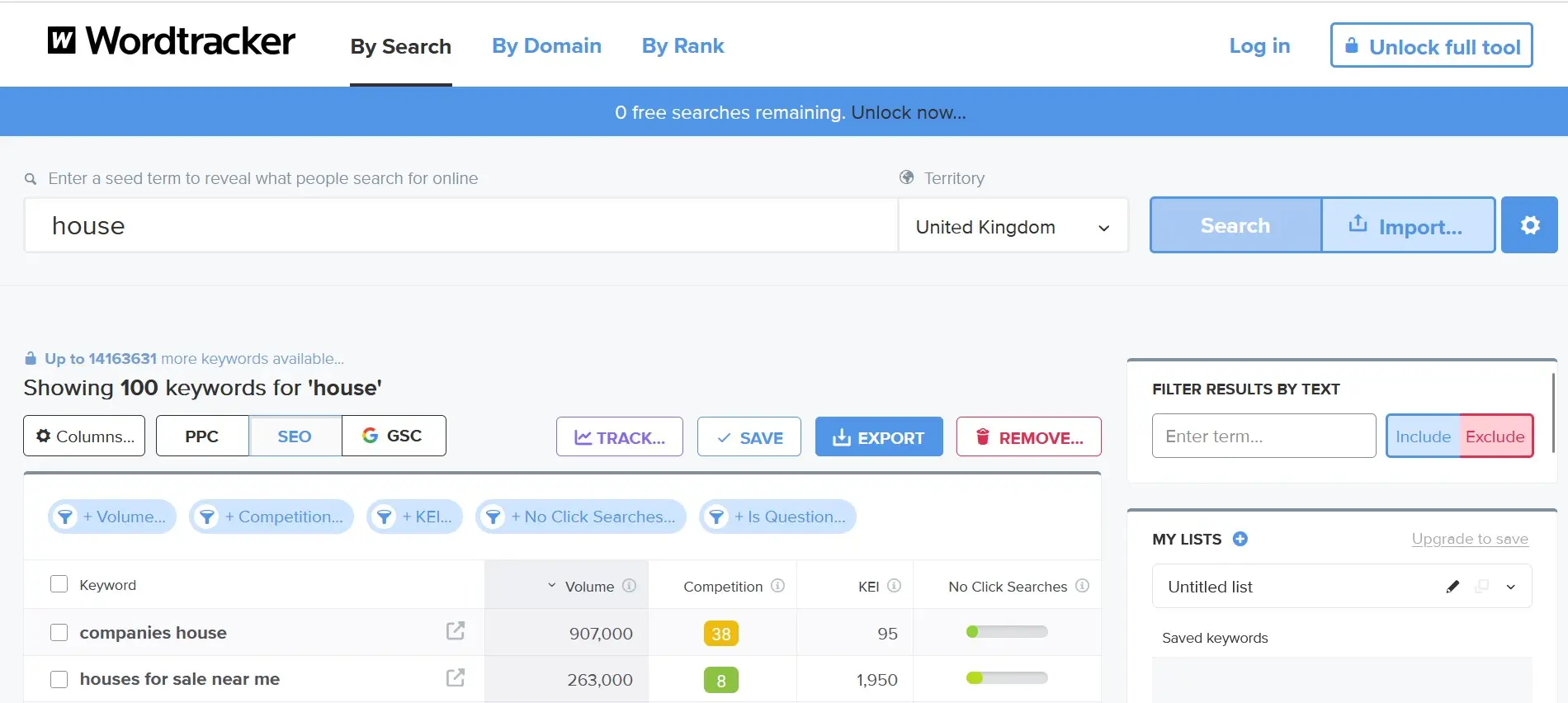
Back when the Google search engine was still in beta, the company Wordtracker was already working on developing techniques to capture and evaluate the frequency of terms in search engines. Over time, the Euston-based company developed various concepts for this purpose, such as the Keyword Efficiency Index (KEI), which reflects the efficiency of keywords in numerical terms. The in-house keyword research tool Wordtracker.com is undoubtedly one of the best paid alternatives to the Keyword Planner. A highly limited free version is available, allowing for one search per day.
Wordtracker relies on a database with over 3 billion searches (over 480 million unique keywords) plus relevant search engine keywords, which the tool sources from partner SEMrush. For a single search, you receive up to 10,000 relevant keywords based on this resource (depending on the acquired license). In the free version, the number is limited to 100 terms. In addition to keyword suggestions, Wordtracker provides a chart summarising the interest of the last twelve months, as well as a preview of search engine results that lists top-ranking URLs and calculates how difficult it would be to surpass them based on criteria such as trustworthiness, link strength, and position. The tool also lists the top search queries on YouTube and Amazon.
Wordtracker is considered one of the best Keyword Planner alternatives primarily due to its level of detail: Even in the free version, each keyword shows the exact search volume, potential competition and the percentage of searches that were not clicked (‘No Click Searches’). If enough evaluation criteria are available, you also learn about the previously mentioned efficiency of a keyword (KEI). The paid packages enhance the keyword research and the resulting set with the following features:
- Selection of Time Period: Instead of the monthly average, Wordtracker can also provide you with the search volume for specific months.
- Selection of Coverage Area: While the free version only offers global searches and selected alternatives such as United States, United Kingdom, Brazil, Australia, Canada, France, and Germany, the most expensive paid license allows you to choose from over 200 regions worldwide, refining your research accordingly.
- Save and Export Keyword List: Save individual keywords or the entire set as a project to access it later at any time. Alternatively, you can also export the list as a CSV file.
- Advanced Keyword Options: Paying users also have access to additional settings for structuring suggested keywords, including options to include plural forms or list only exact matches.
- Access to the Wordtracker API: If you use the Keyword Planner alternative in the Gold version, you can directly access the extensive keyword database with your applications.
Before deciding to purchase a Wordtracker edition, you can first test it for free for one week.
Overview of Wordtracker as a Keyword Planner alternative
| Advantages | Disadvantages |
|---|---|
| ✓ Provides exact values for search volume | ✗ Free edition highly restricted (search region, search period, export function, number of possible searches, etc.) |
| ✓ Huge keyword database | ✗ The interface and generally cluttered presentation of results make getting started unnecessarily difficult |
| ✓ Includes search queries on YouTube and Amazon | ✗ No indication of click costs |
SEMrush
In 2008, a small group of SEO and IT specialists embarked on a mission to make the battle for users on the World Wide Web fair and transparent for everyone. Nearly a decade later, SEMrush with over 11 locations worldwide is undoubtedly one of the most sought-after resources for online marketers around the globe—whether they want to analyse their own web project, design an advertising campaign, or optimise backlink structure.
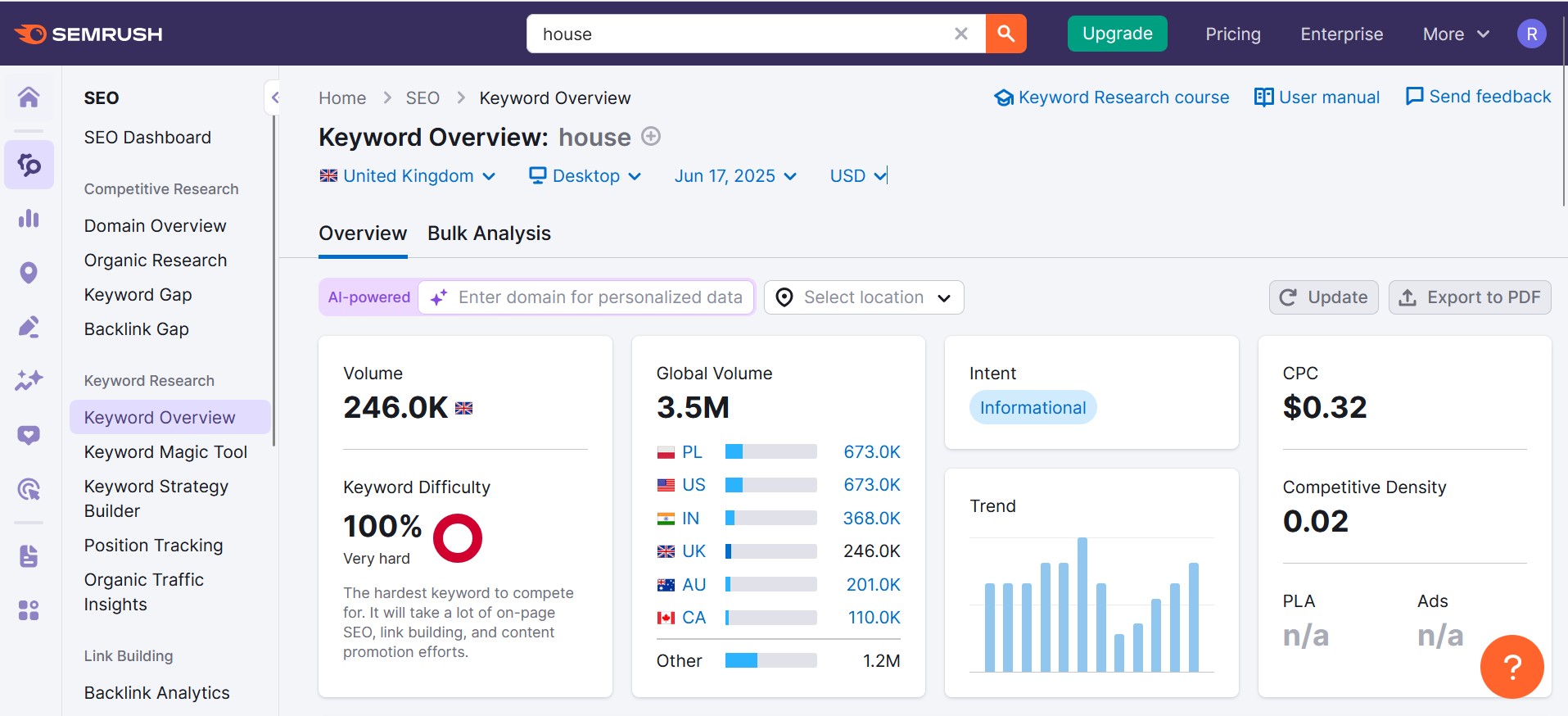
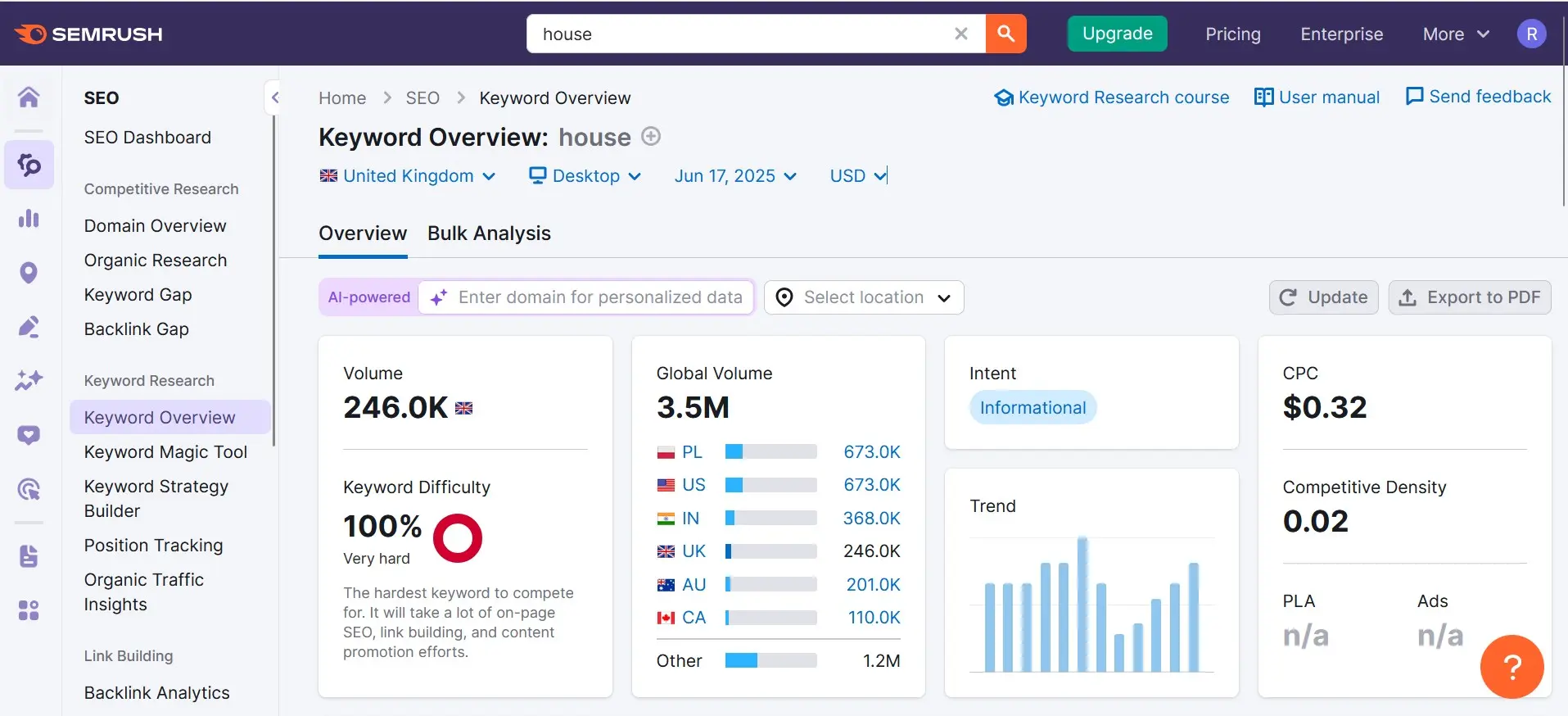
The American company now offers its users more than 140 databases containing over 25 billion keywords, making the marketing and analysis service an excellent alternative to the Keyword Planner. For a quick check of a specific keyword, you can use SEMrush after a free login without a paid account, but if you plan an extensive keyword research, subscribing to a monthly package (due to the daily limit on checks and other restrictions) is necessary. Even with the most affordable version, you can generate keyword suggestions for up to 500 search terms per month—including information such as search volume, competition level, or potential costs in paid search (ad banners).
In the ‘Keyword Analytics’ section, SEMrush offers all the information you need for determining high-quality and competitive keywords. Conveniently, you can select which Google domain should serve as the basis for the research, yielding language-specific results. While the Keyword Planner alternative provides the organic search volume as a single, rounded value, you receive the estimated CPC (Cost-per-Click) value and information on the competition intensity for the paid search of the relevant keyword. Additionally, SEMrush provides a live overview of organic search results, relevant ad texts, and top videos on YouTube. For nearly all result data, you can optionally access detailed reports or export them as Excel, CSV, or CSV-semicolon files.
In addition to the information about the desired search term, which you can retrieve for both desktop and mobile traffic, the SEMrush service also suggests new, suitable keywords for you. The tool generates the following lists for this purpose:
- Keyword Variations: In this list, the Keyword Planner alternative suggests possible new search queries that include the desired keyword or a variation of it. To generate the most high-quality and useful word groups, the research tool combs through a suitable regional database.
- W-Questions: SEMrush analyses the top search queries with the search term you specify to create a list of W-questions where your keyword appears.
For both keyword lists, which you can also export in the formats mentioned earlier, you receive information about the search volume (rounded), potential costs, and the corresponding SERP sources of the suggestions. Users of the ‘Guru’ and ‘Business’ plans also have the option to view historical data.
Overview of SEMrush as a Keyword Planner alternative
| Advantages | Disadvantages |
|---|---|
| ✓ Excellent reporting and export functions | ✗ Due to its complexity, not well-suited for beginners in keyword research |
| ✓ Detailed analysis and monitoring of competitors and one’s own web project are possible | ✗ Not recommended as a free alternative (highly limited) |
| ✓ Specific search volumes based on regional databases available | ✗ No regional search query analysis possible |
mangools: KWFinder
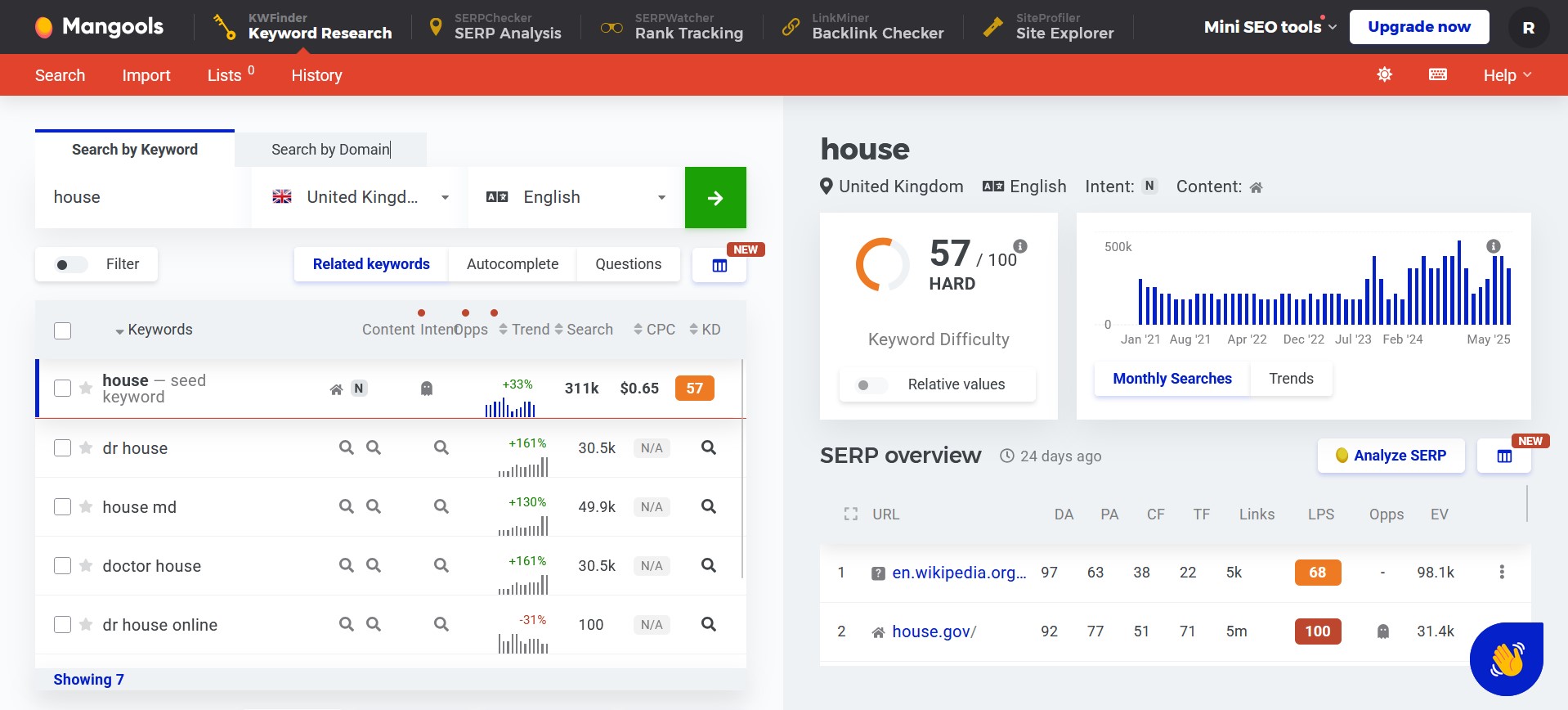
The SEO package mangools, consisting of the two tools SERPChecker and KWFinder, is developed and marketed by the Slovak internet company itrinity. You can use both tools for up to five searches every 24 hours for free after creating an account, making the suite a useful alternative to the Keyword Planner even for smaller keyword samples. SERPchecker primarily serves as a supplement to the actual research, helping you identify and analyse regional and global competitors. By purchasing the paid packages ‘Basic’, ‘Premium’, or ‘Agency’, you increase the number of possible checks to 100, 500, and 1,200, respectively.
To generate information and new keywords for a search term, KWFinder offers you three different options:
- Related Keywords: This standard function allows the research tool to search for similar and topic-related search terms and combinations. It is based on the mangools database and a proprietary algorithm.
- Autocomplete: In an ‘Autocomplete’ search, the keyword planner alternative uses Google autocomplete. To do this, KWFinder places the chosen search term upfront and expands it with various letters or words to create hundreds of new search phrases in real time, which are usually presented to search engine users during input.
- Questions: The ‘Questions’ option places question words before the chosen keyword to generate questions that include the keyword and have a high search volume.
You can further specify each analysis by having the tool check only the search behaviour of users from specific countries or cities, or by setting a language for the outputted search terms.
The research results are summarised into three areas: The main part is a list of the suggested keywords or keyword combinations. Additionally, there is a graphic for the SEO difficulty (scale from 0 to 100) and a chart displaying the search volume trend over the past years. The keyword set researched for the main keyword (limited to 25 entries in the free version) shows the following five metrics for each included suggestion:
- Trend: Mini chart showing the performance of the respective keyword over the last twelve months
- Search Volume: Exact value for the average search volume over the past twelve months
- CPC: Estimated cost per click if the keyword is used for an advertising campaign
- PPC: Competition level of the term in PPC marketing (Pay-per-Click), expressed on a scale from 0 (not competitive) to 100 (highly competitive)
- SEO Difficulty: Degree of difficulty in ranking with the respective keyword, determined based on various SEO criteria (trustworthiness, link strength, social signals, etc.) of the top-ranking competitors
With the help of the filter function, you can arrange the various keyword suggestions according to your preferences and wishes. For example, you can specify that only search terms with a certain minimum or maximum CPC value are displayed or that certain words are completely excluded. Once you have analysed and prepared the results in KWFinder to your satisfaction, you can export the data for individual terms or the entire list as a CSV file.
Overview of SEMrush as a Keyword Planner alternative
| Advantages | Disadvantages |
|---|---|
| ✓ Very detailed results (e.g., exact search volume, competition opportunity, keyword history) | ✗ Free edition is heavily limited |
| ✓ Location-specific search results | ✗ CPC value only in dollars |
| ✓ Import function for own keywords |
The best keyword planner alternatives compared in a table
| Keyword Planner | KeywordTool.io | Moz Pro: Keyword Explorer | Wordtracker | SEMrush | mangools: KWFinder | |
|---|---|---|---|---|---|---|
| Keyword History | ✓ | ✗ | ✗ | ✓ | ✓ | ✓ |
| Search Volume Indication | Range values; exact value (paid) | Range values (paid) | Range values | Exact value | Exact value (rounded) | Exact value |
| CPC Value Indication | ✓ | ✓ (paid) | ✗ | ✗ | ✓ | ✓ (only in dollars) |
| Keyword Potential Indication | ✓ | only for AdWords | ✓ | ✓ | ✗ | ✓ |
| Local Research Possible | ✓ | ✗ | ✗ | ✓ | ✗ | ✓ |
| SERP Analysis | ✗ | ✗ | ✓ | ✓ | ✓ | ✓ |
| Export Format | CSV, Excel | CSV, Excel | CSV | CSV (paid) | CSV, Excel, Semicolon-CSV | CSV |
Reviewer

Melissa Senn
Melissa Senn has been with IONOS since 2016 and focuses on website, e-commerce, social media, and AI in the Digital Guide. As a digital strategist, she uses her extensive SEO and GEO experience to transform complex technological trends into practical content.