

Google mobile search: the evolution of the Google search

For many years, the mobile search played a slightly more minor role in the Google universe. Then came the great mobile boom. Of course, this sudden growth in the use of mobile devices didn’t go unnoticed by the search engine giant residing in Mountain View, California in the USA. And in 2015, Google saw the first official shift of power as mobile devices finally registered more Google searches than stationary desktops.
The mobile search has been constantly changing since then. Using the standard desktop search as a model, Google’s mobile search has become increasingly faster and more precise, improving the company’s ability to answer the queries of mobile users. This has become more and more challenging. In recent years, the smartphone has become an integral part of everyday life and this means user habits have changed quite drastically from what they were like five or ten years ago. This changing reliance on smartphones has put increased expectations on search engines – user experience and usability are two of the most important factors for Google’s mobile search. So Google isn’t just having to constantly prepare new mobile advert formats, it’s also got to contend with innovative features and continual testing to try and get the Google app and the mobile search engine up to the standards of the desktop staple.
The Google universe – just mobile
Google wasn’t caught off guard by the mobile boom – it had recognised the increasing potential and importance of the mobile world long ago. The Californian company used its strong market presence to secure a central role in the mobile internet industry. By the time the Android operating system for mobile devices came to market in 2008, this position of strength was consolidated. Over 80% of mobile devices now run with Google’s operating system.
But obtaining this system was just the basis; Google had many other avenues to explore. Numerous applications like Google Maps or the Chrome mobile browser became available for smartphones. To promote these products, Google created the Google Play Store, which can also be integrated into a search engine. Before long, a whole smartphone created with built-in Google products as applications and functions came onto the market in the form of the Nexus One. Tablets and updated versions soon followed. This final part of the strategy demonstrated that Google wanted to make the term ‘mobile internet’ inseparable from its own brand name and products. In addition to its powerful position in the mobile industry and all its new products and services, there’s one thing Google has achieved which might just be the most significant of all: access to valuable user data that has helped to improve their services significantly and develop their mobile advertising model.
Mobile search results pages: important new features and tests
Since its foundation in 1998, the Google search has been hallmarked by its continuous development and change. Designers and developers at Google work daily on the optimisation of the user experience, with many of their new ideas resulting in tests carried out on a chosen subject group of Google users. Some changes are more obvious, while some are more subtle and conspicuous, meaning that updates have had varying effects on the online marketing industry. In our overview of the Google evolution, we’ve summed up the milestones achieved throughout the Google story so far. In recent years, mobile search results have become more and more like their desktop cousins. Although there’s no huge difference between the content offered by each, the mobile search has to be handled differently because user experience and user behaviour are very different when users switch between desktops and smartphones.
The mobile web search
The standard viewer of the Google mobile website is simply the classic Google layout we’re all used to. But because of the limited display space the right-hand column is missing. In the desktop version, this is where the Knowledge Graph or Shopping results are usually displayed. As with the desktop version, the organic search hits follow the AdWords ads at the top of the mobile search.
For commercial search queries (e.g. ‘insurance comparison’) the user will see up to four AdWords adverts before they receive the first organic search result.
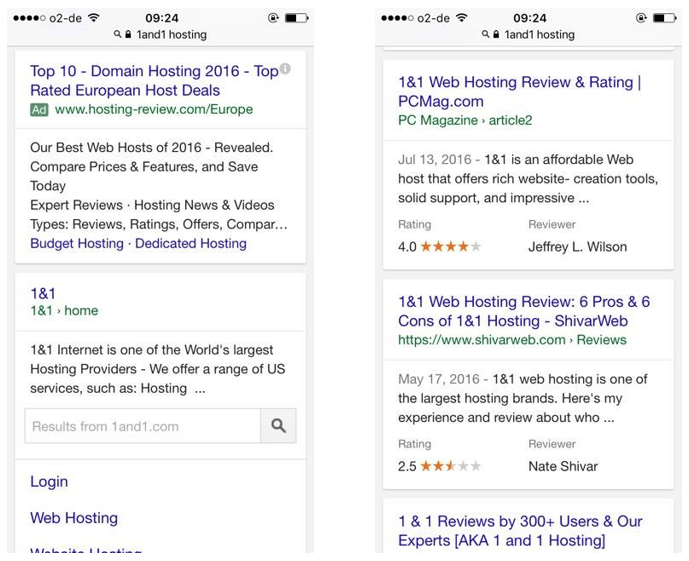
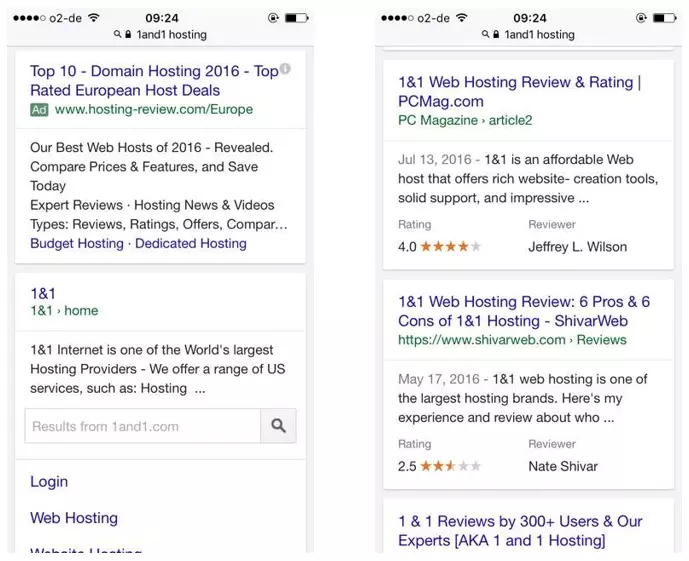
The next screenshots show the Knowledge Graph in the mobile display format. For less commercial searches like types of food or places of interest Google shows the most important information directly in the form of a card. There are no Google AdWords displays in the following examples due to the informational nature of the search terms.
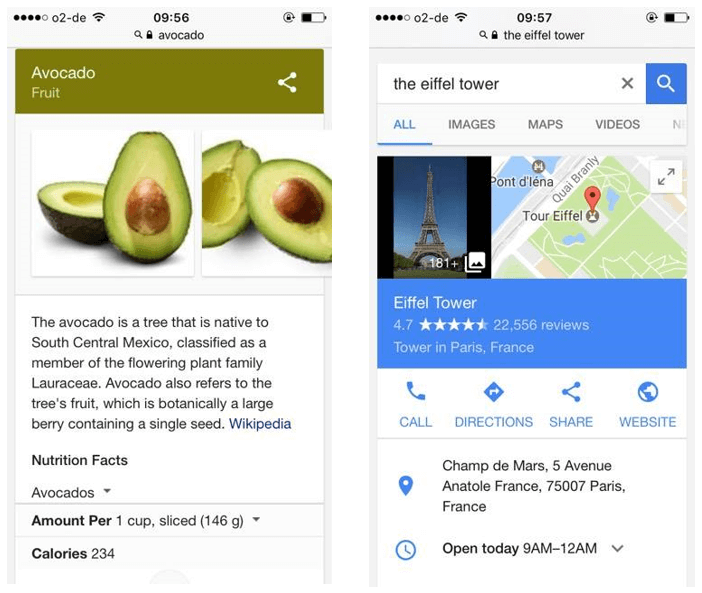
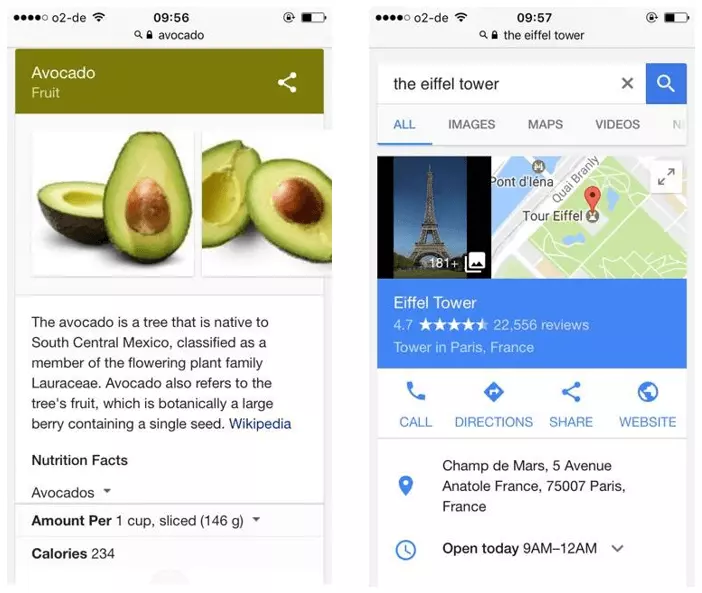
Local searches and location recognition
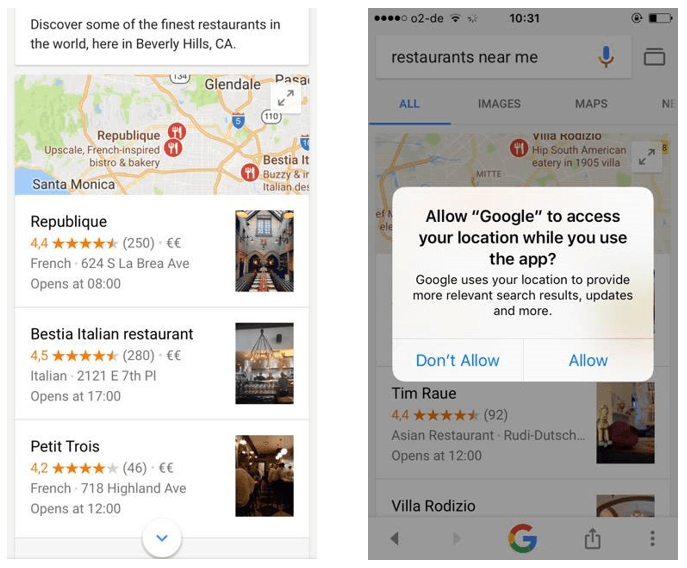
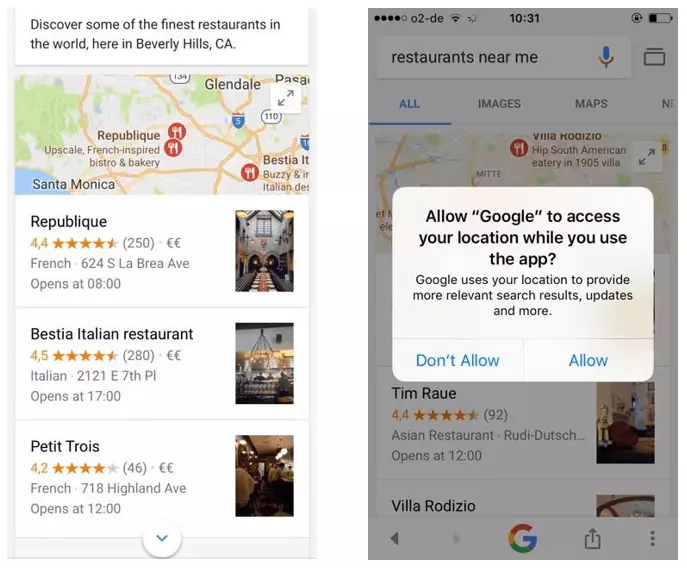
The Google search makes good use of the device’s properties offered by its mobile host, integrating certain functions into the search process. An example of this is location recognition – an integrated GPS receptor is standard in all smartphones today. Certain search queries will prompt Google to ask the user whether they want to turn on GPS location tracking or not. If you conduct a local search, for example for restaurants or hotels nearby, then Google displays a snippet from Google Maps with your current location and the best spots nearby.
Voice Search
Another example of built-in smartphone technology that the Google search takes advantage of is the microphone and voice recognition software. Whether it’s Siri on the iPhone or the in-house voice aid Google Now for Android devices – if you’d prefer not to type, you can always communicate with your phone via the voice recognition tool. Voice searches are becoming more and more common, particularly across the pond. According to official figures from Google, voice searches via mobile devices make up around 20% of the overall search queries in America, and they're starting to become a feature in the UK as well. Digital language assistants aren’t just becoming more important for Google searches either – they’re more and more common across devices used at home. Voice Search and Voice Control are interesting topics that SEO experts should pay attention to moving forward.
App indexing & app testing
Through the Mobile Friendly Update of 2015, the importance of mobile websites and above all apps has grown significantly. But even before that, in October 2014, Google apps have been indexed for the Android operating system and since then Google has worked continually on the development of app indexes.
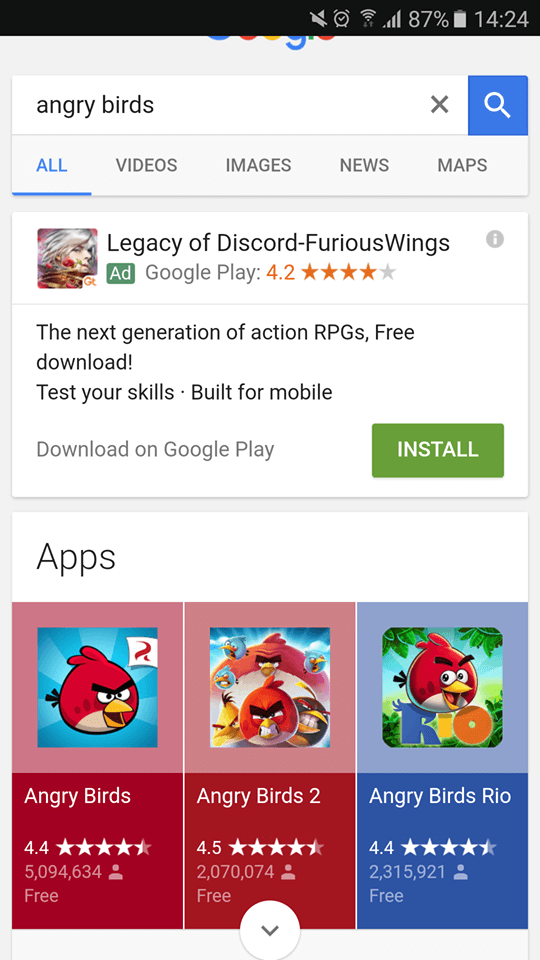
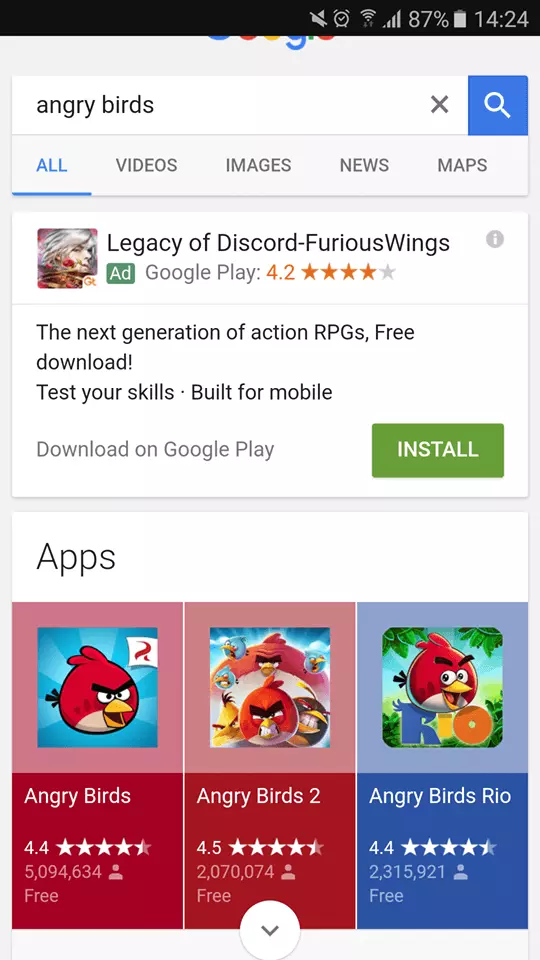
Users can get app content directly through mobile SERPs. The links for embedding apps in this way are known as ‘deep links’. If the user is yet to download the app onto their smartphone, Google suggests that they install it and provides a link to the Google Play Store. Pre-installed programmes can be opened directly from the search results.
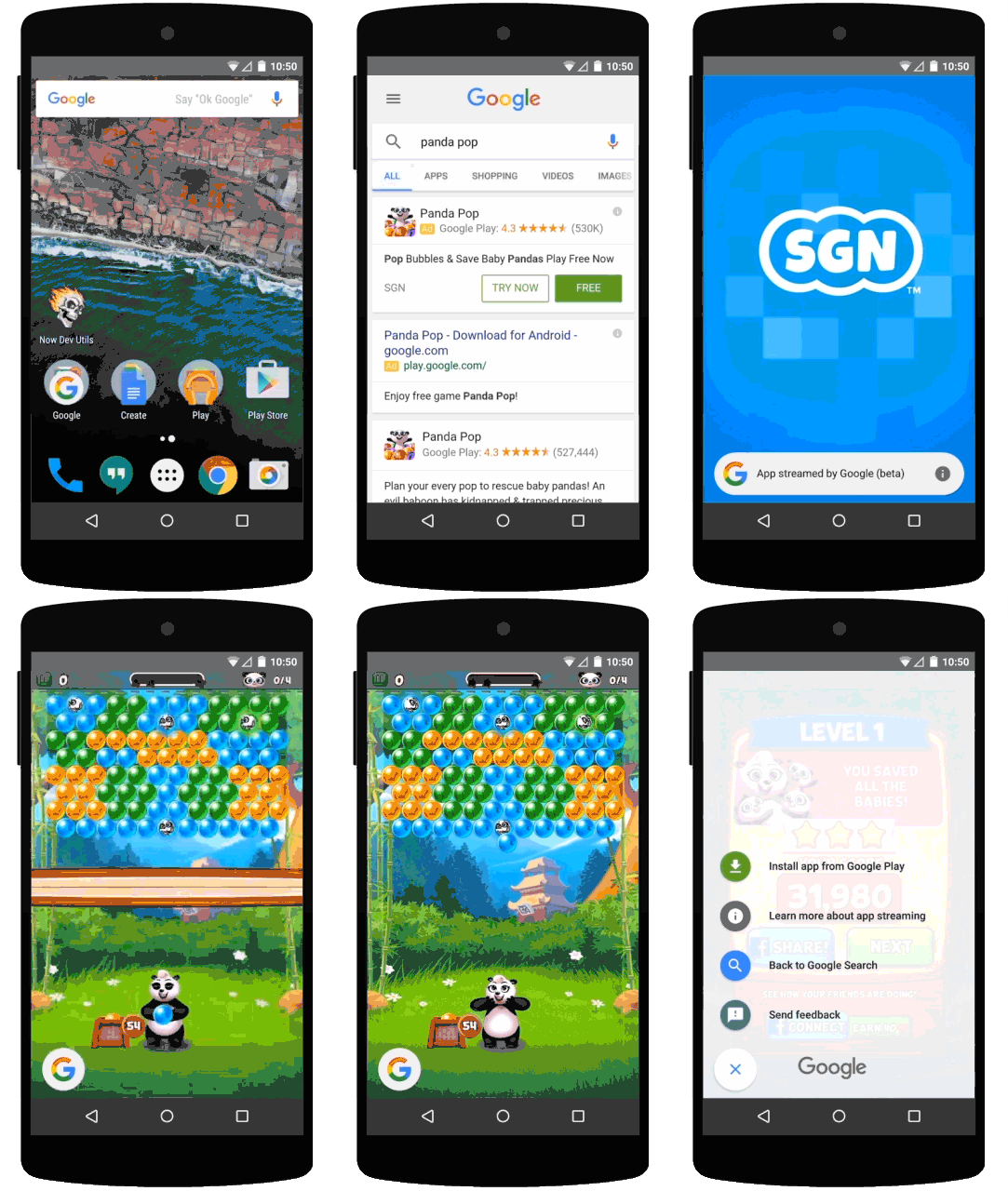
A new feature that’s been in operation since 2016 is app testing. This gives users the option to try out apps in the search results pages without installing the app first. By clicking on the ‘Try now’ button, a demo of the app starts that allows users to get to grips with how it works before you commit to downloading it.
Accelerated Mobile Pages
More and more mobile searches in the past year have featured a new icon: a little lightning bolt and the letters ‘AMP’. AMP stands for Accelerated Mobile Pages and stands for extra quick content loading time. By the end of 2015, Google had launched this open source initiative to promote more streamlined content. At first, AMP was only found in headline areas, but now the AMP icon is commonplace in standard web searches too. The idea behind this is that streamlined content is lighter and so improves the performance of the mobile end device. By reducing amounts of code and using a Content Delivery Network (CDN), pages load up to four times as fast and only need around a tenth of their previous data volume.
According to Google, around 150 million AMP documents have already been indexed, with around 4 million new ones being added every week. AMP is likely to be the new standard for mobile websites in future, but at present they have no influence on search engine ranking. But, given their improved speed and lowered loading times, mobile websites with AMP are sure to profit from better ranking in the near future.
Rich Cards
As a reflection of the presentation of structured data, search results have undergone a lot of changes in recent years. This started with the transition from standard results to ‘Rich Snippets’ and now to the latest foray: Rich Cards. The following graphic shows these changes:
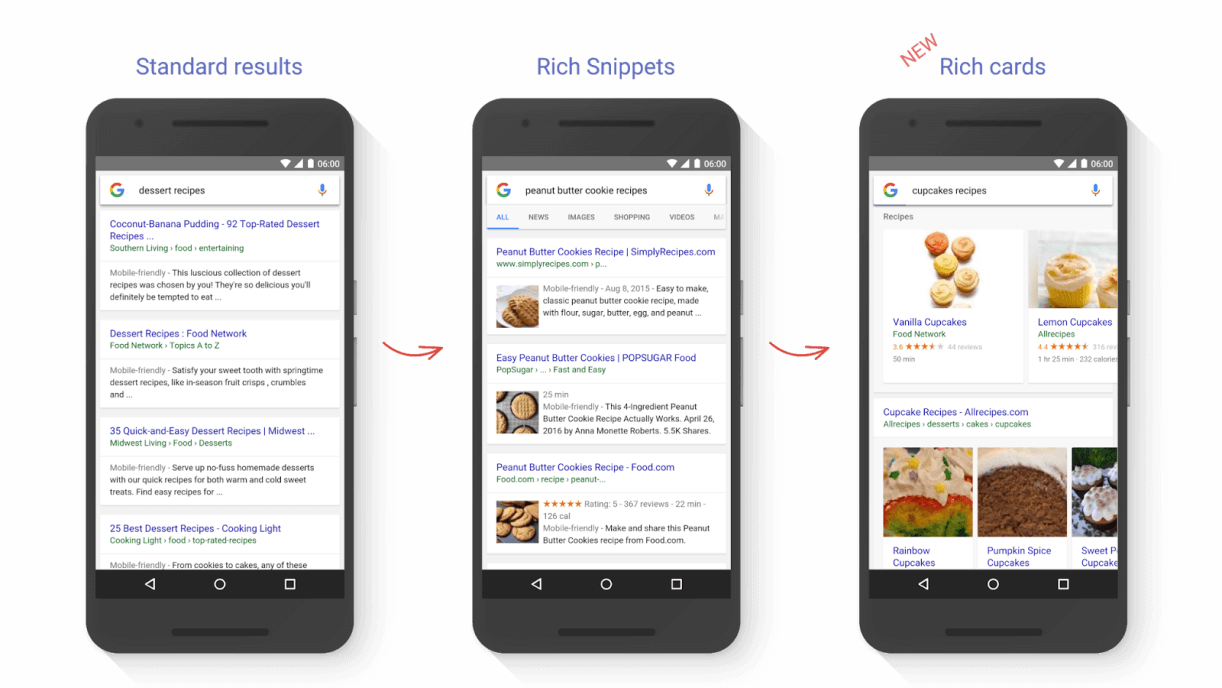
In some fields, web operators can provide the Google Bot with additional information through structured data, for example with recipes or events. This information is then displayed as a preview in the search engine results pages in the form of a ‘snippet’. This means that the user gets all the relevant information they need in one snapshot – and Rich Snippets are easily distinguishable from normal search results. Rich Cards are even clearer, with a beautiful structure and presentation that appeals to users straight away.
These new optical designs should improve user experience even further and enable an optimal presentation of content. Rich Cards present content in the form of an informational carousel that users see at the top of the mobile search before other standard results.
At present, Rich Cards are reserved for recipes and films – but the plan is to roll them out for other types of content as well, which is particularly important news for e-commerce and marketing experts. Mark-ups like products and events will surely have their own Rich Cards category presentation in the not-to-distant future. At the same time as their new Rich Cards creation, Google has published an update to the testing tools for structured data.
Trending Topics
Another new feature that users get to enjoy in mobile searches is what’s known as Trending Topics. When you enter a search query, you receive a list of the current trending topics – meaning the ones most commonly searched for recently. This happens in real time: as you type into the search bar, the trending topics open automatically.
But Google doesn’t just offer predictions for topics that are currently trending in the news. If it senses that there’s a link between the search query and installed apps or past searches, they’ll display automatically in the start screen. So you’ve previously searched for flights to Berlin, then typing Berlin will remind Google to show direct links to flight companies and/or installed apps like British Airways.
Google search with a personalized start screen
Instead of opening Google in your mobile browser, it’s also possible to download the Google app for iPhone and Android. This often comes pre-installed as standard on Android phones, and mobile searches on the Android version of the Google app allow you to search within your phone offline as well for applications, documents, and e-mails. One important component of the Google app is the ‘Google Now’ function, which behaves as a sort of a digital personal assistant for all your daily needs. Users can personalise the start screen and place ‘smart cards’ there for relevant topics. These could include:
- Appointment reminders
- Live weather updates
- Live traffic reports for the route to work
- TV programmes
- Top daily news headlines
- Live sports results
All these functions can also be used via the voice control. The more often and intensely you use the Google app, the more accurately Google is able to target information to your needs.