

How to delete a comment on Facebook

While opinionated posts are certainly desirable across social networks like Facebook, every now and then users overshoot the mark. That’s why sometimes it may be necessary to delete Facebook comments – be it individual posts or a bunch of them. Here’s what you should keep in mind.
- Improve your Google ranking without paying an agency
- Reply to reviews and generate social media posts faster
- No SEO or online marketing skills needed
Deleting your own and others’ Facebook comments
Whether you’re using Facebook for business or as a private user, sooner or later you may come across a reply under one of your posts that not only contradicts your personal opinion but violates the rules of your profile. Unfortunately, insulting, aggressive or otherwise offensive messages are impossible to prevent, much like spam or trolling attempts. Sometimes, the best and perhaps only solution is to delete all corresponding Facebook comments. This way you protect your profile while making friends and customers feel more comfortable.
Similarly, the reason for deleting a Facebook comment may be because you made a mistake in the comment. Perhaps you’ve overlooked an answer to a question and now it’s been answered twice, or your comment is simply no longer relevant. You should only delete your comment if the contribution is truly obsolete or you delete the post transparently. Otherwise, you could be accused of intransparency, which may reflect more negatively on you than the comment would have, particularly in a corporate context.
Deleting comments from your personal profile
Generally, you decide what can and cannot be posted on your private profile. Deleting unpopular Facebook comments from a private user profile is the decision of the user and has no serious consequences. Accordingly, you can remove your comments or those of others at your discretion. However, when it comes to harmless verbal comments that you just find annoying, there is a better option. You can hide the Facebook comment so that it will no longer be seen or responded to. The author will be none the wiser. However, it’s recommended to avoid using comment hiding too often to avoid misunderstandings.
How to delete Facebook comments: business pages and Facebook groups
Things are a little different in a professional context. Interactions tend to be livelier and customers often pay close attention to how a brand or company presents itself on a page or in a group. Unfortunately, this is particularly true when it comes to critical feedback. You should never delete factual criticism or customer complaints that arise as a result of errors or mistakes. Instead, address the comment and move along the conversation to a protected space such as Messenger, where you can make a better effort to resolve the issue.
Deleting individual Facebook comments is the right choice if comments contain misanthropic or defamatory statements, insults, threats, or third-party advertising. Take screenshots of content that fall under criminal law. When you delete offensive Facebook comments, it may also be advisable to briefly address and explain why they were deleted. In this way, you prevent accusations of censorship. Restate your page’s or group’s netiquette to indicate which content is undesirable to prevent future misunderstandings.
Who can delete Facebook comments?
On a private profile, only you have the ability to delete all Facebook comments. On a company profile or in a group, the admin determines who gets the right to do so. In addition, moderators can be appointed who are able to remove comments if they violate group rules.
Delete individual comments: step-by-step guide


The easiest way to delete comments is using the Facebook app. The individual steps are simple:
- Locate the Facebook comment you wish to delete from the activity area.
- Now click and hold for a moment. A new context menu will launch.
- Click the ‘Delete’ option at the bottom to confirm comment removal.
Delete then block
Everyone deserves a second chance. However, if a user repeatedly attracts attention by posting offensive comments, you should consider blocking them permanently. This option is easier than having to delete all their new Facebook comments. However, don’t make this decision lightly. Be conscientious in distinguishing between factual criticism and harmful content.
Delete multiple Facebook comments
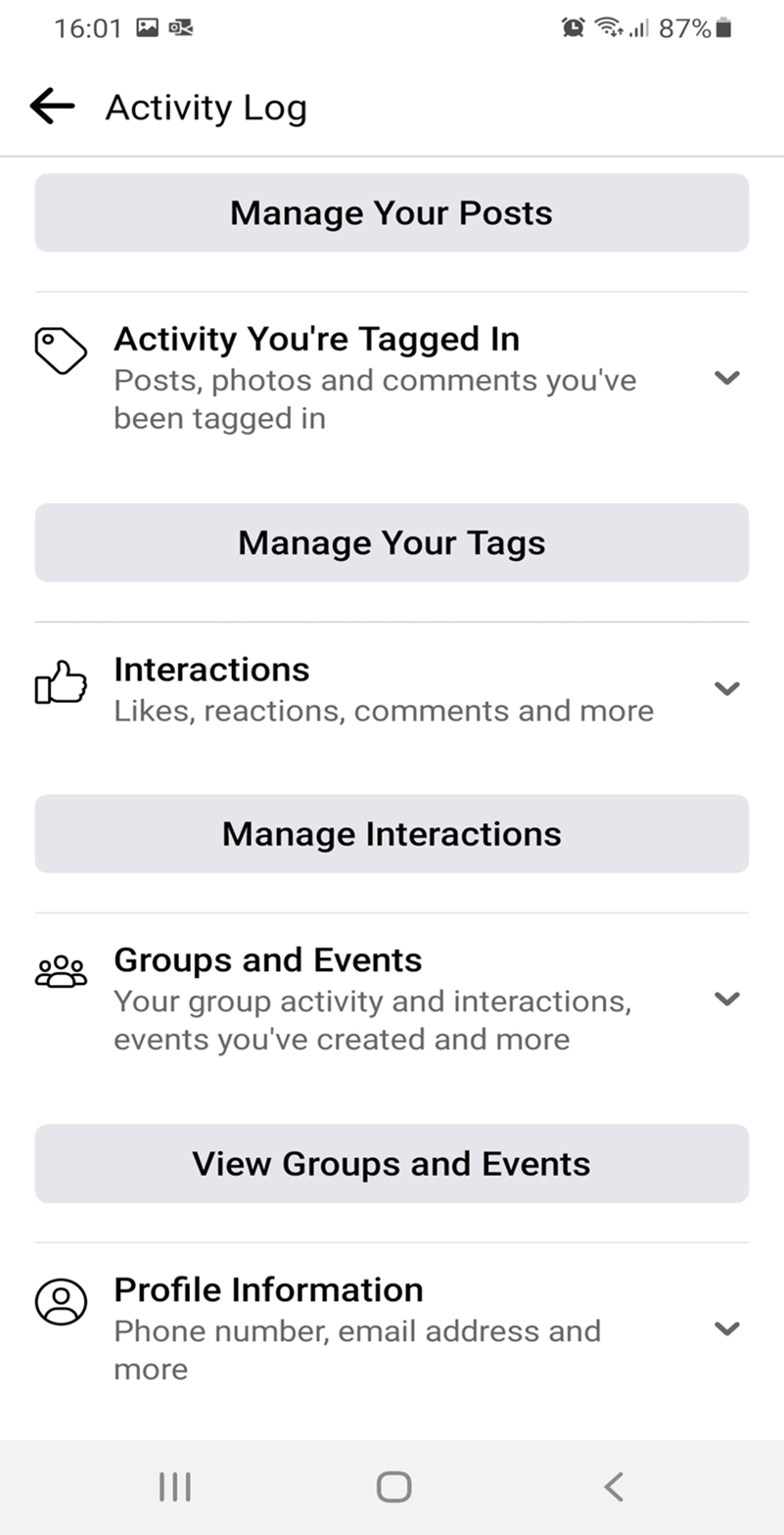
What should you do when you want to delete several of your own comments? Facebook has made it possible to delete multiple comments. The ‘Activity Log’ item and the ‘Manage Interactions’ subitem take you to a list of all your comments and you can delete them collectively without having to navigate to individual pages to do so. This way you can clean up your profile in no time. After all, things change. Following a career change or the end of a relationship you may find it necessary to clean up your profile.
Summary: Delete with caution
Deleting Facebook comments is always an option when there is no other option left. However, this step should be well thought out, as it cannot be reversed. In a professional environment, it is useful to explain your decision for deleting a post.