

What is a server?

The term ‘server’ is used ambiguously in computer science. A server refers to both a computer that provides resources over a network and the program that runs on this computer.
Try out your VPS for 30 days. If you're not satisfied, we'll fully reimburse you.
Definition of server
You can distinguish between the following two server definitions:
- Server definition (hardware): A hardware-based server is a physical machine connected to a computer network, running one or more software-based servers along with the operating system. An alternative term for a hardware-based server is ‘host’. In principle, any computer with server software can be used as a host.
- Server definition (software): A software-based server is a program that offers a specific service, which can be utilised by other programs, called clients, locally or over a network. The available service depends on the type of server software. The foundation of communication is the client-server model. Service-specific transmission protocols are used in data exchange.
At IONOS, you can rent your own server at affordable rates for a variety of projects (web server, mail server, or your very own custom application).
How does a server work?
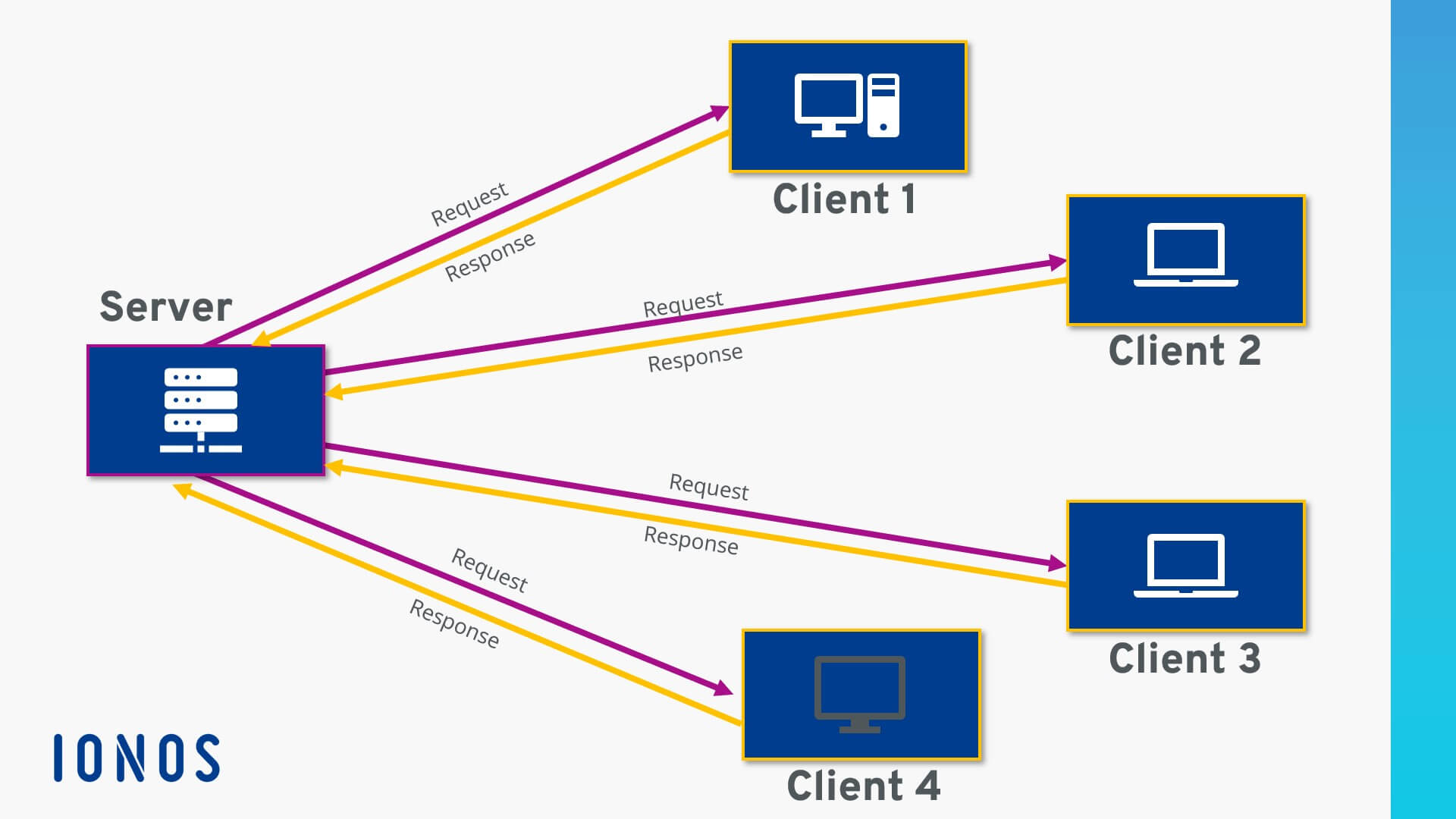
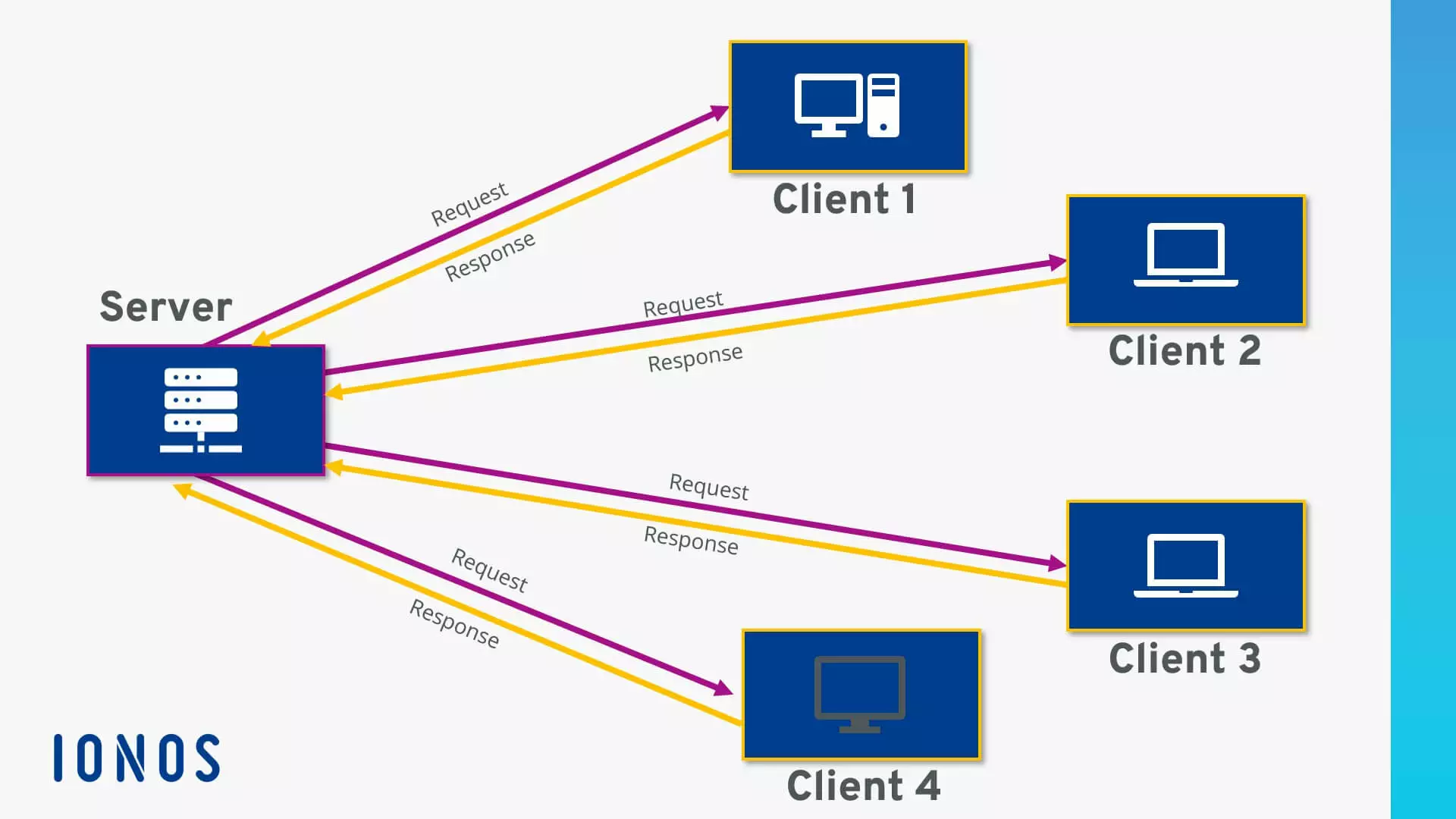
The provision of server services over a computer network is based on the client-server model. This concept allows tasks to be distributed across different computers and made independently accessible to multiple end users. Each service available over a network is offered by a server (software) that is always on standby. This ensures that clients like web browsers or email programs can actively access the server and utilise the service as needed at any time.


What are the different types of servers?
How a client and server communicate depends on the specific service and is determined by a specific transmission protocol. This principle can be illustrated using the example of common server types:
- Web server: The primary task of a web server is to store, process, and deliver web pages to clients like web browsers or search engine crawlers. Communication between server (software) and client is based on the Hypertext Transfer Protocol (HTTP) or its encrypted version HTTPS. Typically, HTML documents and their embedded elements like images, stylesheets, or scripts are transmitted. Common web servers include the Apache HTTP Server, Microsoft Internet Information Services (IIS), and NGINX.
- File server: A file server is used for centrally storing files that are to be accessed by various clients over a network. Companies rely on such file management to allow multiple workgroups access to the same files. A file server prevents conflicts due to different local file versions, enables automatic file versioning, and provides a central backup of all company data. If access to the file server occurs over the Internet, transfer protocols like FTP (File Transfer Protocol), SFTP (Secure File Transfer Protocol), FTPS (FTP over SSL), or SCP (Secure Copy) are used. In local computer networks (LAN), the protocols SMB (Server Message Block) and NFS (Network File System) have become established.
- Email server: An email server consists of several software modules that work together to receive, send, forward, and store emails for retrieval. Typically, the Simple Mail Transfer Protocol (SMTP) is used. Users who want to access an email server need an email client that retrieves messages from the server and makes them available in the email inbox. This retrieval occurs via IMAP (Internet Message Access Protocol) or POP (Post Office Protocol).
- Database server: A database server is a computer program that allows other programs to access one or more database systems over a network. Popular software solutions include Oracle, MySQL, Microsoft SQL Server, PostgreSQL, and DB2. Database servers typically assist web servers in storing and delivering data.
- Game server: A game server is a server (software) specifically set up for online multiplayer games. Game servers manage the game’s data and enable synchronous interaction with the virtual world. A game server’s hardware can either be hosted in a specialised provider’s data centre or installed locally within a home network.
- Proxy server: A proxy server serves as a communication interface in computer networks. Acting as an intermediary, the proxy server receives requests from the network and forwards them using its own IP address. Proxy servers are used to filter communication, control bandwidth, increase availability through load balancing, or cache data. Additionally, a proxy server enables extensive anonymisation as the client’s IP address remains hidden behind the proxy.
- DNS server: DNS or name servers are used for name resolution in a network. For the World Wide Web, DNS servers are crucial as they translate hostnames like
www.example.cominto the corresponding IP address. More information on name servers and the Domain Name System can be found in the in-depth article on DNS. - GPU server: GPU servers are specialised servers that use powerful graphics processors (GPUs) instead of just CPUs to process compute-intensive tasks faster. They are primarily used in applications involving artificial intelligence, machine learning, 3D rendering, or scientific simulations. By processing many data streams in parallel, GPUs can significantly accelerate complex calculations. Compared to traditional servers, GPU servers offer substantially higher computing power for specialised workloads.
Theoretically, different types of servers can be hosted on the same physical machine. However, it is common to have each server housed on a standalone computer or even distributed across multiple computers. This helps prevent the hardware load of one service from affecting the performance of other services.
What does server hosting mean?
While purchasing their own server hardware might be worthwhile for large companies, freelancers and individuals looking to implement their own server projects typically rely on rented resources. Specialised providers offer rental servers in various hosting models where users do not need to maintain the physical machine. The product range includes dedicated servers, whose hardware components are exclusively available to one user, and shared hosting packages, where multiple virtual customer servers are hosted on a common hardware basis.