

What is a hyperlink?

A hyperlink is a unidirectional (moving or operating in a single direction) link in an electronic document. Hyperlinks can connect two different documents as well as various sections in the same document. A text enriched with hyperlinks is called a hypertext.
Ask, create and research with the European alternative to ChatGPT. Robust security and unlimited chats give you peace of mind.
The world wide web consortium (W3C) defines hypertext as the following:
“Hypertext is text which is not constrained to be linear. ’Hypertext is text which contains links to other texts.”
Generally speaking, these are not necessarily linear texts that are linked to other texts via hyperlinks. The term ‘hypertext’ was coined by American philosopher Ted Nelson. The most widespread hypertext system in the world is the world wide web (also known as ‘web’ or ‘www’). On the web, hyperlinks are implemented using the markup language HTML to link web pages and other resources together. In this article, we concentrate on hyperlinks in web documents and present their structure, properties, and give some examples of their use.
Hyperlinks are links in e-documents and are the foundation of the networked structure that is the world wide web. Clicking on a hyperlink enables you to jump between different text elements in a document or between different websites and, therefore, a non-linear organisation of content.
Hyperlinks in the world wide web
In HTML documents, hyperlinks are implemented using <a> and <link> elements. While the <a> element defines the position of a hyperlink in the content area (body) of an HTML document, the element <link> in the header area (head) is used to define relationships with other documents and resources. In the following paragraph, we concentrate on the <a> element, in other words on hyperlinks in the HTML body. They are visible to website visitors, can be clicked on, and belong to the central navigation tools of the world wide web, just as the address bar in the browser or the input fields of search engines.
Information in the header <link> is read and processed exclusively by user agents such as web browsers. This way, resources such as stylesheets, favicons, or copyright licenses can be made available. In addition, the link element defines the logical relationships between the documents of a web project to define alternative pages, language variants or the primary (canonical) URL of the page.
| HTML links | |
|---|---|
| HTML element | Description |
| <link> | The HTM element <link> is used exclusively in the header area (head) of an HTML document and enables web developers to link HMTL documents to other resources. |
| <a> | With the HTML element <a>, website operators define the position of hyperlinks in the HTML body. These HTML tags are also called anchors. |
Structure of a hyperlink
Hyperlinks in the HTML body are implemented using the anchor element a. The basic schema corresponds to the following example:
<a href="https://www.example.org">Linktext</a>The a element consists of a start and an end tag, which are enclosed in angle brackets, and are typical for HTML. The start and end tags of the a element surround the so-called link text. A visible and clickable text element. Alternatively, you can also store image elements with hyperlinks. In this case, the start and end tag of the a elements surround the HTML code in order to embed the graphic.
<a href="https://www.example.org"><img src="bild.jpg" alt="Bild"></a>As a rule, element a not only defines the anchor of the hyperlink and the starting point for the link but also the link target. The hyperlink’s target is specified by the attribute href, which has a unique identifier – the Uniform Resource Identifier (URI) – as a value. The target of a hyperlink is usually the URL of a web resource or a page jump to another part of the document. HTML attributes and their values are defined separately by blank spaces in the start tag of the respective HTML element.
The link examples above both lead to a website that has https://www.example.org as its URL. This is possible thanks to HTTPS. By default, this type of hyperlink directs internet users to the top of the linked website.
However, if it is a link to an internal target in the current document, an HTML markup would be used according to the following scheme:
<a href="#Abschnitt2">Linktext</a>Note that link targets within a document must be defined as markers from HTML5 onwards using unique IDs. In HTML4, the attribute name was used in the a element.
<h1 id="Paragraph1">First paragraph</h1>
    <p>Example text<p>
<h2 id="Paragraph2">Second paragraph</h2>
    <p>Example text<p>
If, on the other hand, you want to link to a page jump in an external document, you can combine the URL of the target page with a hash (#) and the respective ID of the desired page jump.
<a href="https://www.example.org#Abschnitt2">Linktext</a>Element a has no mandatory elements in principle. If a hyperlink is to be implemented, the link target must be specified via href. In addition, the a element supports various attributes that can be implemented if required in order to provide additional information for users or user agents. The following table contains the most relevant attributes of the a element:
| Attributes of the a element | |||
|---|---|---|---|
| Attribute | Description | HTML4 | HTML5 |
| href | The attribute href (short for hyper reference) defines the link target. A website’s URI is expected as the attribute’s worth. Example: href=“https://www.example.org”. The URL https://www.example.org is defined as the target address of the hyperlink. | ✓ | ✓ |
| title | The title attribute enables you to add any link title to a hyperlink. As a value, the attribute requires a string enclosed in quotation marks. The link title is usually displayed in the web browser as a tooltip, which appears whenever a user moves the mouse over the link text. Example: title=“Any link title”. | ✓ | ✓ |
| target | Using the attribute target, you can define a target frame where the link target should be opened by the web browser. As a value, the attribute requires the name of the desired frame. The default value of the target attribute is _self. The target link opens in the specified frame in the current browser window. If you want this effect to happen, you can omit the target attribute. Deviations from the standard are explicitly defined. Example: target=“_blank“. The web browser opens the link target in a new tab or browser window. | ✓ | ✓ |
| rel | With the attribute rel, you define a logical relationship between the target resource and the source document. As a value, the rel attribute requires one or more link type names separated by blanks. Example: rel=“nofollow”. The link type nofollow enables website operators to exclude a hyperlink from search engine ratings. If the rel attribute contains the value nofollow, the hyperlink is defined as a nofollow link. This information tells search engine bots that they aren’t supposed to follow the link if they come across it while crawling the web page. A nofollow link, therefore, has no influence on the website’s position determined by search engine algorithms rel=“noreferrer”. As a rule, a web browser following a hyperlink usually transmits the address of the link source to the link target’s server. If the rel attribute with the value noreferrer is used, the web browser is instructed to omit this information in the HTTP header of the request. The link target operator does not find out how the visitor reached the linked website. More information about the noreferrer attribute can be found in the article on anonymous links. | ✓ | ✓ |
| download | The attribute download was introduced with the new HTML version 5 and defines the link target as a resource that is downloaded when an internet user clicks on the link. The value of the download attribute is the name of the file that is available for download. The correct file extension is automatically detected and added by the web browser. Example: download=“pricelist-2018”. | ✗ | ✓ |
| name | The attribute name enables you to assign a name to the a element that can be used as a page jump later on. HTML5 prohibits the name attribute. Use the global attribute id instead. HTML4 example: <a name=“Paragraph2”>Link text</a>. HTML5 example: <a id=“Paragraph2”>Link text</a>. | ✓ | ✗ |
Note that HTML5 no longer supports some a attributes of the previous standard and provides a number of new attributes.
Link types and their meaning for the search engine
Hyperlinks with different functions are used to link web pages. Different types of links have been established by internet users and now seen as common. These can be roughly divided into internal and external hyperlinks. Internal links are all links between a domain’s individual subpages. External links connect different domains to each other. Internal and external links are used primarily by human users to navigate websites. An additional benefit of hyperlinks in the context of search engine optimisation (in short: SEO) only emerged with the creation of Google bots, especially search engine crawlers that also use hyperlinks to develop websites and evaluate connections to other websites. For a long time, hyperlinks were the main criteria for a website’s rating, a fact that made them decisive for search engine rankings. Today, the importance of the hyperlink has become relativised. Modern search engine algorithms use a multitude of ranking factors to present internet users with the most relevant results for each search query. Nevertheless, the internal linking and backlink profile are still very important for search engine optimisation.
- Improve your Google ranking without paying an agency
- Reply to reviews and generate social media posts faster
- No SEO or online marketing skills needed
Internal hyperlinks
The organisation of internal links within a web project is called the link structure. Link structures are based on strategic observations. The aim is to direct the flow of visitors through the website in an orderly fashion. This is referred to as click paths. Click paths usually have a specific purpose, for example, web store operators want to sell goods and services, attract subscribers to the newsletter or encourage visitors to participate in a sweepstake.
A click path comprises of a series of steps that a web visitor must complete in order to reach the goal intended by the operator. This doesn’t necessarily involve switching from one URL to another: click paths usually lead to multiple web pages.
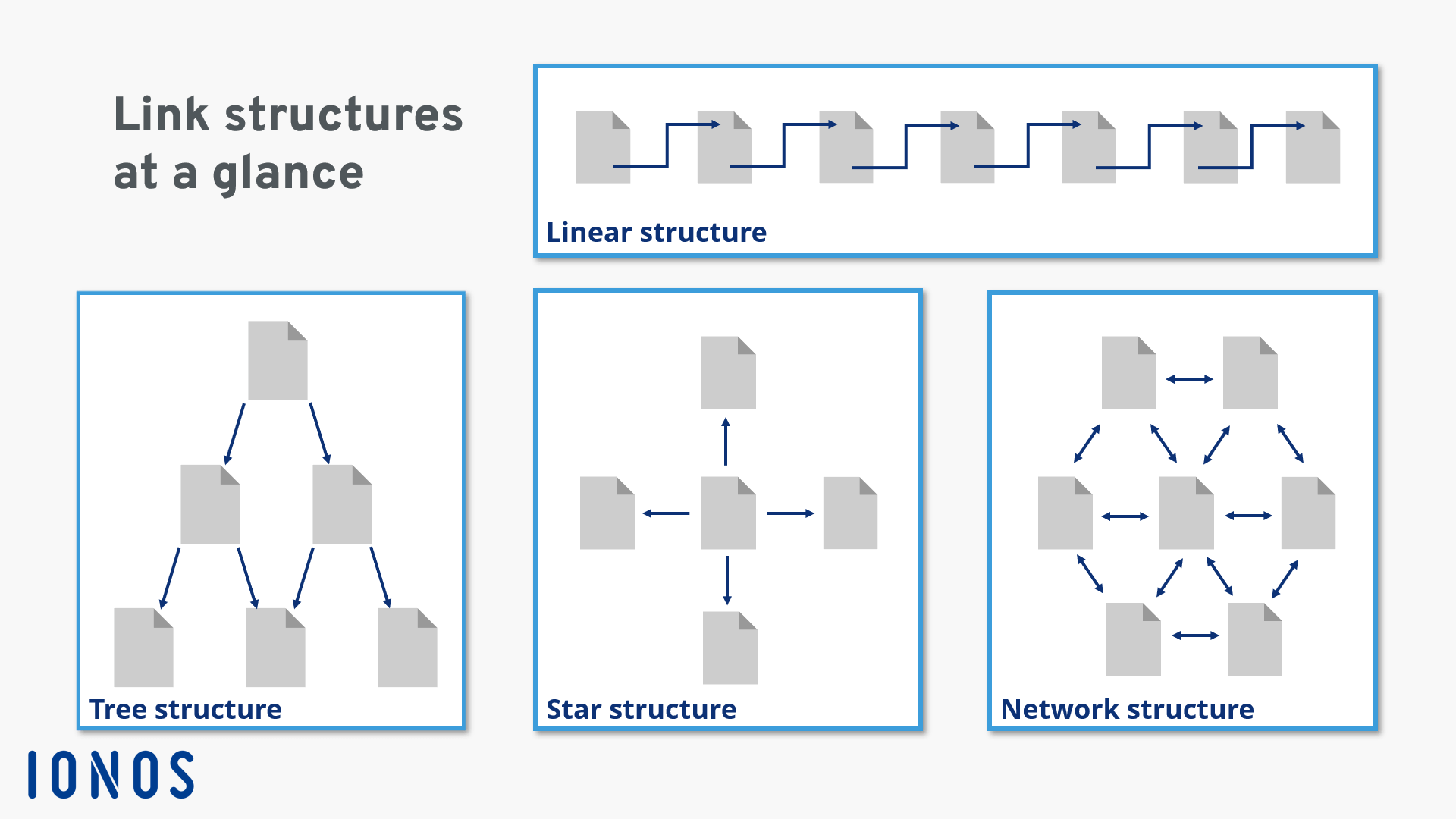
Possible structures for internal linking are the linear structure, the tree structure, the star structure, and the network structure:
-
Linear structure: within a linear link structure, subpages of a web page are linked in such a way that a predefined click path is created. Visitors always access websites with a linear link structure in the order desired by the operator, which gives them maximum control over the click path. However, visitors may find this structure somewhat confining. The linear link structure is typical for dynamic web projects such as blogs
-
Tree structure: if the internal linking follows a tree structure, the website is based on a structure in which subpages of the project are assigned to different hierarchy levels. Link structures like these are typical for web stores. The visitor usually accesses a landing page first that has been optimised for the search engine and then clicks their way through to the desired category and product pages. The thematic orientation of the web pages (category, subcategory, product, article) is usually more specific the further the potential customer gets into the website
-
Star structure: a star structure is when a webpage offers several links to other similar webpages within the same project. Organisational principles like these are typical for online encyclopaedias such as Wikipedia. In each article, users will find hyperlinks to other relevant articles in which the linked items are explained in more detail
-
Network structure: network-shaped structures are characterised by the fact that almost all subpages of a web project are linked on every web page. A website visitor has the possibility of reaching the desired subpage of the website from any point
Keep in mind that the link structures presented here are abstract. As a rule, website operators use a mixture of internal links that combine the link strategies of these presented concepts. For example, a website can basically follow the tree structure and at the same time offer a network link structure via navigation menus, sidebars, and footers that enables potential customers to leave the current click path and switch to another category, product, or service page.
Internal hyperlinks are of central importance to a website’s usability. A web project with a good link structure offers users short click paths to the desired content and encourages them to discover other parts of the website. Good internal linking contributes to increased retention time i.e. visitors staying longer on the website. SEO experts also regard user-friendly internal linking as one of the central factors for good search engine ranking.
For more information on improving the link structure of your website, see our basic article on internal linking.
External hyperlinks
The group of external hyperlinks includes all links from one website to another. Every link between two domains is – depending on how you see it – either an outbound or an incoming hyperlink.
Outbound hyperlinks
Outbound hyperlinks are hyperlinks on your own website that link to another domain’s web resource. As a rule, external links are used as references or recommendations for further content. Note that external hyperlinks lead internet users away from your website and to another one. With every external link comes the risk of losing visitors. This can be compensated for using the HTML attribute target. If you implement external links according to the following scheme, the link target of the external link will open in a new tab or window, depending on the browser settings. Your website will remain open in the browser and the visitor won’t lose sight of it.
<a href="https://www.example.org" target="_blank">Linktext</a>A disadvantage of the target attribute is that website visitors cannot decide for themselves where the link should be opened. If target=“_blank“ is used, you should always use the attribute rel with the value noopener for security reasons:
<a href="https://www.example.org" target="_blank" rel="noopener">Linktext</a>The addition rel=“noopener” closes a security gap that occurs when a hyperlink opens a web resource in a new tab or window. If target=“_blank“ is used without this addition, the target page gets access to the window in which your website is displayed via window.opener. The page can then redirect this to any URL using window.opener.location = newURL. This can be avoided by setting the window.opener to null by using rel=“noopener”. Links to further information on the topic can be found on the GitHub site of developer Mathias Bynens. Unfortunately, rel=noopener isn’t currently supported by all browsers.
Whether a website contains outbound links or not has no direct positive influence on the search engine ranking. This was revealed by Google employee, John Mueller in May 2016 in a Google Webmasters hangout session on YouTube. However, according to Mueller, hyperlinks that offer added value to the visitor by linking to high-quality and trustworthy content increase the quality of the website. Therefore, you should not completely refrain from using outbound hyperlinks. Although Google denies that outbound links have a direct, positive influence, it is undoubtable that outbound hyperlinks can have a negative influence on the ranking of a website. If a website has too many unnatural outbound links, there is a danger that search engines will classify them as spam and will penalise the website.
Note that the internet is constantly changing. Therefore, you should regularly check that none of your outbound links lead to outdated link targets or error pages as these will have a negative impact on your website’s usability. There are SEO tools that can check this for you.
As a website operator, you should exercise caution when using external hyperlinks since linking to other websites could have legal consequences, for example, copyright infringement or hyperlinks leading to illegal gambling content.
If you want to prevent an outbound link on your website from being considered a recommendation by the search engine, you can instruct the crawler to ignore the link in question. To do this, use the attribute rel with the value nofollow. Nofollow links are not considered relevant by search engine algorithms. This type of link has established itself as the standard, especially for web projects where visitors can also publish their own content including hyperlinks. Online forums, rating platforms, online magazines, and Wikis protect themselves from spam this way. This spam serves solely to build links within the framework of Black Hat SEO.
Incoming hyperlinks
Incoming hyperlinks (also called inbound links or backlinks) are all links that lead from other domains to your own web project. All the incoming links together form a website’s backlink profile. The links in your backlink profile can be roughly divided into two categories, depending on the target link:
- Surface links
- Deep links
Surface links are links to the homepage or different landing pages of your web project. Deep links, on the other hand, are backlinks that lead to a specific subpage of your website. Deep links can also target media content on your website such as videos, images, or documents offered for download (i.e. PDFs). These are also referred to as media links. Backlinks can also be differentiated from one another in terms of their link source. Search engine optimisation distinguishes between content links, sidebar links, and footer links as well as comment links and social signals.
-
Content links: content links are links that lead from the text content of another website to your domain. Content links can be either deep or surface links. Hyperlinks like this usually represent a recommendation regarding the contents of your website. Search engine providers also interpret content links as being of strong quality and of relevance. Content links are particularly valuable when it comes to search engine optimisation. When evaluating a content link, the search engine takes factors into account such as the link text, the thematic orientation of the linked website, and how trustworthy the link source is.
-
Sidebar and footer links: sidebar and footer links have something in common. They are not directly implemented in a web page’s text. They are found in parts of the menu at the side or the end of the page. In the blogger scene, for example, it is common practice to link to friends or topic-relevant blogs in the sidebar. This is known as a blogroll. Footer links are sometimes used on corporate websites to link business partners, customers, industry associations, press commentaries, or sponsors. Since sidebar and footer links used to be used primarily for unnatural link building measures, these types of hyperlinks are of minor importance when assessing a website’s relevance. However, if a backlink profile contains lots of unnatural sidebar and footer links, this can lead to the search engine provider automatically or manually devaluating the website
-
Comment links: comment links are hyperlinks in user-generated text content such as blog comments, reviews, or articles in online forums. Many website operators offer visitors the opportunity to comment on content or rate products and services. In some cases, hyperlinks to other websites can also be placed in the respective posts, which, like all other inbound links, appear in the backlink profile of the linked website. Like sidebar and footer links, comment links can be manipulated and it’s easy to create an unnatural backlink profile. In order to prevent spam, hyperlinks in comments are often implemented automatically as nofollow links
-
Social signals: in Web 2.0, users have become accustomed to sharing content that they like, think is discussion-worthy, or want to promote with their contacts on social media platforms. These are also hyperlinks that link to the respective website from the social network. These are referred to as social signals. Whether or how search engine algorithms rely on social signals such as likes, shares, and comments to evaluate the relevance of a website is quite controversial – especially since network operators only grant limited access to social media content to search engine crawlers such as the Google bot
A natural backlink profile usually contains each of the link types listed above. High-quality, topic-relevant content links are decisive for the search engine ranking. Nevertheless, every natural inbound link is a good link, as it allows internet users to visit your website and represents a potential traffic source. Social signals in particular offer great potential to reach new groups of visitors, especially when shared content goes viral.
Detailed information on external hyperlinks and how to maintain a backlink profile can be found in our article on search engine-compliant link building.
- Professional templates
- One-click design changes
- Free domain, SSL and email
Author

Vladimir Simovic
Vladimir Simović has been building web projects with WordPress since 2004. He was one of the first German-speaking WordPress bloggers and has published several specialised books as well as over 60 expert articles, and has managed well over a hundred WordPress projects.
Reviewers

Sven Ignor
Sven Ignor is a TYPO3 web developer with over 15 years of experience and specialises in bespoke solutions based on TYPO3. He is happy to share his knowledge and is committed to TYPO3 and the community

Melissa Senn
Melissa Senn has been with IONOS since 2016 and focuses on website, e-commerce, social media, and AI in the Digital Guide. As a digital strategist, she uses her extensive SEO and GEO experience to transform complex technological trends into practical content.

Julia Hertler
With over 18 years of experience in content marketing, Julia Hertler has deep expertise in digital communications. For the past 10 years, she has specialised in the areas of domains and hosting at the IONOS Digital Guide, making complex technical topics easy to understand.