

Design patterns – for faster, more reliable programming

Every design has a pattern and everything has a template, whether it be a cup, house, or dress. No one would consider attaching a cup’s handle to the inside – apart from novelty item manufacturers. It has simply been proven that these components should be attached to the outside for practical purposes. If you are taking a pottery class and want to make a pot with handles, you already know what the basic shape should be. It is stored in your head as a design pattern, in a manner of speaking.
The same general idea applies to computer programming. Certain procedures are repeated frequently, so it was no great leap to think of creating something like pattern templates. In our guide, we will show you how these design patterns can simplify programming.
What are design patterns?
The term ‘design pattern’ was originally coined by the American architect Christopher Alexander who created a collection of reusable patterns. His plan was to involve future users of the structures in the design process. This idea was then adopted by a number of computer scientists. Erich Gamma, Richard Helm, Ralph Johnson, and John Vlissides (sometimes referred to as the Gang of Four or GoF) helped software patterns break through and gain acceptance with their book ‘Design Patterns – Elements of Reusable Object-Oriented Software’ in 1994.
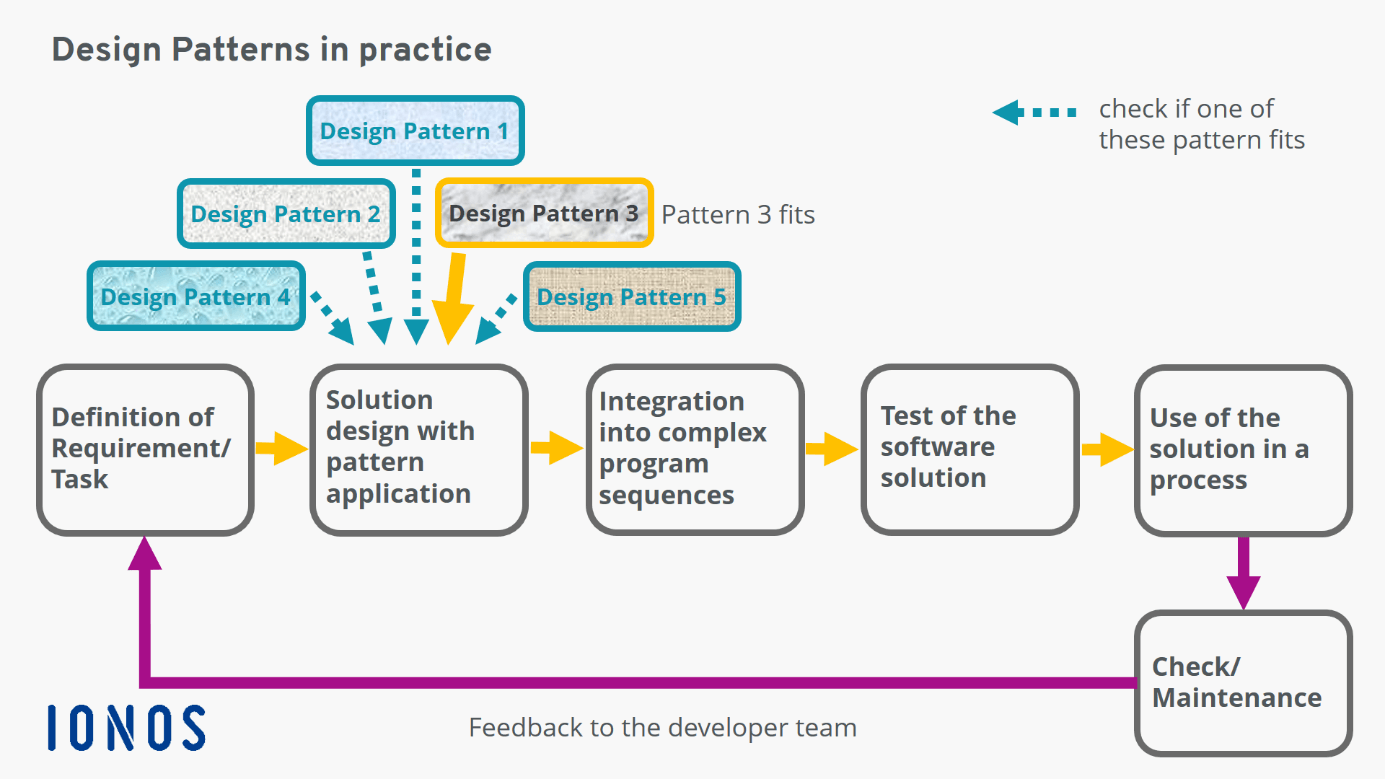
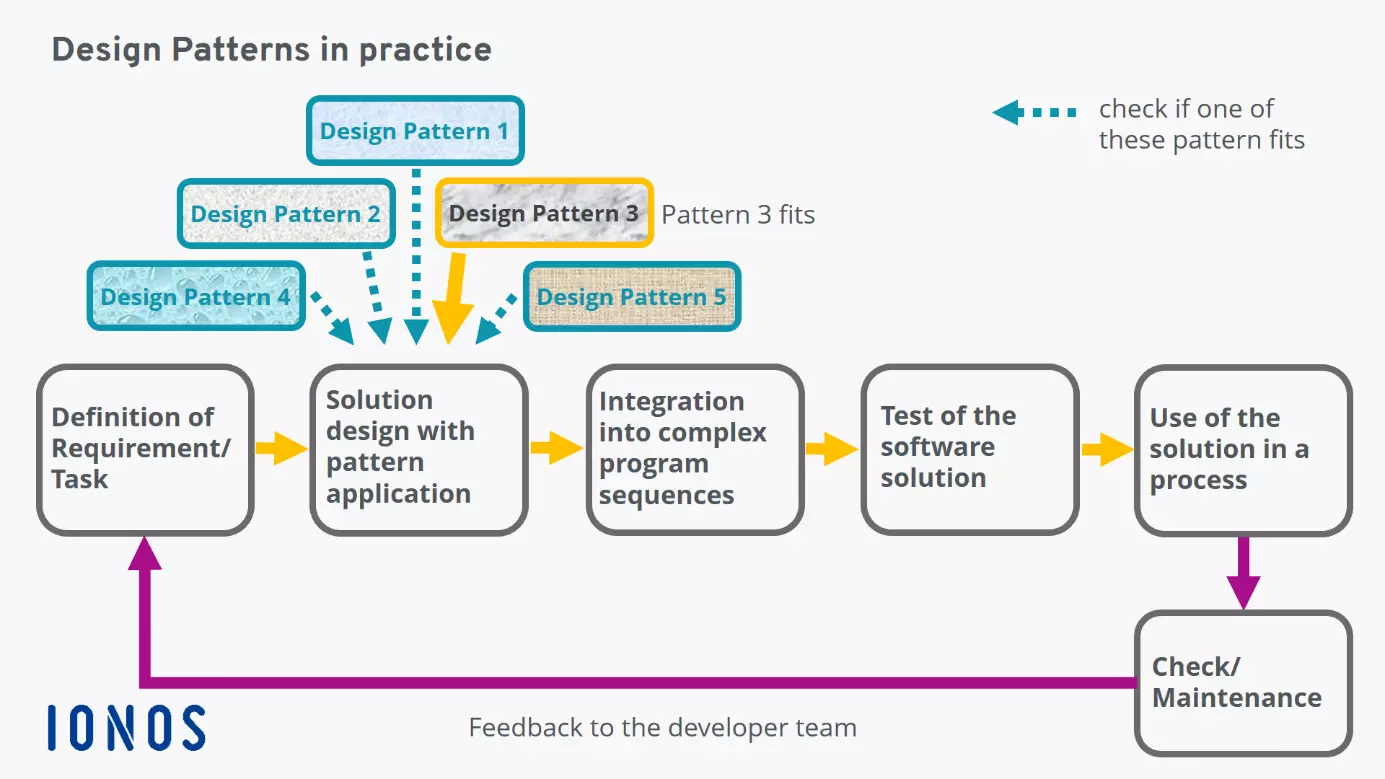
So, what exactly are design patterns? Let us continue using our previous example. The same basic elements will always be needed for a cup: the bottom, sides, and a handle. This applies to all cups whether they be coffee, espresso or teacups. Programming is quite similar: Loops to be executed are always linked to start and end parameters. Conditions always require that operations be defined for what to do when they are met and what to do when they are not. Calculations always output the results for the combination of variables and so on. From many different programming steps, a program sequence can be created which always has the same steps for specific tasks. A design pattern is a description of how to solve a problem.
Below, you will find a simple example of a software pattern, in this case, a factory pattern:
class Cup
{
    private $cupMake;
    private $cupModel;
    public function __construct($make, $model)
    {
        $this->cupMake = $make;
        $this->cupModel = $model;
    }
    public function getMakeAndModel()
    {
        return $this->cupMake . ' ' . $this->cupModel;
    }
}
class CupMaking
{
    public static function create($make, $model)
    {
        return new Cup($make, $model);
    }
}
$espresso = CupMaking::create('cup', 'espresso'); // Object is created
print_r($espresso->getMakeAndModel()); // Outputs ‘cup espresso’
The same applies to larger contexts and processes that are frequently used to solve specific tasks in program sequences. This code example can be extended as needed, even to be used in other industries with completely different products and processes. Needless to say, it is only one building block in a more extensive piece of software. In other words, design patterns should be considered templates that have already been proven to work in practice.
What are the different types of design patterns?
The different types of design patterns reflect the basic applications of the software patterns compiled in each case.
Structural patterns
Structural patterns are ready-made templates for relationships between classes. The aim is to achieve an abstraction that can also communicate with other solutions – the keyword here is interface programming.
Behavioural patterns
Behavioural patterns are used to model the software’s behavior. These patterns simplify complex processes for controlling and monitoring. For this, you can choose between algorithms and object responsibilities.
Creational patterns
Creational patterns are used to create objects which can simplify process design for specific instances. This works regardless of how the individual objects are created and represented in the software.
Over time, additional types of design patterns have been introduced that do not fit into any of the three categories described above. This includes patterns for object-relational mapping to store objects and their relationships in a relational database.
The pros and cons of using design patterns
Advantages
The option to use tried and tested solutions can save you time and money. Development teams do not have to constantly reinvent the wheel to solve subtasks in a program procedure that has already been solved multiple times before. The individual patterns are usually named using common design vocabulary. This simplifies discussions between developers as well as communication with the user of the future solution. The software’s documentation is also simplified if you use building blocks that have already been documented. These advantages also hold true for the maintenance and further development of a program.
Disadvantages
Using design patterns requires extensive knowledge. Having design patterns available can also lead to people believing that apparently all problems can be solved using existing design patterns. In short, this can limit creativity and the desire to find new (better) solutions.
What are the common design patterns?
There are more than seventy design patterns across various categories. The following are some important software patterns:
Creational patterns
- Builder pattern: This creational pattern separates the development of a (complex) object from its representation.
- Factory pattern: This creational pattern creates an object by calling a method instead of a constructor.
- Singleton pattern: This creational pattern ensures that a class only has one object and provides global access to it.
Structural patterns
- Composite pattern: This structural pattern is specially designed to handle dynamic structures, such as for file organisation or data compression.
- Decorator pattern: This pattern integrates additional functions or responsibilities into existing classes.
- Facade pattern: This pattern provides an interface for other systems or sub-systems.
Behavioral patterns
- Observer pattern: This pattern passes on modifications made to an object to structures that depend on the original object.
- Strategy pattern: This pattern defines a family of interchangeable algorithms.
- Visitor pattern: This pattern isolates executable operations so that new operations can be performed without changing the relevant classes.
Design patterns are ready-made patterns that solve specific problems by relying on tried and tested concepts. They build on real existing software designs and involve the user of the future solution in the design process. For the moment, design patterns are not restricted to any one programming language. This makes them universally applicable.