

What is a static site generator? Explanation, functionality, and benefits

To build static sites, developers are increasingly adopting Jamstack architectures with static site generators, which streamline the development process and enable fast site deployment. Dynamic features are handled through a distributed setup, with client-side JavaScript connecting to microservice APIs to deliver the required interactivity.
- Intuitive website builder with AI assistance
- Create captivating images and texts in seconds
- Domain, SSL and email included
What is a static site generator (SSG)?
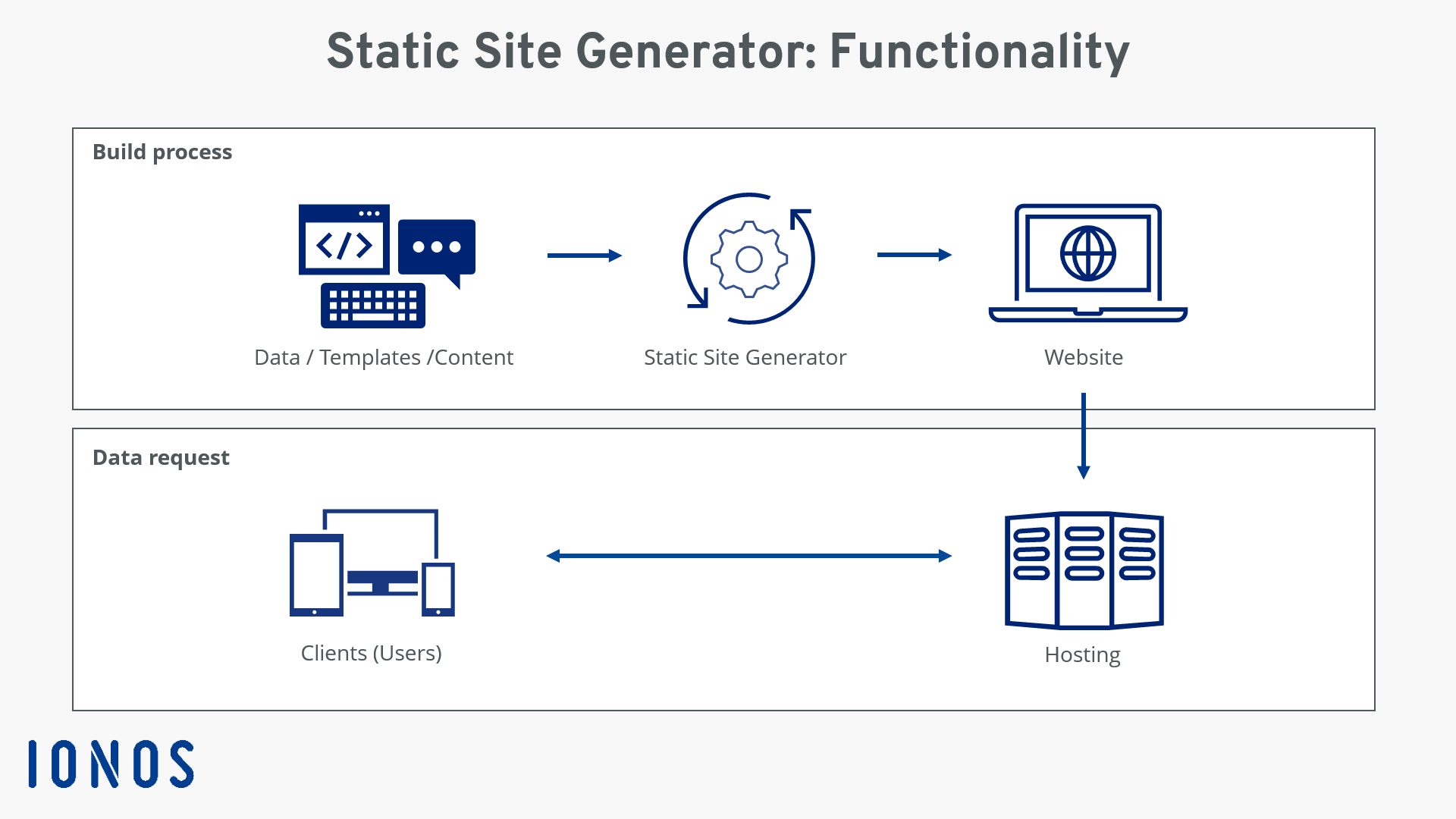
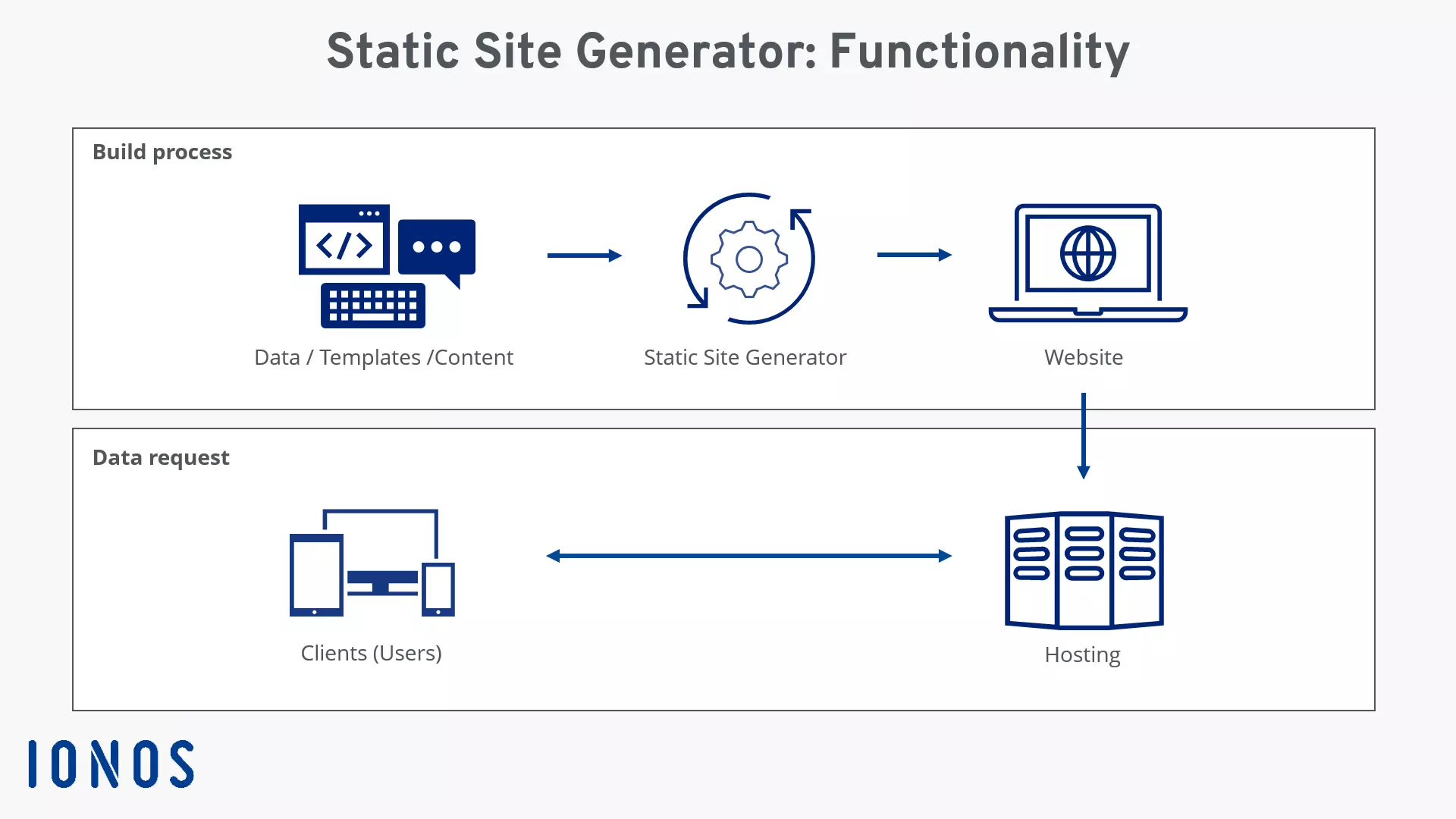
Static website generators are ready-to-use code frameworks that allow you to create a static site. Unlike content management systems that retrieve content from databases, static site generators produce the HTML files of a site using a script from input files stored in a file system. This process also occurs at the time of creation, that is, while changes to code and content are being made, rather than when the visitor opens the site in a browser.
A static site generator script for converting input files to output files can be written in a variety of languages. JavaScript is particularly on the rise here, especially in connection with the aforementioned Jamstacks. Alternatives like PHP, Python, Ruby, or Go are also in demand.
How do static website generators work?
Installation and operation of a static site generator work through the command line. The actual website content is written in markup languages like markdown. Markdown documents can easily be adjusted using GitHub’s web tool for version control. Alternatively, you can use any text editors or special markdown editors. By using metadata at the beginning of the files (often referred to as ‘Front Matter’), the generator ensures that the website is displayed in the browser.
What are the advantages of creating a static site?
In certain cases, such as blogs or company websites, the primary focus is on the simple transmission of information. While content management systems and website builders can also be used for such projects, static site generators have decisive advantages over traditional solutions:
- Speed: Projects created with a static website generator offer excellent speed for users, which is also relevant for SEO. This is because the files are processed during the development or setup phase of the site, not at the time of page retrieval (keyword: database query).
- Version control for content: While the content of dynamic web projects is stored separately from the codebase in databases, the content of a static website is typically found in simple text files. Structurally, the content elements do not differ from other components of the codebase, making it easy to set up version control. This means, for example, that not only the code framework of a blog can be managed in a GitHub repository but also the individual blog posts.
- Security: Another advantage of websites created with static website generators is that they offer only limited attack surfaces—unlike content management systems like WordPress, which inherently carry the risk of security vulnerabilities and require regular updates. The entire risk potential is confined to the individual access by the client when the page is called. Since typically not much more than structured HTML pages are delivered, the likelihood of unwanted access is reduced to a minimum.
- Simple server maintenance: Although a static site generator as a software package has its dependencies that need to be met, the number of necessary components is relatively small and they are only relevant during the development process. While other solutions require various modules, databases, libraries, frameworks, and packages for live operation, necessitating regular updates, the generated static pages are only bound to a functional web server upon publication.
With Deploy Now by IONOS, you can seamlessly host static site generators like Astro, Hugo, or Jekyll from GitHub onto geo-redundant, DDoS-protected infrastructure. When you make changes to your project, Deploy Now automatically triggers an update of the static content on your webspace in the background. Deploy Now also supports automatic SSL provisioning and the use of staging environments.
What distinguishes static site generators from traditional CMS?
Content management systems have transformed website development. They eliminated the high manual effort once needed to program traditional static sites. The major shift from earlier methods was the storage of content in databases, enabling pages to be dynamically assembled and displayed in response to user requests.
Static site generators bridge the gap between traditional static websites and CMS projects. Like the classic programming approach, the pages and their contents are already generated before being accessed by users. Similar to content management systems, static site generators allow developers to use templates and automatically generate pages.
Content management systems and static site generators can also complement each other effectively. Specifically, it’s about the combination of headless CMS and generator, where the latter is used as the driving force for linking code and content.
The key difference between a static site generator and a CMS is the timing of website creation – with the former, it’s during the development process, while with the latter, it’s at the moment of user access. Additionally, a generator eliminates the dependency on databases or other external data sources, as well as server-side data processing when accessing the website. It is, of course, possible to incorporate external data sources with an API if needed.
Why use a static site generator?
Using a static site generator to build your web project can pay off for a variety of reasons. Perhaps the most significant reason is the performance boost that the created websites offer. The excellent loading times when accessing the site, resulting from the pre-generated content, positively affect the user experience. Since all website files are centrally stored in one location, projects based on a static site generator also offer maximum flexibility and availability. Additionally, the management effort is minimal.
However, if
- content needs to be updated regularly,
- new features are to be added later,
- user input must be processed, or
- design changes should be possible at any time with minimal expertise,
then website builders or content management systems are often the better choice.


Weaknesses of static site generators
While static pages offer clear benefits—like outstanding load speed and strong security—there are important reasons why a static site generator may not be suitable for larger projects. Using one typically demands solid knowledge of Markdown, HTML, and similar technologies, and it lacks many automations that come standard with content management systems or website builders.
In addition, static site generators come with the following drawbacks:
- No real-time content: A static site generator in its standard configuration offers no means to generate dynamic content (recommendations, price updates, full-text search, etc.). Elements that automatically adjust to the user by evaluating real-time data can only be implemented with the help of client-side scripts (especially JavaScript).
- Tedious use of user input: Another issue with the lack of server scripts and databases becomes apparent when the web project needs to allow user inputs in certain situations (like a contact form). Here, too, JavaScript is required, or the support of third-party services is necessary. The platform DISQUS can, for example, be used to add a comment function (including moderation and spam management) to static website generator projects.
- No standard user interface: Many static site generators, like headless CMS, lack an interface for adding new content or modifying or deleting existing content without the appropriate extension, instead operating through the terminal. WYSIWYG editors help to write the necessary markdown code and preview the result in advance, but they do not eliminate the need for manual uploading of the finished files to the server.
In summary, projects based on static pages mostly exhibit weaknesses where timeliness, change, and user interaction are required.
What are some well-known static website generators?
The number of generators with which you can create a static site has increased significantly in recent years. On GitHub, there are project directories of numerous open-source solutions that can be used for free to build your own website and adapted as needed.
An overview of the most popular options is provided by jamstack.org: The site lists the various options alphabetically or sorted by GitHub stars, forks, or issues (suggestions/tasks). Additionally, the website frameworks can be filtered by the underlying programming language (including Ruby, JavaScript, Go…).
The following table lists some of the most important generators based on StaticGen information:
| License | Language | Template Engine | Website/Project Page | |
|---|---|---|---|---|
| Next.js | MIT | JavaScript | React | nextjs.org |
| Hugo | APL 2.0 | Go | Go | gohugo.io |
| Docusaurus | MIT | JavaScript | React, Markdown | docusaurus.io |
| Nuxt | MIT | JavaScript | Vue | nuxtjs.org |
| Gatsby | MIT | JavaScript | React | gatsbyjs.com |
| Astro | MIT | JavaScript, TrueScript | Various | astro.build |
| Jekyll | MIT | Ruby | Liquid | jekyllrb.com |
| Hexo | MIT | JavaScript | EJS, Pug, etc. | hexo.io |
| Vuepress | MIT | JavaScript | Vue | vuepress.vuejs.org |
| Eleventy | MIT | JavaScript | Liquid, Nunjucks, etc. | 11ty.dev |
When it comes to the best static site Generators, individual solutions like Hugo or Jekyll are definitely worth considering.
Create client websites with Jamstack
This whitepaper explores the challenges of traditional CMS, explains why Jamstack-based static sites are emerging as a strong alternative, and shows how they can streamline workflows while delivering better results for clients.
Build faster websites through prerendering and leaner hosting. Deploy them with IONOS.
How deploying a static site generator via GitHub works
You can easily and straightforwardly store and manage the code of static site generators, including contents, assets, and scripts responsible for generating the output, in a GitHub repository. This way, you link your project with version control and simplify code collaboration.
Finally, you just need to deploy the files on a web server, where the build process for HTML and CSS files must be repeated with each repository update. You can significantly simplify this task as well—with hosting services for static site generators like Deploy Now. The IONOS solution automatically triggers an update of the static content on your webspace when you make changes to your static site generator‘s directory. Deploy Now uses a GitHub Actions workflow, allowing you to monitor the build logs directly in the GitHub interface.
Deploy Now, the new way to create static websites
Deploy Now is a practical hosting service that supports all popular static site generators and is also well-suited for Jamstack hosting. Additionally, Deploy Now features simple staging and offers a free SSL/TLS certificate and DDoS protection for your project.
The decision to bring and integrate your own domain or register a new domain is up to you. For more information on technical configurations, tutorials, and starter projects, refer to the official Deploy Now documentation.