

What is SMTP? Definition and basics

If you think of e-mail as electronic mail, then SMTP is the mail man. Without the internet’s standard network protocol, sending applications documents, e-cards, and funny cat videos wouldn’t be possible at all. This is because when you send an e-mail, it doesn’t simply travel directly to the recipient, but goes through a complex communication process with numerous instances before it reaches its destination.
- KVM based dev servers for developers
- Scalable to enterprise cloud level
- Pay-as-you-go, per-minute billing
What is the SMTP protocol?
SMTP stands for “Simple Mail Transfer Protocol.” It is a connection-orientated, text-based network protocol from the internet protocol family and is located on the seventh layer of the OSI model: the application layer. Just like any other network protocol, it contains rules for correct communication between computers in a network. SMTP is responsible for feeding and forwarding e-mails from sender to recipient.
Since its release in 1982 as the successor of the “Mail Box Protocol” in Arpanet, SMTP has become the standard protocol for sending e-mails. For the average consumer, however, the SMTP protocol remains largely invisible, since the respective e-mail program executes it in the background. If the software, the webmail application in the browser, or the mobile mail app don’t automatically define the SMTP protocol when setting up an account, you have to set it up manually to ensure smooth e-mail traffic.
Sendmail was one of the first Mail Transfer Agents (MTA) that supported the SMTP protocol.
Here is an overview of SMTP server addresses and SMTP ports for some of the most popular e-mail providers.
| E-mail provider | SMTP server address | SMTP port | |
|---|---|---|---|
| Yahoo | smtp.mail.yahoo.com | 465 | |
| AOL | smtp.aol.com | 587 | |
| Outlook | smtp.live.com | 587 | |
| Gmail | smtp.gmail.com | 587 (TLS/STARTTLS), 465 (SSL) |
How does SMTP work?
To understand the SMTP protocol, you first have to understand e-mail. This is basically how it works:
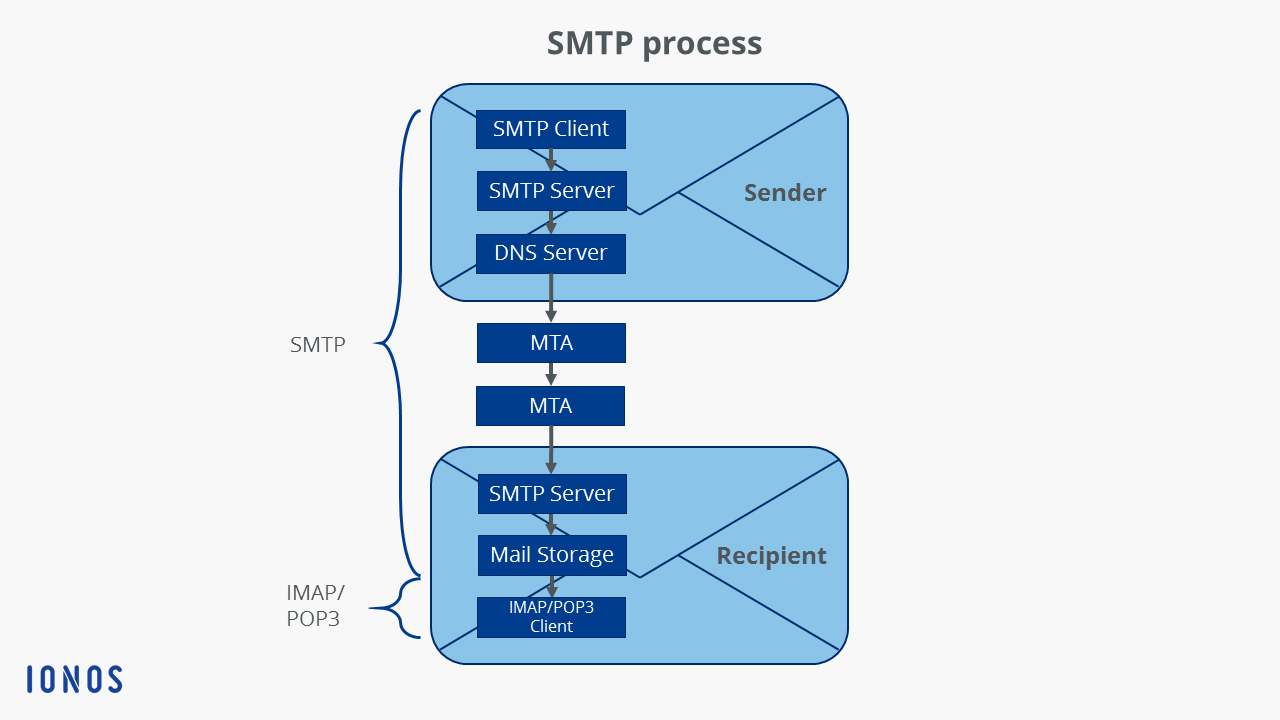
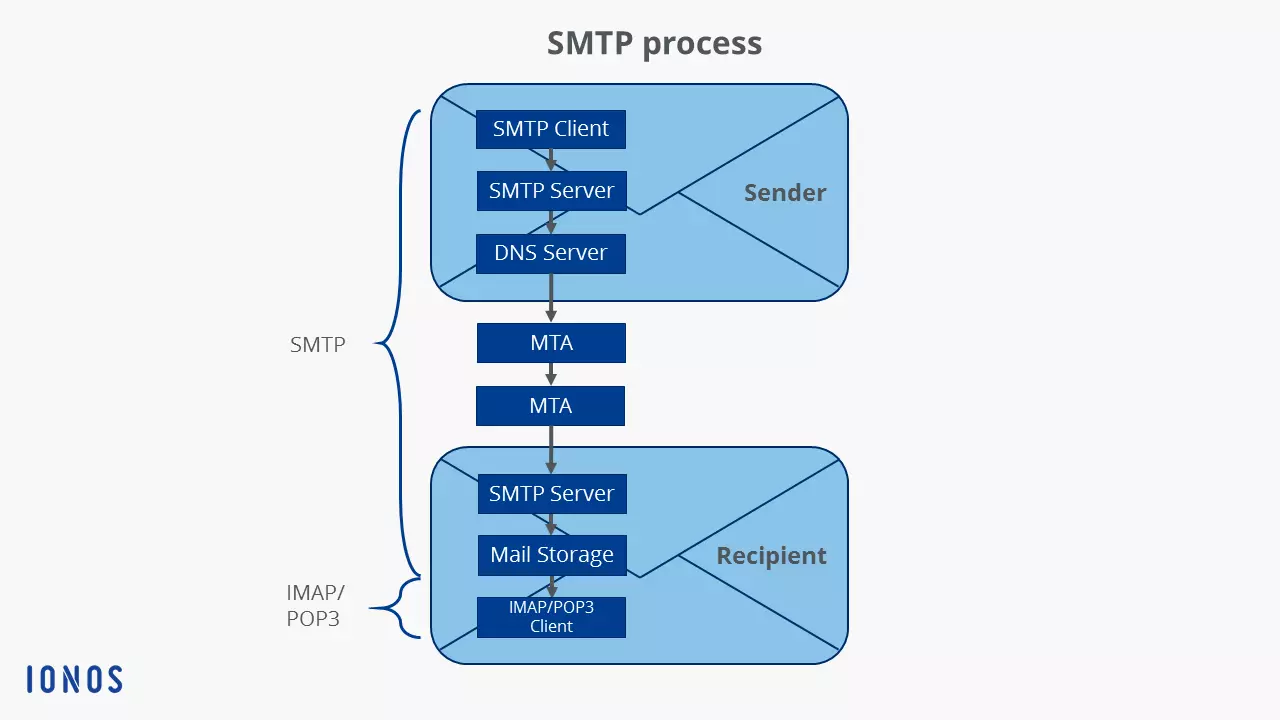
- The SMTP client, i.e. the sender, loads the e-mail onto the SMTP server, i.e. the outgoing mail server of the respective e-mail provider. This is done via a webmail application in the browser or an e-mail program (technically called “Mail User Agent,” MUA for short) such as Windows Live Mail or Mozilla Thunderbird.
- The SMTP server then contacts the DNS server, and this server then searches for the IP address of the target SMTP server (also called “Mail Delivery Agent,” MDA for short), which is stored for the recipient address of the e-mail.
- The SMTP server sends the e-mail to the target SMTP server via one or more “Mail Transfer Agents” (MTA). Each of these forwarding processes runs according to the SMTP protocol.
- The target SMTP server temporarily stores the e-mail in the message store.
- The recipient MUA downloads the e-mail either via IMAP or POP3.
How does an SMTP session work?
The interaction between the SMTP client and the SMTP server mentioned in the first step of the SMTP procedure represents the actual SMTP session. The rest of the SMTP procedure i.e. forwarding the e-mail via SMTP from the server to the recipient is covered in a separate article. Each session consists of a sequence of SMTP commands from the client and responses in the form of status codes from the server.
Overview of SMTP commands
According to the applicable SMTP specifications, each implementation of the network protocol must support at least the following eight commands, consisting of 7-bit ASCII characters:
| SMTP command | Meaning | |
|---|---|---|
| HELO | “Hello.”– the client logs on with its computer name and starts the session | |
| MAIL FROM | The client names the sender of the e-mail | |
| RCPT TO | “Recipient” – the client names the recipient of the e-mail | |
| DATA | The client initiates the transmission of the e-mail | |
| RSET | The client terminates the initiated transmission, but maintains the connection between client and server | |
| VRFY/EXPN | “Verify”/“Expand”– the client checks whether a mailbox is available for message transmission |
Overview of server status codes
The server responds to each of these SMTP commands of the client with a three-digit status code including plain text message:
| Status code | Plain text message | |
| Status codes that indicate that the server has successfully carried out the command: | ||
| 200 | (Non-standard success) | |
| 211 | System status or system help reply | |
| 214 | Help message | |
| 220 | Server ready for SMTP session | |
| 221 | Server ends the connection | |
| 250 | Requested mail action OK, completed | |
| 251 | User not local; mail is forwarded | |
| 252 | Cannot verify (VRFY) user, but will accept message and attempt delivery | |
| 253 | Pending messages for node started | |
| Status codes that indicate that the server has understood the command, but requires further information for processing: | ||
| 354 | Server starts mail input | |
| Status codes that indicate that the server has detected a temporary error, but that the command may still be processed: | ||
| 421 | Server not available, connection is terminated | |
| 450 | Commando not executed, mailbox unavailable | |
| 451 | Requested action aborted: local error in processing | |
| 452 | Requested action not taken: insufficient system storage | |
| Status codes that indicate that the server has detected a fatal error and the command cannot be processed: | ||
| 500 | Syntax error, command unrecognised | |
| 501 | Syntax error in parameters or arguments | |
| 502 | Command not implemented | |
| 503 | Bad sequence of commands | |
| 504 | Command parameter not implemented | |
| 521 | Server doesn’t accept any mails | |
| 530 | Access denied; authentication required | |
| 550 | Requested action not taken: mailbox unavailable | |
| 551 | User not local; please try forward path | |
| 552 | Requested mail action aborted: exceeded storage allocation | |
| 553 | Requested action not taken: mailbox name not allowed | |
| 554 | Transaction failed |
SMTP example session
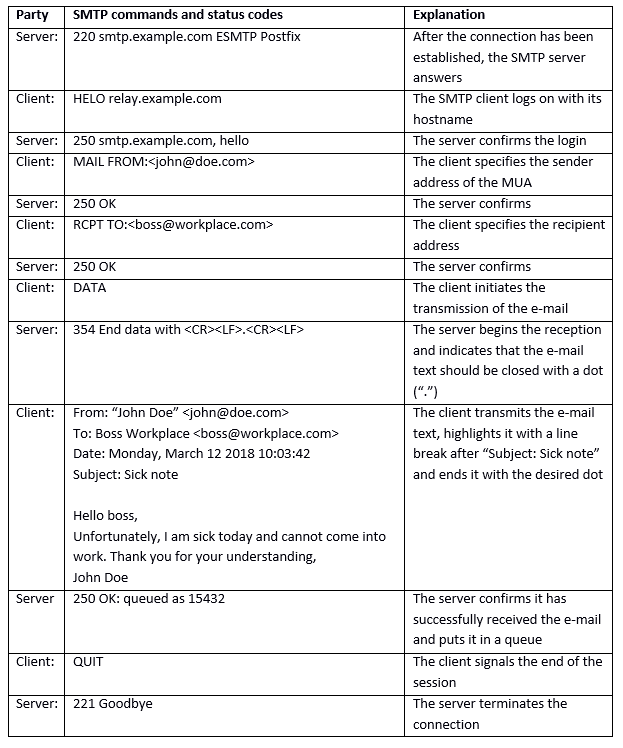
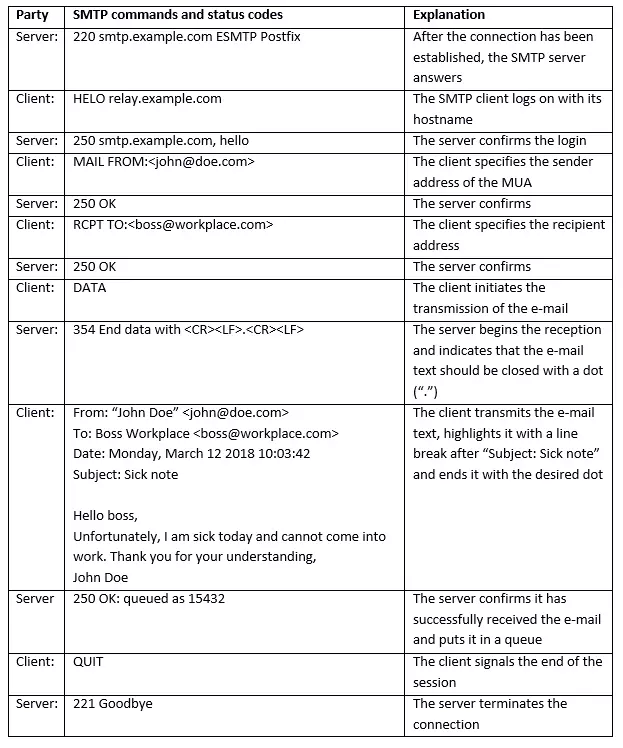
An example of an SMTP session between client and server could be as follows:
Email hosting from IONOS means you can communicate professionally and safely, all at a reasonable price. Use personalized email addresses with your own domain, flexible access to your mails at any time, archiving function, calendar and office solution and much more. Rely on the highest security standards too, with IONOS' ISO-certified data centers.
What are the disadvantages of the SMTP protocol?
The disadvantage of SMTP is that users are not verified when a connection is established, meaning that the sender of an e-mail might not be trustworthy. As a result, open SMTP relays are often used to send spam on a massive scale. The spammers use fake sender addresses so that they cannot be traced (mail spoofing). Today, there are many security technologies in use to prevent SMTP servers from being abused. For example, suspicious e-mails are rejected or moved to quarantine (spam folder). The identification protocol DomainKeys (DK), the Sender Policy Framework (SPF), or greylisting can be used for this purpose. In addition, it has become more or less standard to receive e-mails not only via the traditional port 25/TCP, but also via port 587/TCP, so that transmission is only allowed for verified users.
What is ESMTP?
In response to the rampant spam problem on the internet, an extension of SMTP was released in 1995: extended SMTP (ESMTP for short). It adds additional commands to the protocol in 8-bit ASCII code, enabling many new functions to save bandwidth and protect servers. These include, for example:
- Authentication of the sender
- SSL encryption of e-mails
- Possibility of attaching multimedia files to e-mails
- Restrictions on the size of e-mails according to server specifications
- Simultaneous transmission to several recipients
- Standardised error messages in case of undeliverability
Lastly, here are some examples of ESMTP commands:
| ESMTP command | Meaning | |
|---|---|---|
| EHLO | The alternative to “HELO” in the extended protocol. The client logs on with its computer name and starts the session. If the server supports ESMTP, the session is started successfully. Otherwise, the client must use SMTP. | |
| 8BITMIME | The client prompts the server to allow the 8-bit ASCII character set in the message text. | |
| SIZE | The client prompts the server to specify the maximum e-mail size allowed in bytes. | |
| STARTTLS | The client asks if the server supports TLS encryption. |