

Amazon keyword tools: the best solutions for Amazon keyword research

An online shop, either on your own page or on a selling platform like eBay or Amazon, helps to expand your customer base and significantly increase sales. These days, if you want to launch a new product on the market, it’s difficult to avoid also selling it online – even if success in e-commerce is anything but easy. As with any offer on the internet, the biggest challenge is getting users to find the offered goods or shop in the first place. Amazon keyword tools, which make use of the online platform’s search vocabulary, play an increasingly important role in this task.
Why Amazon keywords are so important for e-commerce
When selling products online, just like when selling in a store, the goal is to turn interested people who are already in the store (or the web shop) into paying customers. Before you can attempt to optimise these “conversions”, you first have to drum up business to get people interested in your offer. Since web users often rely on search engines for their online shopping, it’s also important to integrate the appropriate keywords into your product and shop pages in addition to or instead of expensive advertisements. As opposed to classic SEO, it’s not the Google search engine but instead the Amazon counterpart that serves as the most important keyword research source – no matter whether your products are listed directly on the online platform, in your own shop, or with another service provider.
The reason for this is that product-oriented search queries are increasingly started via Amazon. For some time now, the sales platform’s database has been providing better, more precise information about the search behavior of online shoppers than Google’s search term base. The strongly product-oriented Amazon search queries can also be used for overall e-commerce keyword research. Amazon keyword tools help with this.
Additional information on the function of keywords on Amazon as well as the most important steps for the optimisation of Amazon product pages can be found in our basics article on the topic of Amazon SEO.
Amazon SEO tools for keyword research: an overview
If you’re searching for a tool to optimise the keywords for your product or shop pages, then, for the aforementioned reasons, you should prioritise applications that focus on Amazon keywords. The quality of such tools depends on the regularity with which the Amazon database is checked and how many relevant search queries the database already contains. It also plays a role whether the keyword inventory is in the same language as the intended market: Simple one-to-one translations will rarely improve visibility, apart from coincidental hits.
For Amazon’s keyword research to succeed quickly with a tool, it needs to be easy to operate and present results in the most appealing form possible. Otherwise, both research and further processing become tedious tasks rather than traffic generators. The solutions also differ in terms of price and range. Some tools, particularly those which were developed specially for Amazon SEO, offer functions that go far beyond the actual research and are therefore a bit more expensive. In the following, we present some useful tools that could be worthwhile to you.
Amazon Keyword Tool from SISTRIX
The German-based performance agency SISTRIX was one of the first to recognise the value of Amazon for e-commerce keyword research, and began to build its own Amazon keyword database at an early stage. This serves as the foundation for the Amazon Keyword Tool published in January 2016, which can be accessed at any time without registration or login using any popular browser. The web application delivers the most promising keyword combinations for the desired search term, and also presents valuable information about the search volume, the average price of the corresponding products, and the average number of reviews.
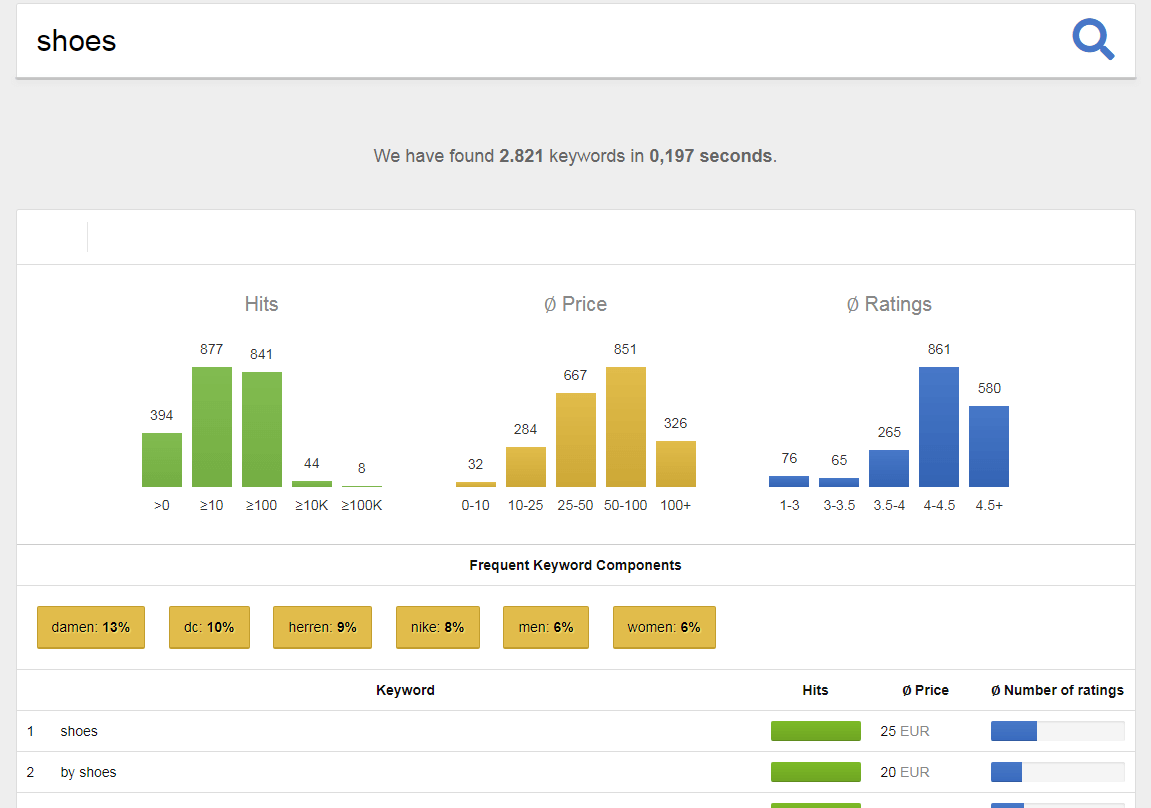
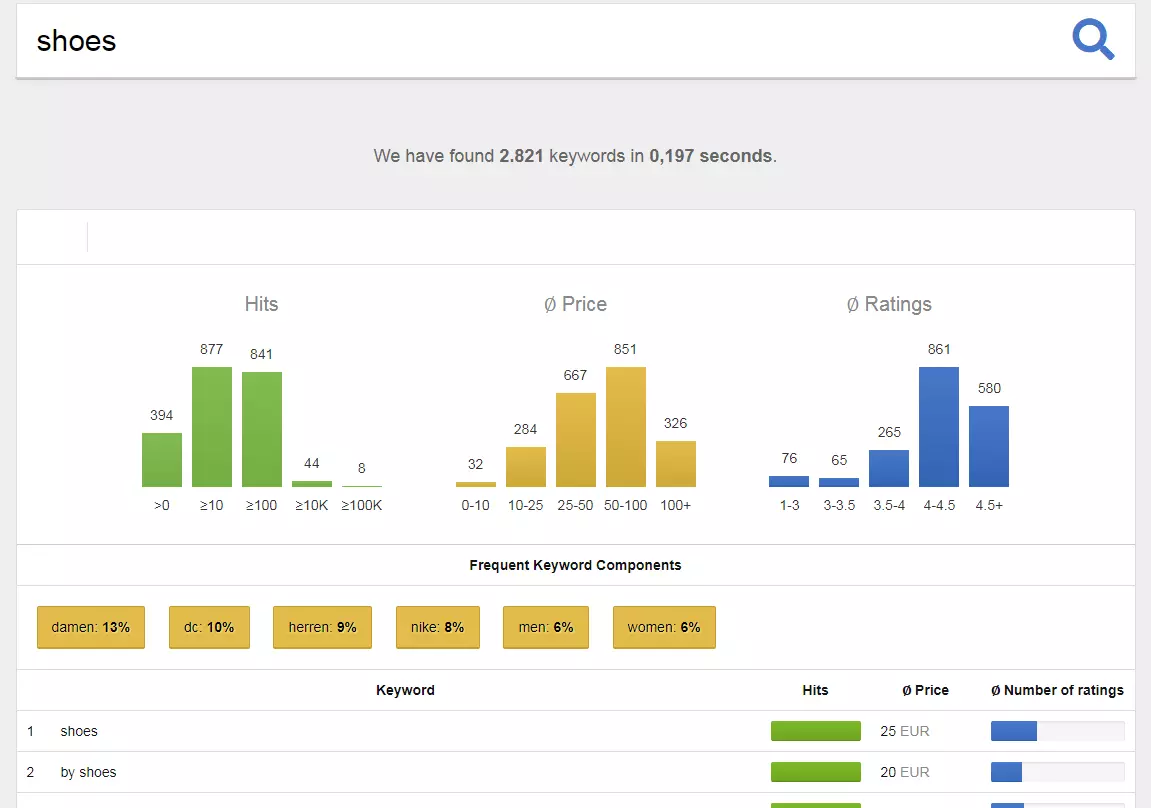
The SISTRIX tool presents the top 100 hits with the strongest search volumes for the desired search term. If there are also combinations of these that are related to a known brand, the web app marks them with the gray note “(Brand)”. Since its publication, the application for Amazon keyword research has been in beta mode – which you can register for without any commitment. A single access gives you the possibility to perform up to 250 searches per day for keywords of your choice. Login with another active SISTRIX account is also possible, if, for example, you use the SISTRIX toolbox. The tool can be used completely login-free, but in this case you’re limited to 25 searches per day.
| Benefits | Drawbacks |
|---|---|
| Huge keyword database | No export function exists for researched data without login |
| Free use (up to 25 searches per day) |
Sonar
When it comes to optimising your Amazon products and managing received ratings, there’s no way around using the Marketplace Analytics platform. With Sonar, the software of the Berlin-based startup Sellics includes, among others, an Amazon keyword tool, which is also available separately and helps you find the right keywords for your products. For this purpose, the free web application relies on a database with more than 32 million actual Amazon search queries for around 65 million products (as of November 2017), which Sellics gathers with the help of proprietary algorithms and regularly expands.
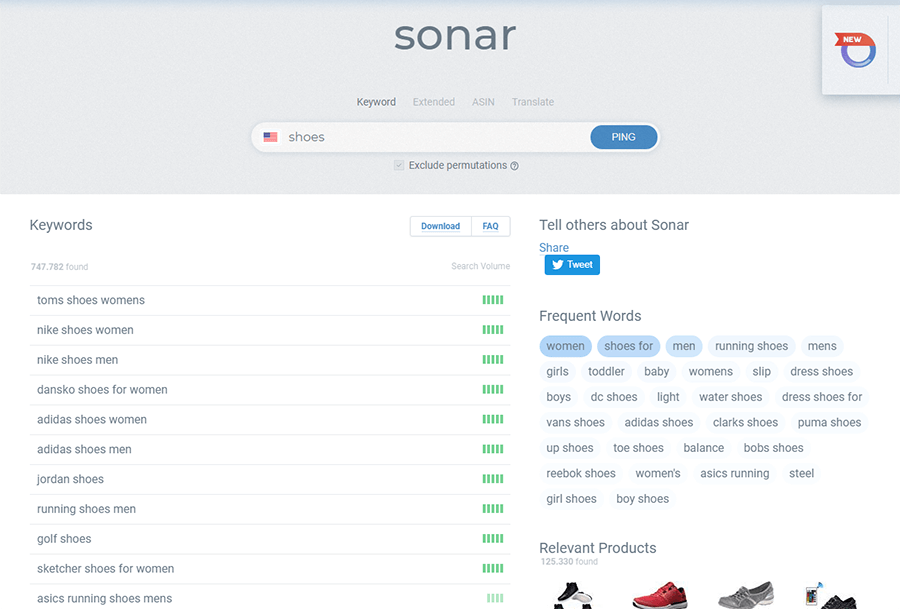
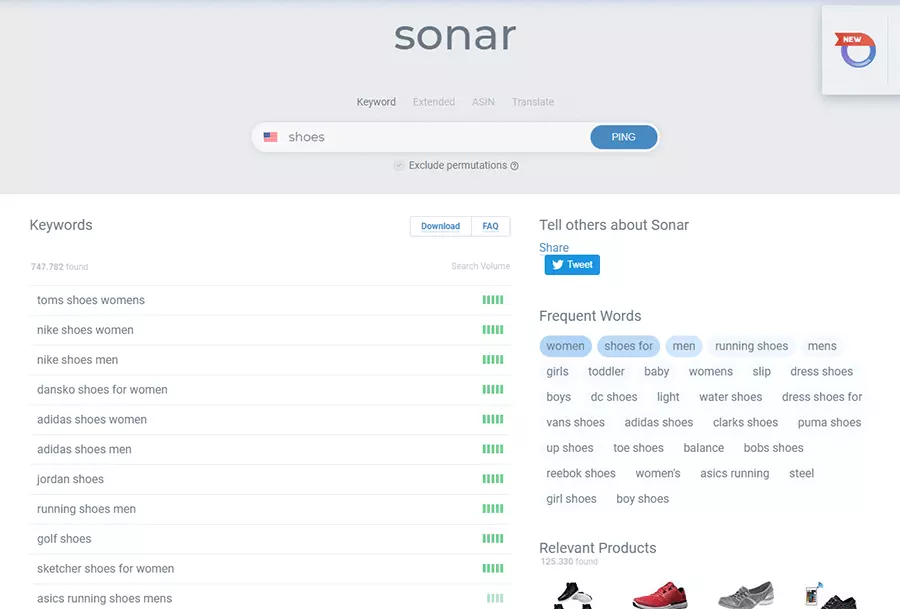
The search engine, which the startup has integrated into the tool for the purpose of Amazon keyword research, provides users with four different available modes: An ordinary standard search can be started via the “Keyword” tab. If you also want to receive synonymous terms, then select “Extended”. Also useful (for example, for advertisement analysis) is the ASIN reverse search, which plays out all of the keywords with which a product already on sale is ranked. With “Translate” mode, it’s possible to do cross-market research (currently: German, French, Italian, English, Spanish). Sonar presents the search volumes of the researched terms not in exact values, but instead via its own bar grading system, with five bars representing the maximum and one bar representing the minimum search volume.
| Benefits | Drawbacks |
|---|---|
| Enables ASIN reverse searches | Doesn’t show exact search volumes |
| Keyword lists can be downloaded as CSV files |
MerchantWords
In December 2012, the software developer George Lawrence published the online tool MerchantWords, which has since developed into one of the most popular solutions for optimising Amazon keywords. While the database was initially fed entirely with Amazon search queries, today it also obtains keywords from various other online sales platforms (e.g. Walmart.com) worldwide. In this way, MerchantWords builds a comprehensive picture of search behavior for the online shopping communities in the USA, France, Germany, Italy, Spain, and Canada. In the future, it’s also planned for keyword research to be possible in other international markets such as Australia, Japan, India, and Mexico.
When you enter a term into the MerchantWords search bar, you receive a list with matching keywords and their estimated monthly search volume as well as the Amazon categories in which they’re primarily found. By clicking on the respective flag symbol, you can select which languages you would like to search for. Thanks to the integrated filter function, the results can be sorted alphabetically or by search volume strength. It’s also possible to filter search categories for a specific category. After searching, you can export your keyword list as a CSV file if required. To use the Amazon keyword tool, a paid subscription (from 60 dollars per month for the global market) is required.
| Benefits | Drawbacks |
|---|---|
| Supports various international markets | Use only with paid subscription |
| Delivers information on keyword performance in different Amazon product categories |
Uberseller
At the end of 2015, Toni Grünert and Dawid Schütte started the beta of their Amazon SEO tool Uberseller. The SEO suite, whose core function is profit optimisation on the online sales platform, is now available as an official live version. All European Amazon marketplaces are supported in addition to the US market, the web application exemplifies itself with features such as the sales tracker, which automatically keeps an eye on your sales figures as well as selected competitors. In combination with the profit dashboard, which presents the top-selling products and days of the week, you have all important data for the perfection of your selling strategy on hand. Uberseller also has available functions for Amazon keyword research.
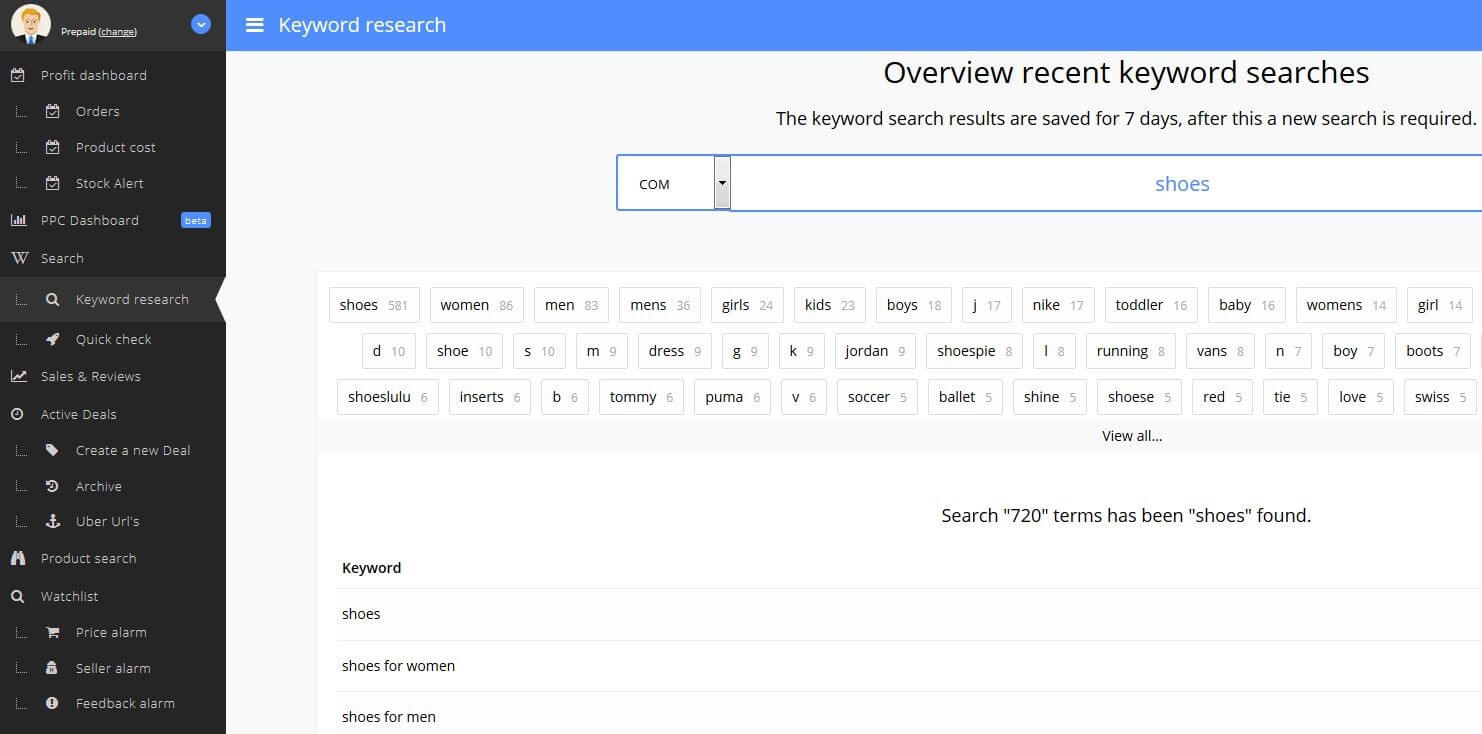
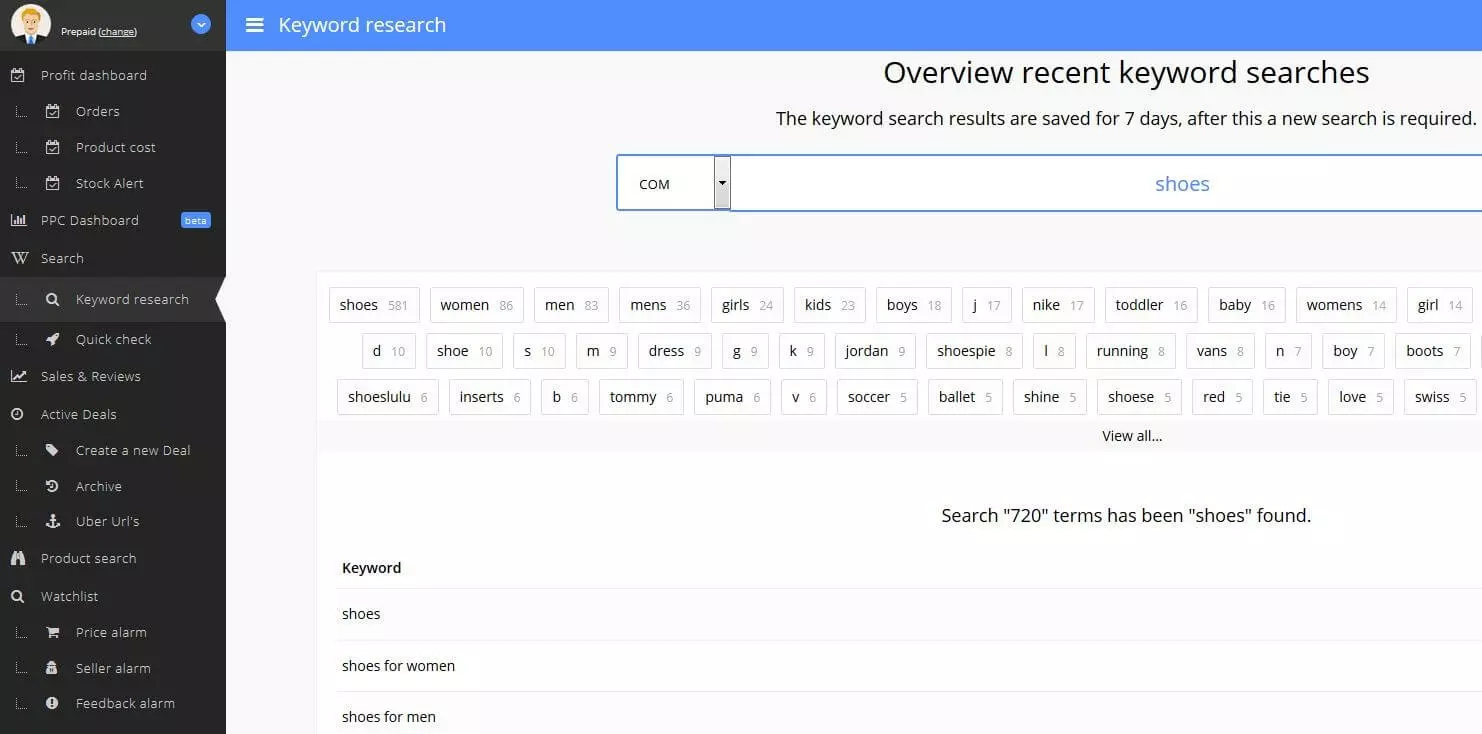
With the “Keyword research” tab, you can determine all relevant keywords for a desired search term. In the country code menu, simply select the desired languages that the search should look for. The created list can be fully downloaded in CSV format. You can also access Amazon products that match the keywords. The “Quick check” tab offers the possibility to determine the Amazon keywords of the competition based on ASIN. Both research features are available without limits in the “Free/Prepaid” edition – you only need an Uberseller account. However, access to the tools mentioned above, like the sales tracker, are only available with a purchase of one of the paid packages (from 79 euros per month).
| Benefits | Drawbacks |
|---|---|
| Amazon keyword research also possible with free packages | No search volume details |
| Can be quickly upgraded to Amazon SEO complete suite by adding paid packages | Keyword search process takes a relatively long time |
AMZ Tracker
AMZ Tracker, launched in 2014 by Travis Jamison, was one of the first SEO tools that was developed specially for Amazon ranking optimisation. The web application contains various features for this, which improve the conversion rate and support keyword settings as well as user interaction. AMZ Tracker also gives tips on how you can optimise your product pages, and shows you which components (title, bullet points, product photos, etc.) display a need for optimisation. Thanks to keyword tracking, you also have the rankings of your products as well as the positioning of the competition available at a glance. Notification e-mails, which inform you about negative user reviews, can be enabled so that you can react as quickly as possible. New keywords for your product pages and the Amazon backend can be found with the keyword research tool and the Deepwords app.
 To display this video, third-party cookies are required. You can access and change your cookie settings here.
With the keyword research tool, you receive useful keyword suggestions that AMZ Tracker obtains from the automatically delivered Amazon search suggestions. Which of these keywords ultimately end up on the list is decided by you. You can also use the suggestions as a basis for a new search. The search engine app Deepwords gives AMZ Tracker users the additional option to search specifically for longtail keywords, which play a particularly important role when it comes to conversion optimisation in e-commerce. All tracking, analysis, and research functions are available for various international markets (USA, Brazil, Germany, Italy, France, and Spain, among others). Purchase of a paid subscription is required (from around 33 US dolalrs per month).
| Benefits | Drawbacks |
|---|---|
| Targeted search for longtail keywords possible | Not suitable for smaller Amazon keyword research |
| Automatic notifications about negative user reviews |
Scientific Seller
The software company Velluto Tech Incubator out of Las Vegas offers, in its own words, “The World’s Slowest” keyword tool for Amazon. As opposed to a majority of the competition, Scientific Seller doesn’t complete the keyword search within a few seconds, but instead requires significantly longer to present a list of suitable suggestions for the desired term. Behind the time-intensive search process and joking self-criticism hides the great strength of the tool, which is not satisfied with a simple search, but instead digs deeper than other solutions into Amazon’s search vocabulary. This way, Scientific Seller presents keyword suggestions that aren’t found in other research tools.
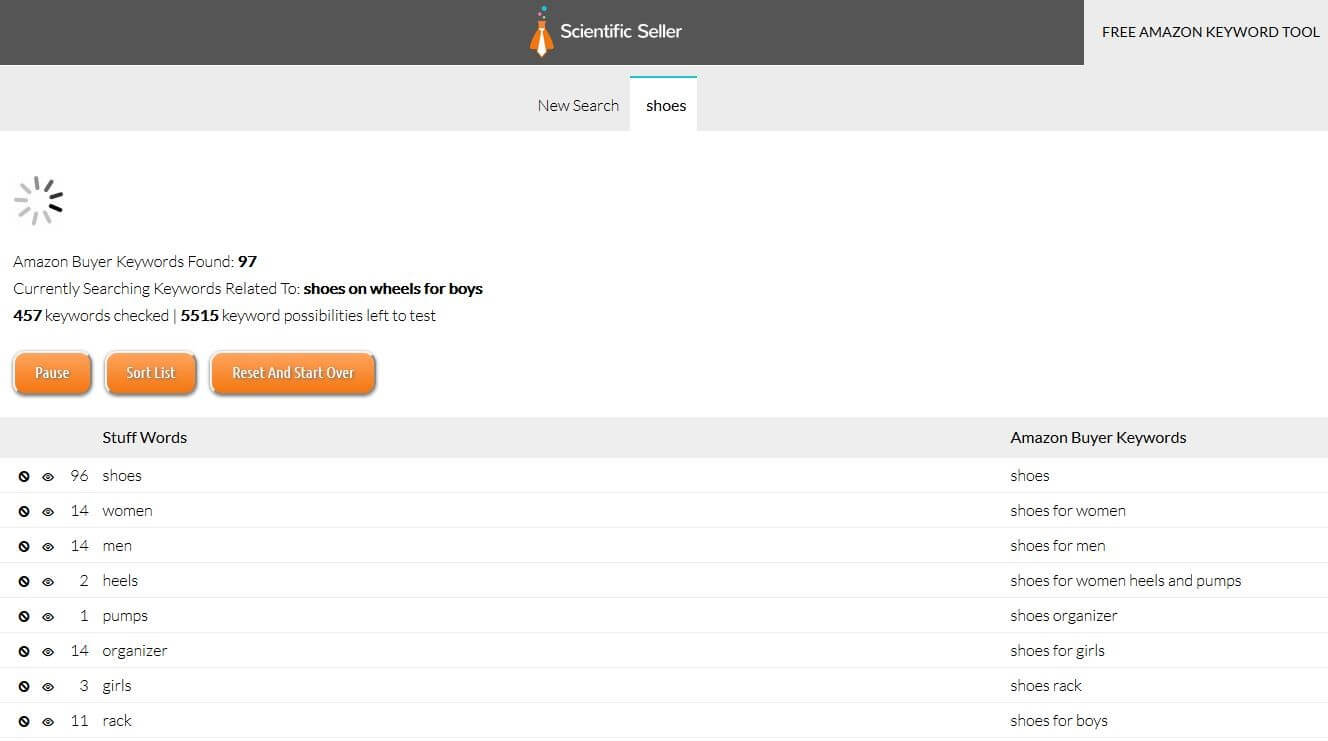
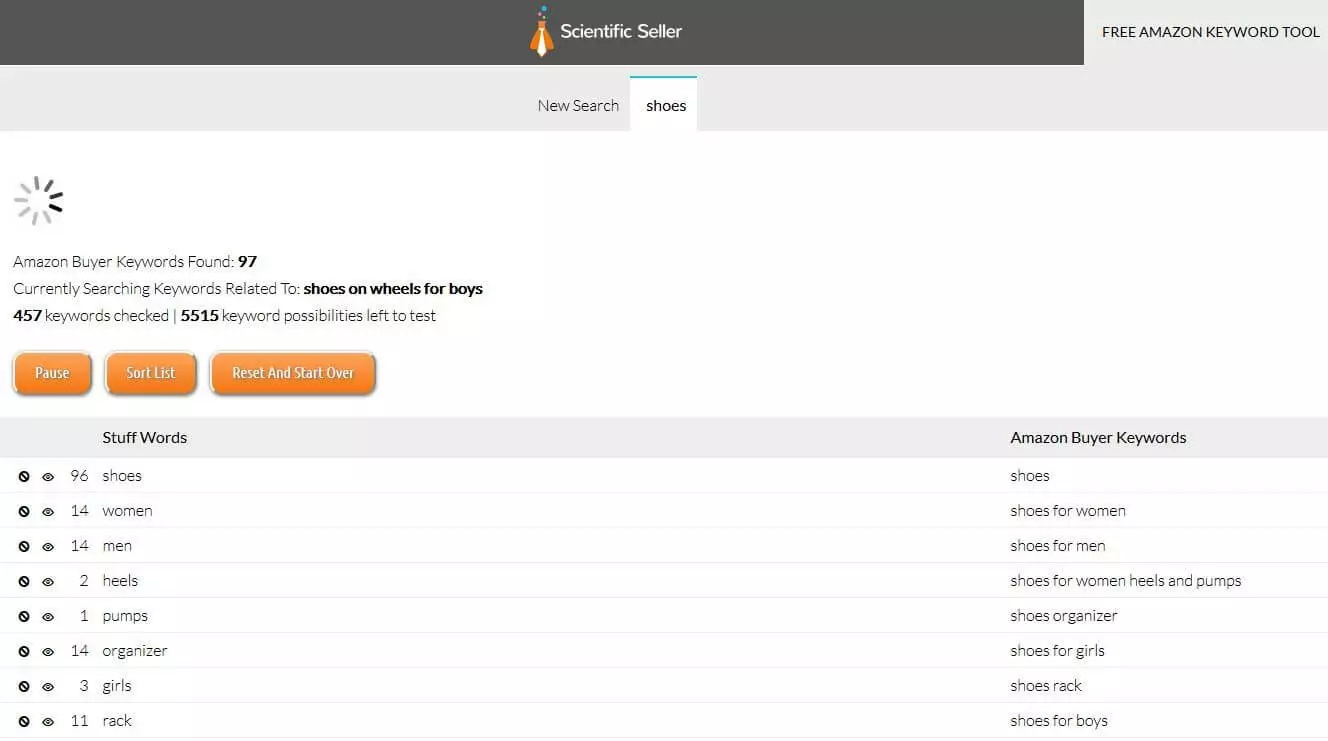
After you’ve entered one or more search terms, Scientific Seller begins its extensive research. In real-time, the tool presents the individual keywords as well as the most important search combinations for Amazon buyers in two columns. For the individual terms, you also receive information on how often they’re represented in the searched combinations. You can sort the list at any time so that the keywords with the highest values are displayed in the top positions. It’s also possible to pause the search and resume it at a later time. For the US Amazon platform, you can run up to five search processes per day for free. If you want to use the Amazon keyword tool for other markets as well, then you need a paid account (from around 50 US dollars per month).
| Benefits | Drawbacks |
|---|---|
| Very thorough keyword research | Free edition limited to five daily searches for the US market |
| Very time-intensive search process |
The best solutions for researching Amazon keywords: overview
| Publication year | Developer | Cost | Developer | |
|---|---|---|---|---|
| Amazon Keyword Tool from SISTRIX | 2016 | SISTRIX | Free (25 searches per day) | Presents data for average number of product reviews as well as average price |
| AMZ Tracker | 2014 | Travis Jamison | From around $33 per month | Targeted search for longtail keywords possible |
| MerchantWords | 2012 | George Lawrence | From $30 per month | Delivers all relevant product categories for keywords |
| Scientific Seller | 2015 | Velluto Tech Incubator | Free (5 US searches per day) | Very extensive research process |
| Sonar | 2016 | Sellics | Free | Use as standalone or as part of the SEO suite Marketplace Analytics |
| Uberseller | 2015 | Toni Grünert, Dawid Schütte | Free | Extendable to comprehensive conversion optimisation suite |
Reviewers

Melissa Senn
Melissa Senn has been with IONOS since 2016 and focuses on website, e-commerce, social media, and AI in the Digital Guide. As a digital strategist, she uses her extensive SEO and GEO experience to transform complex technological trends into practical content.

Julia Hertler
With over 18 years of experience in content marketing, Julia Hertler has deep expertise in digital communications. For the past 10 years, she has specialised in the areas of domains and hosting at the IONOS Digital Guide, making complex technical topics easy to understand.

Jeanna Raffa
With over 18 years of experience in online marketing, Jeanna Raffa possesses extensive expertise in digital marketing. Since 2020, her focus has been on providing practical information regarding email, office, and cloud storage solutions.