

How to create the best Instagram bio

The Instagram bio is among the most important features of an artist’s, company’s, or influencer’s Instagram profile. Much like a business card or teaser, it engages in just a few sentences and connects visitors to external pages via links and hashtags. Attractive profile pictures, informative profiles, and branded web pages or artist website links are used for this purpose.
What is an Instagram bio?
The Instagram bio is the small section beneath the username that describes what a person or a brand’s profile is all about in 150 characters or less. Links, emojis, icons, and hashtags can be added to spice things up. Professional artists, companies, and social media influencers are advised not to underestimate the marketing importance of an Instagram bio.
Sell products and services via Instagram and social media using the Social Buy Button. It’s intuitive to use and includes multi-channel selling, popular payment methods, shipping wizards, and channel syncing.
What goes into an Instagram bio?
The Instagram bio needs to convince users that visiting your profile page is worthwhile. In addition, it should engage potential customers or supporters to find out more about your products or offering. Ideally, users decide to follow your profile and develop an interest in your services, activities, and products.
Here’s what goes into a professional Instagram bio:
Username
The username is one of the most important components of a good profile. You can check if a desired username is still available by typing it into the URL ‘instagram.com/your-username’. If no page is displayed, that means the name is available. Businesses should use their company’s name, while artists are advised to select their artist name. The username must not contain any special characters except underscores and dots.
Profile name
The profile name is displayed in a smaller font beneath the username and above the Instagram bio. It can be 30 characters long and should be distinctive. You can also use profile names to convey information such as the focus of your profile or USPs.
Want to change your Instagram name? You can do this as often as you like for profile names, but usernames can only be amended twice in 14 days.
Profile photo
When selecting an Instagram profile picture, consider the size of the Instagram photo. Catchy and representative profile pictures are best. Companies often use their company logo or name. Artists and influencers, on the other hand, usually use profile pictures in close-up or semi-close-up.
Depending on the category, the profile picture is best used to make a first impression. Travel or food accounts are advised to select a theme through their profile picture. For best results, Instagram tools are useful for editing images.
Category (Instagram business profile)
Adding a category is restricted to business profiles on Instagram or Facebook. This can be configured via an associated Facebook account. A category, however, is only displayed on the mobile app not the web view.
Profile description
The profile description is the core of the Instagram bio. In 150 characters or less, describe yourself, your accomplishments, and your goals. While companies fare better using this space for USPs or brand descriptions, a more approachable style is recommended for personal profiles, providing visitors a quick glimpse of your personality. Considerate placements of emojis and a clear structure are a good idea.
Link
By default, Instagram lets you include an external link in your Instagram bio to direct visitors to your website or online store. If you don’t use a business profile, you can refer to a link in your profile description. Although there are tools that can be used to expand the number of links, it is recommended to include only one link and a brief explanation of where it leads.
Call-to-action button (Instagram business profile)
Business profiles on Instagram can integrate a special call-to-action button to their profile. CTAs such as ‘Book Now’, ‘Contact Us’, ‘Reserve Now’, or ‘Use App’ can be incorporated into a profile. Possible CTA functions for companies include:
- Reservations
- Orders
- Bookings
- Ticket purchases
CTAs are great for highlighting products and collections in Instagram Shopping.
Contact details
A professional Instagram bio should also include company contact information. Local businesses trying to attract customers nearby should include their email, phone number, and business address.
How to create an Instagram bio
When you set up a new Instagram account, the app guides you through the creation of an Instagram bio step-by-step. To optimise an existing account, follow these steps:
- Login to your Instagram account.
- In the app: tap your profile picture and select ‘Edit profile’.
- In the browser: click your profile picture and click on ‘Settings’.
- Edit your bio as desired.
Want to register a personal domain? IONOS provides the perfect domain extension for your needs, including Domain Lock and Wildcard SSL.
Useful tips for a successful Instagram bio
Use the following tips to create the best bio for Instagram.
Use hashtags
Instagram hashtags are a great way to build a community and boost reach. Set branded or personalised hashtags, tag other accounts, and encourage sharing of your hashtags.
Focus on what’s important
Don’t overload on details. Keep content short and to-the-point using a personalised or branded style.
Use Story highlights
If you tend to create Instagram Stories regularly or enjoy working with Instagram Reels, use Instagram Highlights. With highlights, you can permanently integrate Stories and Reels into your profile and use Stories as an FAQ or visual extension.
Place strong CTAs and links
Place targeted CTAs that inform visitors where a link leads. Links should be succinct. Although they can be shortened using tools like Bitly, caution is advised. URL shorteners are often used to lure people to dubious sites. This can make your bio look a bit suspicious. Therefore, it is better to include complete URLs or add CTA buttons.
Liven up with emojis and icons
Don’t shy away from using colourful emojis and icons to liven up your bio. Emojis and special characters should match services and style and be chosen thoughtfully. Websites like getemoji.com or coolsymbol.com have a good selection of emojis.
Clarify focus and activity
Highlight focal points and interests beneath your profile name. Keywords separated by a vertical bar are popular. For example, if your interests are travel, food, and lifestyle, you may want to emphasise this by writing: ‘Travel | Food | Lifestyle’. Add your occupation beneath your profile name, e.g. ‘Musician’ or ‘Entrepreneur’.
Use keywords
When targeting specific audiences, use keywords that lead search engines to your profile. Tools such as the Google Ads Keyword Planner come in handy here.
Use distinctive fonts
Instagram does not provide fonts, but you can use third-party font generators like igfonts.io. Copy-and-paste the text into your bio and embellish it using custom fonts.
Opening hours and contact details
Local businesses and restaurants should add their opening hours and contact details to their bio. This way, local followers get the most important information at a quick glance.
- Sell on social media in minutes
- Manage everything from one platform
- Works with any product or service
Successful Instagram bio examples
The following Instagram bio ideas may provide some inspiration for your profile. We’ve included them because they stand out due to their effective design.
Minimalist and to the point
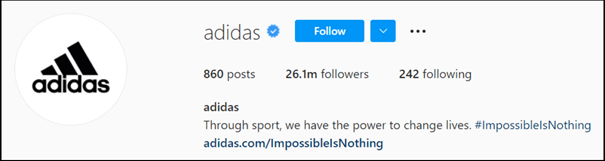
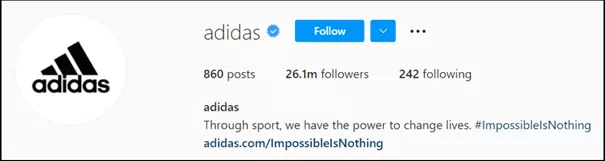
Big brands tend not to waste words. For example, adidas can get away with a single sentence, a hashtag, and a link. No further information required.
Short and explanatory
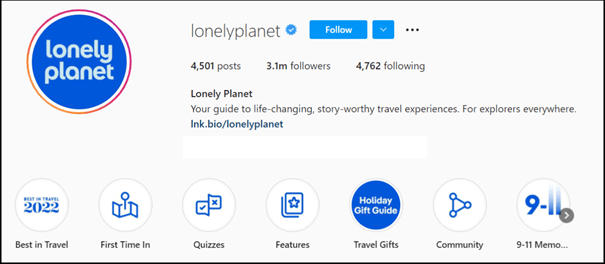
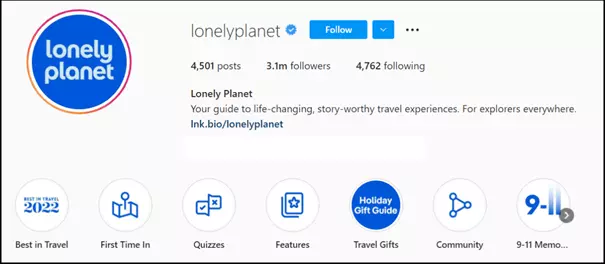
An Instagram bio is ideal for relaying your mission to visitors. Travel publisher Lonely Planet summarises corporate philosophy and services in two sentences. Story highlights of features, FAQs, and community building are well-used.
The IONOS Website Builder provides intuitive website creation, multiple designs, and templates, and your personal or business domain plus SSL and email inbox.
Original, personal, arty
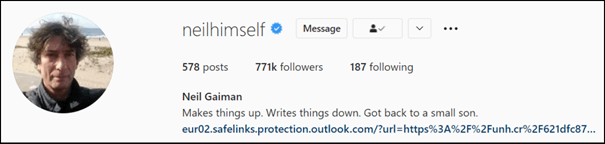
There’s greater scope for fun phrasing on an Instagram artist profile. The Instagram bio of successful author Neil Gaiman, for example, is British, laconic, informative, and personal.

Informative and visitor-friendly
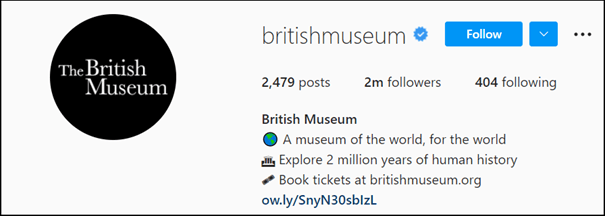
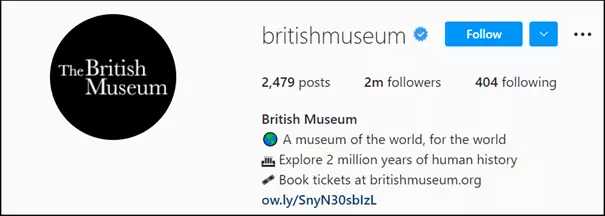
Exhibition venues, concert halls, or museums make a good impression when hinting at what they’re all about and adding booking options. The British Museum Instagram bio outlines the museum’s mission by using emojis/symbols and a link for booking tickets.
Local sites that thrive on regular visitors should add their address. Restaurants, bars, and retail stores can also add opening hours.
Reach through hashtags
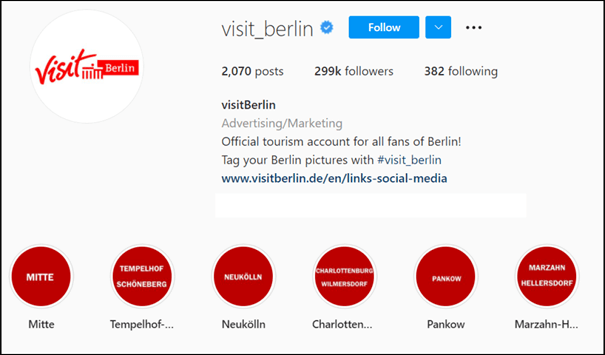
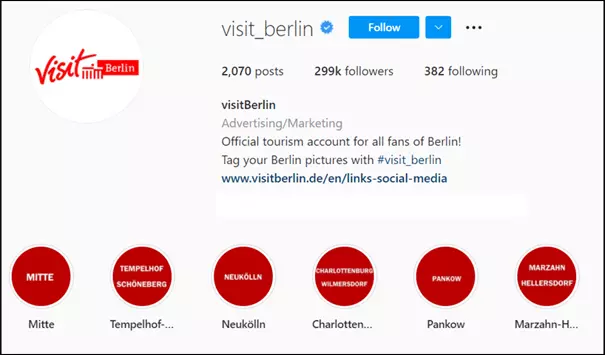
The Instagram bio of tourism portal Visit Berlin features a short description and invites people to share Visit Berlin hashtags. Story highlights are used effectively here.
Instagram is just one platform for successful social media marketing. Find out more about available Instagram alternatives and explore how to create Facebook pages for businesses, TikTok marketing, or Twitter strategies for businesses.
Templates for your Instagram bio
Don’t want to start from scratch? Use our helpful online templates. Copy them to your profile description and add your text and design. Successful examples serve as templates in a slightly modified form.
Here are three more templates for an Instagram bio to get you started.
Example 1: Focus on target group needs and USPs
A company offering specialised services or products should emphasise the benefits to their target group. A search engine optimised structure could look something like this:
- Business name/personal name + keyword
- Brief introduction/professional description/type of company
- 2-3 sentences of mission statement, USPs, and customer benefits
- Call-to-action focused on target group
- Branded or personalised hashtags
- Link to website
Example 2: Corporate mission/mission statement for lead generation
Entrepreneurs may want to boost reach by adding a short, clear mission statement with CTA for lead generation:
- Name/job + keyword
- Type of business / type of profession
- Mission statement in one sentence
- Tag profiles if you have multiple Instagram business profiles
- Use clear, branded hashtags
- Point to offers using CTAs
- Link to website/contact
Example 3: Personalised community building
Artists and influencers should use Instagram in a personalised manner to engage and grow their community:
- Artist name/personal name
- Profession/type of profession
- Original description in two to three sentences/lines
- CTA for fans and supporters
- Personalised hashtags to grow community
- Link to website/Patreon/YouTube channel, etc.