

What is HTTP?

Every website address begins with ‘http://’ (or ‘https://’). This refers to the HTTP protocol, which your web browser uses to request a website. In the following, we will introduce the concept of HTTP, explain the differences between the versions, and indicate what other concepts are related to HTTP.
What does HTTP mean?
HTTP stands for ‘Hypertext Transfer Protocol’. It was developed by Tim Berners-Lee at CERN (Switzerland) alongside other concepts that laid the basis for the world wide web, such as HTML and URI. While HTML (Hypertext Markup Language) defines the structure and layout of a website, HTTP controls how the page is transferred from the server to the client. The third concept URL (Uniform Resource Locator) defines how a resource (e.g. a website) must be addressed on the web.
So, what does the term ‘hypertext’, used in the abbreviations HTTP and HTML, actually mean? It refers to a concept we are all familiar with: linking files. Hyperlinks are placed on websites and lead to other pages.
What is the purpose of HTTP?
If you enter an internet address in your web browser and a website is displayed shortly thereafter, your browser has communicated with the web server via HTTP. Figuratively speaking, HTTP is the language your web browser uses to speak with the web server in order to inform it of a request.
How does HTTP work?
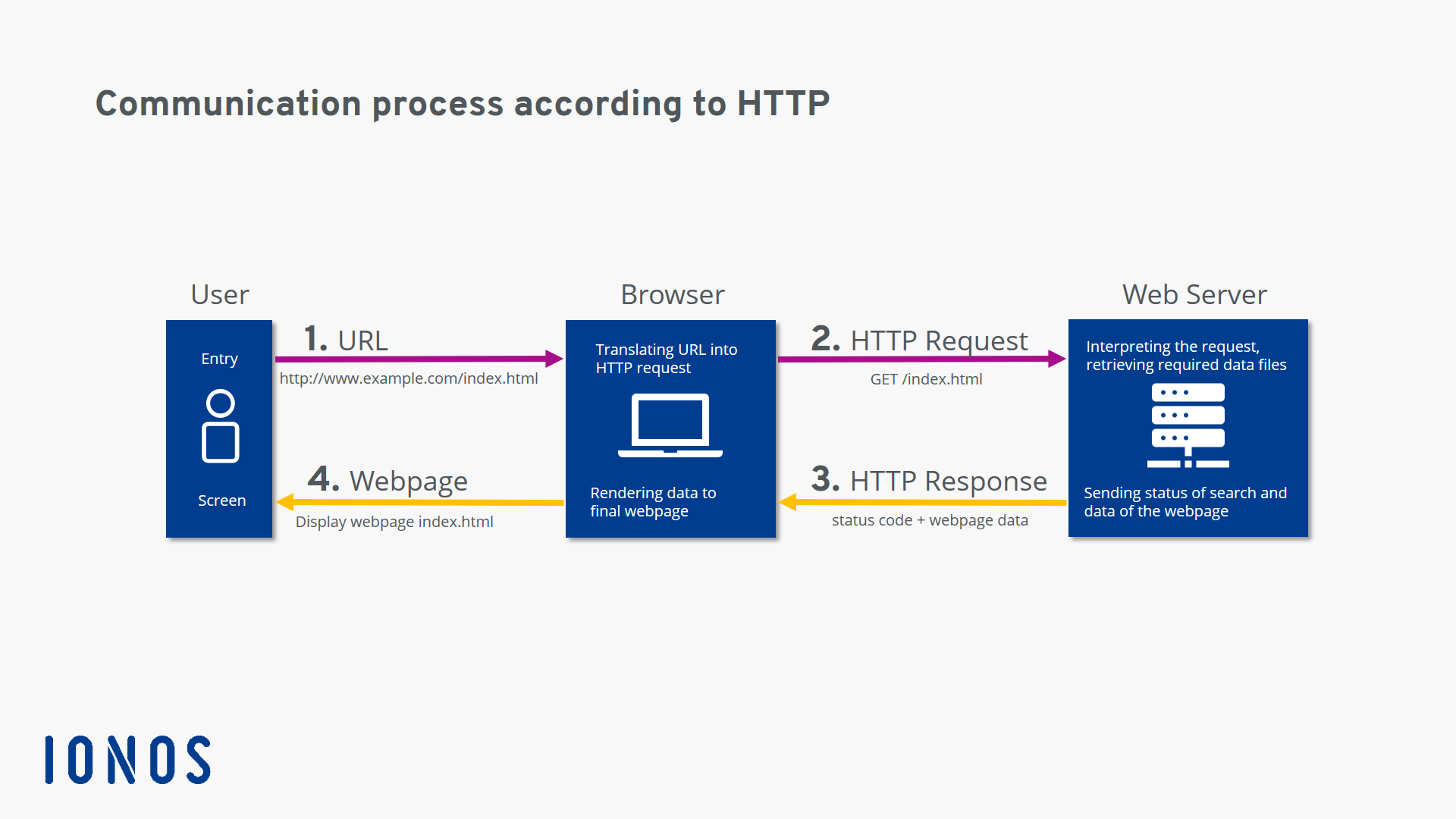
The easiest way to explain how HTTP works is by looking at an example of how a website is requested:
- The user types http://example.com/ into the address bar of their internet browser.
- The browser sends the respective request (i.e. the HTTP Request to the web server that manages the domain example.com. Usually, the request is, “Please send me the file.” Alternatively, the client can also ask, “Do you have this file?”.
- The web server receives the HTTP request, searches for the desired file (in this example, the homepage example.com, meaning the file index.html), and begins by sending back the header which informs the requesting client of the search result with a status code. You can find more information about status codes in our follow-up article.
- If the file was found and the client wants it to be sent (and did not just wish to know whether it existed), the server sends the message body after the header (i.e. the actual content). In our example, this is the file index.html.
- The browser receives the file and displays it as a website.
When is HTTP used?
Originally, HTTP was only used to request an HTML document from a web server. Today, the protocol has many different uses:
- Browsers use HTTP to request all types of media used on modern websites: text, images, videos, program code, etc.
- Application programs use HTTP to request files and updates from remote servers.
- The REST-API is a HTTP-based solution for handling web services.
- Another HTTP-based technology is WebDAV.
- HTTP is used in machine-to-machine communication as a protocol for communicating between web services.
- Media players also use HTTP.
- Databases on the web can also be accessed (i.e. CRUD operations) using HTTP.
What are the different HTTP versions?
The original version: HTTP/1
The history of HTTP began in 1989 when Tim Berners-Lee and his team at CERN developed the world wide web. The original version of HTTP was labelled version 0.9 and called the ‘One-Line Protocol’. It could only request one HTML file from a server.
GET /dummy.htmlAll the server did was send the corresponding file. Therefore, this protocol version could only handle HTML files.
In 1996, the Internet Engineering Task Force (IETF) documented version HTTP/1 in the non-binding informational memo RFC 1945. A new header was introduced which could specify both the client request and the server response more precisely. One new header introduced was the ‘content type’ header which made it possible to transfer files other than HTML files. The following is a short summary of this HTTP version’s features:
- Connectionless: The client establishes a connection to the server, sends a request, the server responds, and then the connection is terminated. For the next request, the client will have to re-establish the connection. This is inconvenient because a website usually consists of several files and each of them has to be retrieved using a separate request.
- Stateless: The two parties (i.e. the client and server) ‘forget’ about each other immediately. The next time the client logs on to the server, the server will not remember that a client previously sent a request.
- Media-independent: Any type of file can be sent via HTTP as long as both parties know how to handle the respective file type.
The first official standard: HTTP/1.1
In 1997, version HTTP/1.1 was published, as documented in the informational memo RFC 2068. It became the first official standard and is still being used today. It offered some important innovations in comparison to HTTP/1:
- Keepalive: The client can keep a connection from a request open (i.e. a persistent connection) by sending a keepalive in the header of the request.
- HTTP pipelining allows the client to send another request before it has received a response to the first one.
- In chats, the browser can update the browser window using the MIME type multipart/replace.
- Data can also be sent from the client to the server.
- The newly introduced TRACE method allows you to trace the path from the client to the web server.
- Cache: There are new mechanisms for caching content.
- Host: An HTTP request will work due to a given specification in the header (i.e. host) even if several different domains are hosted under a single IP address, as is the case with the majority of websites today (i.e. shared web hosting).
An urgently needed update: HTTP/2
Over the years, websites have become larger and more complex. To load a modern website in your browser, the browser will need to request several megabytes of data and send up to several hundred HTTP requests. Since HTTP/1.1 requires requests over a connection to be processed one after the other, the more complex the website is, the longer it will take to load the page.
In response, Google developed a new experimental protocol called SPDY (pronounced ‘speedy’). This was met with great interest by the developer community and finally led to the release of the protocol version HTTP/2 in 2015. This new standard introduced the following non-comprehensive list of innovations, all of which are intended to speed up the loading time of websites:
- Binary: The protocol is based on binary data instead of text files.
- Multiplexing: The client and server can send or process several HTTP requests at the same time.
- Compression: The headers are compressed. Since headers are often almost identical in many HTTP requests, compressing them eliminates unnecessary redundancy.
- Server push: If the server already knows what data the client will require, it can send it to a client cache by itself without having received a previous HTTP request.
HTTP/2 was able to establish itself quickly, particularly with websites with a lot of traffic which switched over shortly. According to W3Techs, currently (as of January 2020) around 42% of websites use HTTP/2.
For more detailed information on HTTP/2, check out the article ’How HTTP/2 optimises the world wide web’.
The future: HTTP/3
A weak point of all the previous HTTP versions has been the underlying transport protocol TCP. This protocol requires the recipient to confirm each data packet before the next one can be sent. If a single data packet is lost, all the other packets have to wait for the lost one to be sent again. Experts refer to this as head-of-line blocking.
The new HTTP/3 will, therefore, no longer be based on TCP but rather on UDP which does not require any corrective measures for this kind of situation. The QUIC protocol (Quick UDP Internet Connections) was developed based on UDP as the foundation for HTTP/3.
HTTP/3 has not yet been definitively adopted by the IETF. Nevertheless, almost 3% of websites already use QUIC or HTTP/3 according to W3Techs.
Reviewer

Julia Hertler
With over 18 years of experience in content marketing, Julia Hertler has deep expertise in digital communications. For the past 10 years, she has specialised in the areas of domains and hosting at the IONOS Digital Guide, making complex technical topics easy to understand.