

NGINX vs. Apache

The first version of the Apache HTTP server appeared in 1995. Today, more than 20 years later, the software continues to reign as the king of web servers – but not without competition. In particular, the Russian web server NGINX (pronounced “Engine-X”), also an open source project, is gaining market share – and at breakneck speed. What’s most harmful for the Apache Foundation: Most of the websites that do well in the Alexa rankings today are already delivered via NGINX. You can see regularly-updated web server usage statistics from W3Techs. It’s not just Russian internet giants, such as the search engines Ramblex and Yandex, the e-mail service Mail.RU, or the social network VK that rely on the lightweight web server; international providers such as Dropbox, Netflix, WordPress, and FastMail.com also use NGINX to improve the performance of their services. Will the Apache HTTP server be outdated soon?
The Apache HTTP server is a software project operated under the sponsorship of the Apache Foundation. In the economic terms of the internet community, the name of web server is usually shortened to just “Apache”. We will also follow this convention: In the following guide, “Apache” will be used to mean the software, not the manufacturer.
The challenge of Web 2.0
Owen Garrett, Head of Products at Nginx, Inc., describes the Apache web server in a blog post from October 9, 2015 as the “backbone” of Web 1.0 and emphasises its significance for the development of the internet around the turn of the millennium. The large success of the web server is primarily attributed to the simple architecture of the software. However, this is based on design decisions that correspond to a World Wide Web that can’t be compared with today’s decisions. Twenty years ago, websites were considerably more simply built, bandwidth was limited and expensive, and CPU computing time was comparatively cheap.
Today we’re dealing with a second-generation World Wide Web, which is shown from a completely different angle: The number of users and web traffic worldwide have multiplied. The same goes for the average size of websites on the internet and the number of components that a web browser needs to query and render to be able to present them. An increasing portion of the internet community has grown up with the possibilities of Web 2.0 since childhood. This user group is not familiar with waiting multiple seconds or even minutes for a website to download.
These developments have repeatedly posed challenges to the Apache HTTP server in recent years. Owen Garrett blames the process-based architecture of Apache for this, as it can’t be scaled well in view of the rapidly increasing traffic volume. This difficulty was one of the main motivations for the development of NGINX in 2002, which takes a completely different approach with its event-driven architecture. NGINX traces back to the Russian software developer Igor Sysoev who designed the software, which is used as a web server, reverse proxy and e-mail proxy, especially for the needs of the Russian search engine Rambler.
We compare the two web servers side by side and look at their architectural differences, configuration, and extension options, as well as compatibility, documentation, and support.
Architectural differences
The web servers Apache and NGINX are based on fundamentally different software architectures. Varying concepts are found in regard to connection management, configuration, the interpretation of client requests, and the handling of static and dynamic web content.
Connection management
The open source web servers Apache and NGINX differ essentially in how they handle incoming client requests. While Apache runs on a process-based architecture, connection management with NGINX follows an event-driven processing algorithm. This makes it possible to handle requests resource-efficiently, even if they’re received from a large number of connections at the same time. This is cited – by the NGINX developers, among others – as a big advantage over the Apache HTTP server. And from version 2.4 onwards, it also offers the possibility of implementing events. The differences, therefore, are in the details.
The Apache web server follows an approach where each client request is handled by a separate process or thread. With single-threading – the original operating mode of the Apache HTTP server – this is associated with I/O blocking problems sooner or later: Processes that require read or write operations are executed in strict succession. A subsequent request will remain in the queue until the previous one has been answered. This can be avoided by starting several single-threading processes at the same time – a strategy associated with high resource consumption.
Alternatively, multi-threading mechanisms are used. As opposed to single-threading, where only one thread is available to answer client requests for each process, multi-threading offers the possibility to run multiple threads in the same process. Since Linux threads require fewer resources than processes, multi-threading provides the ability to compensate for the large resource requirements of the process-driven architecture of the Apache HTTP server.
Integration of mechanisms for parallel processing of client requests with Apache can be done using one of three multi-processing modules (MPMs): mpm_prefork, mpm_worker, mpm_event.
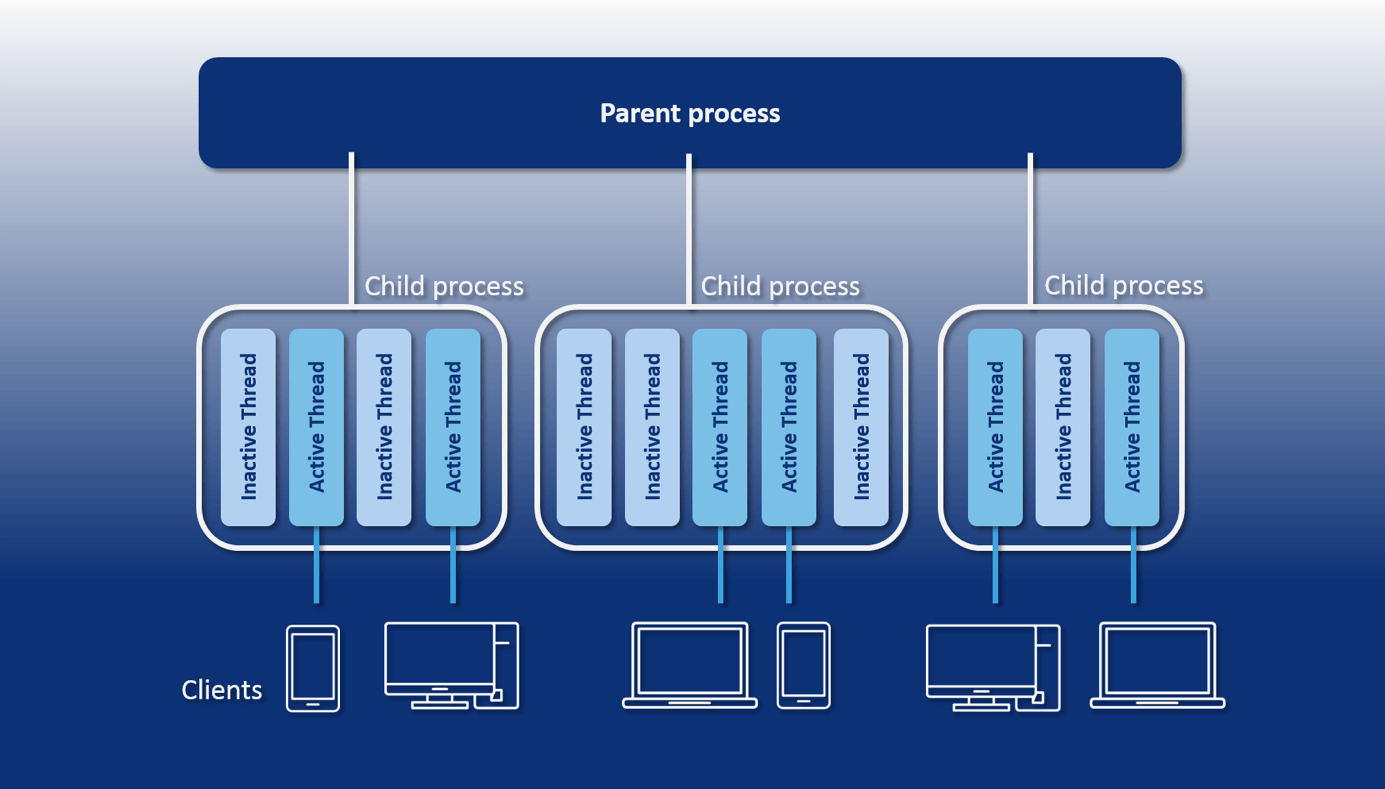
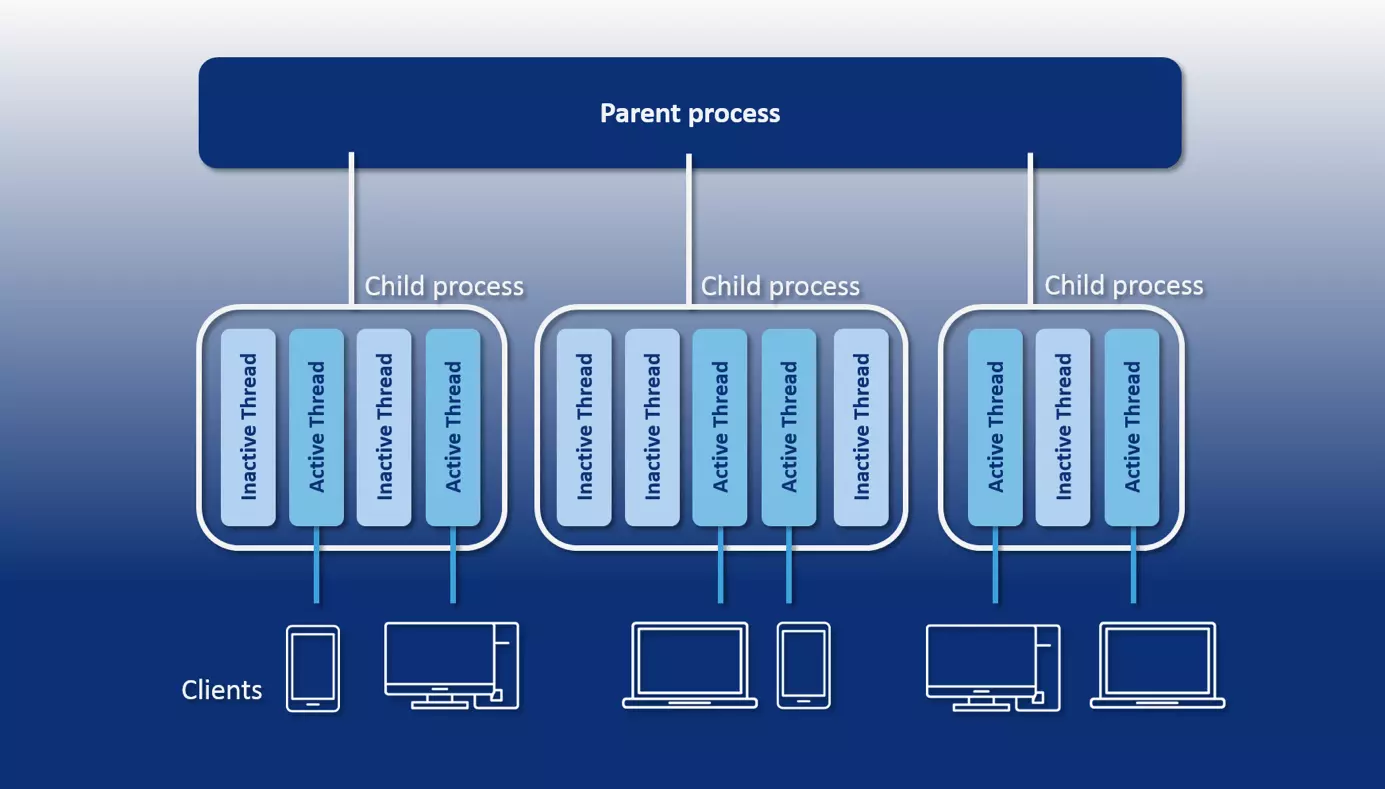
- mpm_prefork: The Apache module “prefork” offers a multi-process management on the basis of a single-threading mechanism. The module creates a parent process with an available supply of child processes. A thread runs in each child process that allows you to answer one client request at a time. As long as more single-thread processes are present than incoming client requests, the requests are processed simultaneously. The number of available single-threading processes are defined using the server configuration options “MinSpareServers” and “MaxSpareServers”. Prefork contains the performance drawbacks of single-threading that are mentioned above. One benefit, though, is the extensive independence of the separate processes: If a connection is lost due to a faulty process, it generally won’t affect the connections being handled in the other processes.
- mpm_worker: With the “worker” module, Apache users have an available multi-threading mechanism for parallel processing of client requests. How many threads can be started per process is defined using the server configuration option “ThreadsPerChild”. The module provides one thread for each TCP connection. As long as there are more threads available than incoming client requests, the requests are processed in parallel. The parent process (httpd) watches over idle threads.
The commands “MinSpareThreads” and “MaxSpareThreads” are available for users to define at which number of idle threads new threads will be created or running threads will be removed from the memory. The worker module has a much lower resource requirement than the prefork module. But since connections aren’t handled in separate processes, a faulty thread can affect all connections being processed in the same multi-thread process. Like prefork, worker is also susceptible to overload caused by so-called keep-alive connections (see below).
- mpm_event: With event, the Apache HTTP server has had a third multi-processing module available for productive use since version 2.4. This presents a variant of the worker module that distributes the workload between started threads. A listener thread is used for each multi-threading process which receives incoming client requests and distributes related tasks to worker threads.
The event module was developed to optimise contact with keep-alive connections, i.e. TCP connections that are maintained to allow the transfer of further client requests or server responses. If the classic worker module is used, worker threads usually maintain connections that have been established once and so become blocked – even if no further requests are received. This can lead to an overload of the server with a high number of keep-alive connections. The event module, on the other hand, outsources the maintenance of keep-alive connections to the independent listener thread. Then, worker threads are no longer blocked and are available to process further requests.
The following graphic shows a schematic representation of the process-based architecture of the Apache web server using a worker module:
Depending on which module is used, Apache solves the concurrency problem (the simultaneous answer of multiple client requests) by adding either additional processes or threads. Both solution strategies involve additional resource expense. This becomes a limiting factor for the scaling of an Apache server.
The enormous resource appetite of the one-process-per-connection approach results from the fact that a separate runtime environment must be provided for each additional process. This requires the allocation of CPU time and separate storage. Each Apache module that’s available to a worker process also has to be loaded separately for each process. Threads, on the other hand, share an execution environment (the program) and address space in the memory. The overhead of additional threads is therefore considerably less than that of processes. But multi-threading is computation-intensive, too, when context switches are used.
A context switch means the process of switching from one process or thread to another in a system. To do this, the context of the terminated process or thread must be saved and the context of the new process or thread must be created or restored. This is a time-intensive administrative process, in which the CPU register as well as various tables and lists need to be loaded and saved.
The mpm_event module has an event mechanism available for the Apache HTTP server that transfers the processing of an incoming connection to a listener thread. This makes it possible to terminate connections that are no longer required (including keep-alive connections) and so reduce resource consumption. This doesn’t solve the problem of computation-intensive context change that occurs when the listener thread passes requests to separate worker threads via its held connections, though.
By contrast, NGINX’s event-based architecture realises concurrency without requiring an additional process or threat for each new connection. A single NGINX process can handle thousands of HTTP connections at the same time. This is achieved by means of a loop mechanism called the event loop. This makes it possible to asynchronously process client requests within a threat.
Theoretically, NGINX only uses one single-threading process when processing connections. To optimally utilise the hardware, though, the web server is usually started with one work process per processor core (CPU) of the underlying machine.
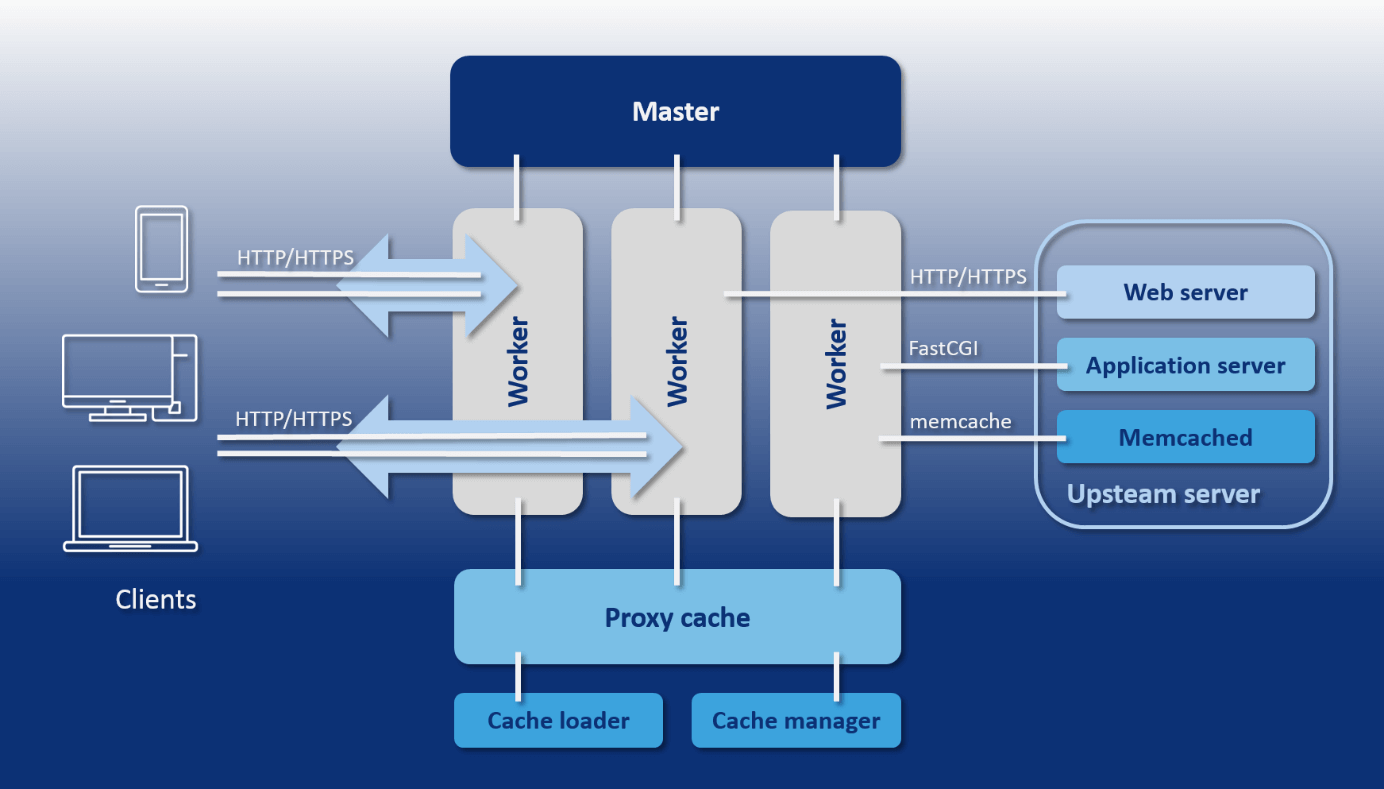
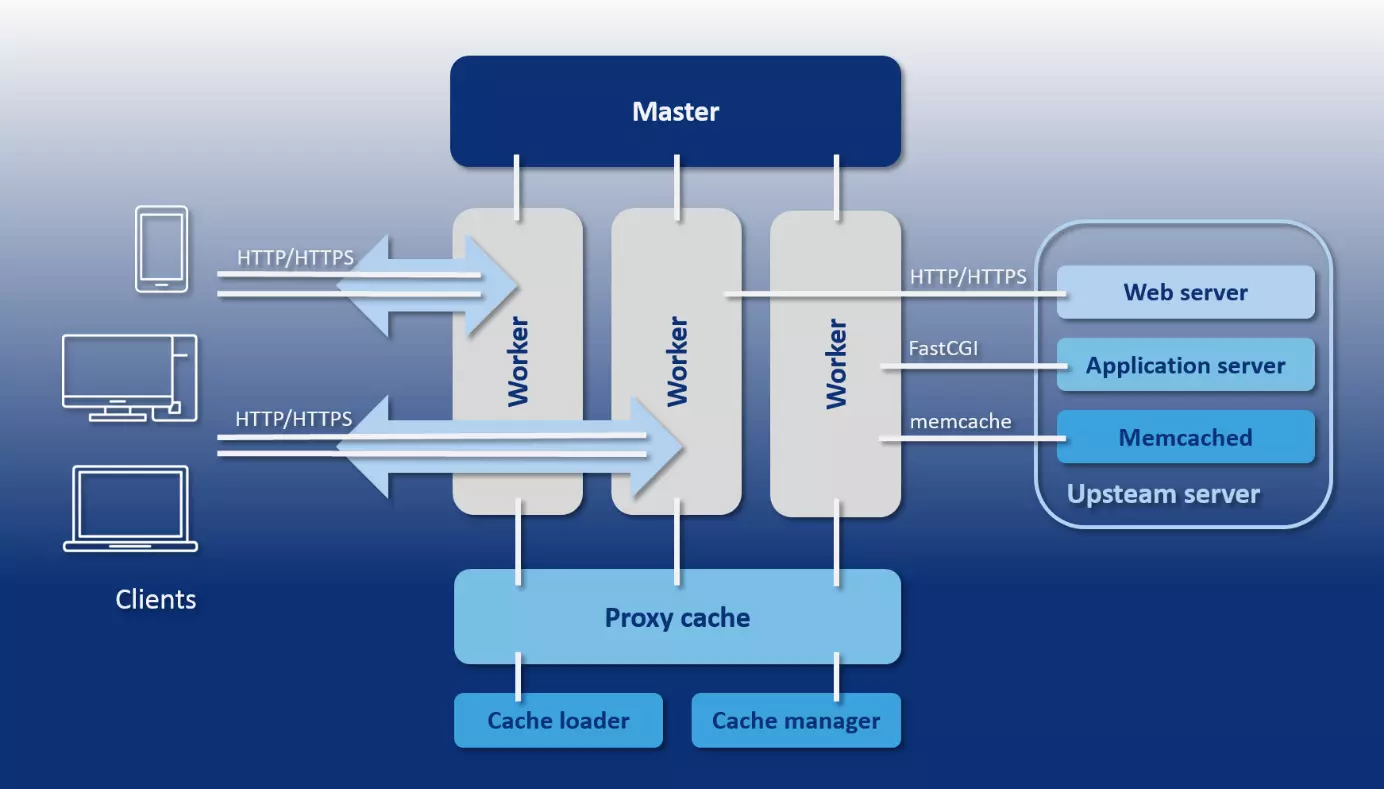
As opposed to the Apache web server, where the number of active processes or threads is only limited using minimum and maximum values, NGINX offers a predictable process model that’s precisely tailoured to the underlying hardware. This includes a master process, the cache loader and cache manager helper processes, as well as a number of worker processes tailoured to the number of processor cores precisely defined by the configuration.
- Master process: The master process is a parent process that performs all basic operations. These include, among others, importing the server configuration, port binding, and creating all following process types.
- Helper processes: NGINX uses two helper processes for cache management: cache loader and cache manager.
- Cache loader: The cache loader is responsible for loading the hard drive-based cache into the memory.
- Cache manager: The task of the cache manager is to make sure that entries from the hard drive cache have the preconfigured size, and to trim them if necessary. This process occurs periodically.
- Worker process: Worker processes are responsible for processing connections, read and write access to the hard drive, and communication with upstream servers (servers that provide services to other servers). This means that these are the only processes in the NGINX process model that are continuously active.
The following graphic is a schematic representation of the NGINX process model:
All worker processes started by the NGINX master process during configuration share a set of listener sockets. Instead of starting a new process of thread for each incoming connection, an event loop is run in every worker process that enables the asynchronous handling of thousands of connections within one thread without blocking the process. To do this, the worker processes at the listener sockets continuously listen for events triggered by incoming connections, accept them, and execute read and write processes on the socket during the processing of HTTP requests.
NGINX doesn’t have its own mechanism available for the distribution of connections to worker processes. Instead, core functions of the operating system are used. Schemes on how to handle incoming requests are provided by separate state machines for HTTP, raw TCP, SMTP, IMAP, and POP3.
In general, NGINX can be described as an event handler which receives information about events from the core and tells the operating system how to handle the associated tasks. The asynchronous processing of tasks with the event loop is based on even notifications, callbacks, and timers. These mechanisms make it possible for a worker process to delegate one operation after the other to the operating system without having to wait idly for the result of an operation or for client programs to respond. NGINX functions as an orchestrator for the operating system, and takes over the reading and writing of bytes.
This type of connection management only creates a minimal overhead for additional connections. All that’s needed is an additional file descriptor (FD) and a minimum of extra memory in the worker process. Computation-intensive context switches, on the other hand, only occur if no further events occur within an event loop. This efficiency in the processing of requests over a variety of connections makes NGINX the ideal load distributor for highly frequented websites such as WordPress.com.
With its event-driven architecture, NGINX offers an alternative to the process-based connection management of the Apache HTTP server. But this isn’t enough to explain why NGINX performs so well in benchmark tests. Apache, since version 2.4, also supports an event-based processing mechanism for client requests. When comparing web servers, such as Apache vs. NGINX, always pay attention to which modules the web servers are used with in the test, how they’re configured, and which tasks have to be mastered.
Dealings with static and dynamic web content
When it comes to dynamic web content, NGINX also follows a different strategy than the Apache HTTP server.
In principle: To be able to deliver dynamic content, a web server needs to have access to an interpreter that’s capable of processing a required programming language, such as PHP, Perl, Python, or Ruby. Apache has various modules available, including mod_php, mod_perl, mod_python, or mod_ruby, which make it possible to load the corresponding interpreter directly into the web server. As a result, Apache itself is equipped with the ability to process dynamic web content created with the corresponding programming language. Functions for the preparation of static content are already implemented with the above-mentioned MPM module.
NGINX, on the other hand, only offers mechanisms for delivering static web content. The preparation of dynamic content is outsourced to a specialised application server. In this case, NGINX only functions as a proxy between the client program and upstream server. The communication takes place via protocols like HTTP, FastCGI, SCGI, uWSGI, and Memcached. Possible application servers for delivering dynamic content are offered by WebSphere, JBoss, or Tomcat. The Apache HTTP server can also be used for this purpose.
Both strategies for delivering static and dynamic content come with their benefits and drawbacks. A module like mod_php allows the web server to execute PHP code itself. A separate application server isn’t needed. This makes the administration of dynamic website very simple. But the interpreter modules for dynamic programming languages have to be loaded separately into each worker process that’s responsible for delivering content. With a large number of worker processes, this is associated with a significant overhead. This overhead is reduced by NGINX, since the outsourced interpreter is only called upon when required.
While NGINX is set to interact with an outsourced interpreter, Apache users can choose either of these two strategies. Apache can also be placed in front of an application server that’s used to interpret dynamic web content. Usually, the protocol FastCGI is used for this. A corresponding interface can be loaded with the module mod_proxy_fcgi.
With both web servers in our comparison, dynamic content is delivered. But while Apache interprets and executes program code itself using modules, NGINX outsources this step to an external application server.
Interpretation of client requests
To be able to satisfactorily answer requests from client programs (for example, web browsers or e-mail programs), a server needs to determine which resource is requested and where it’s found based on the request.
The Apache HTTP server was designed as a web server. On the other hand, NGINX offers web as well as proxy server functions. This difference in focus is reflected in the way that the software interprets client requests and allocated resources on the server.
The Apache HTTP server can also be set up as a proxy server with the help of the mod_proxy module.
Apache HTTP server and NGINX both have mechanisms that allow incoming requests to either be interpreted as physical resources in the file system or as URIs (Uniform Resource Indentifier). But while Apache works based on files by default, URI-based request processing is more prominent with NGINX.
If the Apache HTTP server receives a client request, it assumes by default that a particular resource is to be retrieved from the server’s file system. Since Apache uses VirtualHosts to provide different web content on the same server under different host names, IP addresses, or port numbers, it must first determine which VirtualHost the request is referring to. To do this, the web server matches the host name, IP address, and port number at the beginning of the request URI with the VirtualHosts defined in the main configuration file httpd.conf.
The following code example shows an Apache configuration where the two domains www.example.com and www.other-example.com are operated under the same IP address:
NameVirtualHost *:80
<VirtualHost *:80>
ServerName www.example.com
ServerAlias example.com *.example.com
DocumentRoot /data/www/example
</VirtualHost>
<VirtualHost *:80>
ServerName www.other-example.com
DocumentRoot /data/www/other-example
</VirtualHost>
The asterisk (*) serves as a placeholder for an IP address. Apache decides which DocumentRoot (the starting directory of a web project) the requested resource will be searched in by comparing the host name contained in the request with the ServerName directive.
If Apache finds the desired server, then the request URI is mapped to the file system of the server by default. Apache uses the path specification contained in the URI for this. In combination with the DocumentRoot, this amounts to the resource path.
For a request with the request URI "http://www.example.org:80/public_html/images/logo.gif", Apache would search for the desired resource under the following file path (based on the example above):
/data/www/example/public_html/images/logo.gifSince the standard port for HTTP is 80, this specification is usually left out.
Apache also matches the request URI with optional file and directory blocks in the configuration. This makes it possible to define special instructions for requests that lead to the selected files or directories (including subdirectories).
In the following example, special instructions are defined for the directory public_html/images and the file private.html:
<VirtualHost *:80>
    ServerName www.example.com
    ServerAlias example.com *.example.com
    DocumentRoot /data/www/example
      <Directory var/www/example.com/public_html/images>
          Order Allow,Deny
          Allow from all
     </Directory>
      <Files public.html>
          Order Allow,Deny
          Deny from all
      </Files>
</VirtualHost>
In addition to this standard procedure for interpreting client requests, Apache offers the alias directive, which allows you to specify an alternate directory to search for the requested resource instead of the DocumentRoot. With mod_rewrite, the Apache HTTP server also provides a module that allows users to rewrite or forward URLs.
Find out more about the server module mod_rewrite in our basics article on the topic rewrite engine.
If you want Apache to retrieve resources that are stored outside of the server’s file system, use the location directive. This allows the definition of instructions for specific URIs.
What represents the exception for Apache is the standard case for NGINX. First, NGINX parses the request URI and matches it with server and location blocks in the web server configuration. Only then (if necessary) does a mapping to the file system and combination with the root (comparable to the DocumentRoot of the Apache server) take place.
Using the server directive, NGINX determines which host is responsible for answering the client request. The server block corresponds to a VirtualHost in the Apache configuration. To do this, the host name, IP address, and port number of the request URI are matched with all server blocks defined in the web server configuration. The following code example shows three server blocks within the NGINX configuration file nginx.conf:
server {
    listen 80;
    server_name example.org www.example.org;
    ...
}
server {
    listen 80;
    server_name example.net www.example.net;
    ...
}
server {
    listen 80;
    server_name example.com www.example.com;
    ...
}Each server block usually contains a row of location blocks. In the current example, these are replaced with the placeholder (…).
The request URI isn’t matched with the location blocks within a server block until the requested server has been found. For this, NGINX reads the specified location blocks and searches for the location that best matches the request URI. Each location block contains specific instructions that tell NGINX how the corresponding request is to be processed.
Locations can be set to be interpreted as a prefix for a path, as an exact match, or as a regular expression (RegEx). In the syntax of the server configuration, the following modifiers are used:
| No modifier | The location is interpreted as a prefix. All requests whose URIs have the prefix defined in the location directive are considered a match with the location. If no specific location is found, the request is processed according to the information in the location block. |
| = | The location is interpreted as an exact match. All requests whose URIs match exactly with the string specified in the location directive are processed according to the information in the location block. |
| ~ | The location is interpreted as a regular expression. All requests whose URIs match the regular expression are processed according to the information in the location block. Upper- and lower-case letters are evaluated for the match (case-sensitive). |
| ~* | The location is interpreted as a regular expression. All requests whose URIs match the regular expression are processed according to the information in the location block. Upper- and lower-case letters are not evaluated for the match (case-insensitive). |
The following example shows three location blocks which display how the information for the domains 'example.org' and 'www.example.org' are to be processed:
server {
    listen 80;
    server_name example.org www.example.org;
    root /data/www;
    location / {
        index index.html index.php;
    }
    location ~* \.(gif|jpg|png)$ {
        expires 30d;
    }
location ~ \.php$ {
        fastcgi_pass localhost:9000;
        fastcgi_param SCRIPT_FILENAME $document_root$fastcgi_script_name;
        include fastcgi_params;
    }
Based on a client request with the request URI 'http://www.example.org:80/logo.gif', NGINX would proceed as follows to interpret the requests and deliver the desired resource:
http://www.example.org:80/logo.gif
http://www.example.org:80/index.php
First, NGINX determines the specific prefix location. To do this, the web server reads all locations with modifiers in sequence and stops at the first location that matches the request. Then all locations are read out that are marked with the RegEx modifier (~). The first match is also used here. If no matching RegEx location is found, then the web server uses the previously determined prefix location as a fallback.
The request URI 'http://www.example.org:80/logo.gif' matches, for example, with the prefix location / as well as with the regular expression \.(gif|jpg|png)$. NGINX would therefore map the request in combination with the root to the file path /data/www/logo.gif and deliver the corresponding resource to the client. The expired header indicates when an answer is considered obsolete – in the current example, it’s after 30 days: expires 30d.
The request for the PHP page with the URI 'http://www.example.org:80/index.php' also matches the prefix location / and the RegEx location ~ \.php$, which receives preferential treatment. NGINX forwards the request to a FastCGI server that listens on localhost:9000 and is responsible for the processing of dynamic web content. The fastcgi_param directive sets the FastCGI parameter SCRIPT_FILENAME to /data/www/index.php. Then the file is run on the upstream server. The variable $document_root corresponds to the root directive, and the variable $fastcgi_script_name corresponds to the part of the URI that follows the host name and port number: /index.php.
This seemingly complicated procedure for interpreting client requests is due to the different fields of application in which NGINX is used. As opposed to the primarily file-based approach of the Apache HTTP server, the URI-based request interpretation enables more flexibility with the processing of different request patterns. This is required, for example, when NGINX is being run as a proxy or mail-proxy server instead of as a web server.
Apache is mainly used as a web server, and interprets client requests with a primarily file-based method. NGINX, on the other hand, works with URIs by default and so is also suited to other request patterns.
Configuration
NGINX is said to have a tremendous speed advantage over the Apache HTTP server when it comes to delivering static web content. This is partly due to difference in configuration. In addition to the main configuration file httpd.conf, the Apache web server gives administrators the option of directory-level management. This uses .htaccess files. In principle, these decentralised configuration files can be implemented in any server directory that you want. Instructions, which are defined in an .htaccess, indicate which directory the configuration file contains as well as its subdirectories. In practice, .htaccess files are used to restrict directory access to specific user groups, set up password protection, or define regulations for directory browsing, error messages, forwarding, or alternate content. Note that this can also be configured centrally in the httpd.conf file. But .htaccess becomes relevant in web hosting models such as shared hosting, where access to the main configuration file is reserved for the hosting service provider. The decentralised configuration via .htaccess makes it possible to allow users to permit administration for particular areas of the server file system – for example, for selected project directories – without giving access to the main configuration. Changes also take effect immediately without requiring a restart. NGINX, on the other hand, only offers central configuration possibilities. All instructions are defined in the nginx.conf file. With access to this file, a user gains control over the entire server. In contrast to apache, the administrative access is not limited to selected directories. This has advantages as well as disadvantages. The central configuration of NGINX is less flexible than the concept used by the Apache HTTP server, but it offers a clear security advantage: Changes to the configuration of the web server can only be made by users who are given root permissions. More important than the security argument, though, is the performance disadvantage of using a decentralised configuration via .htaccess. The developer has already recommended in the Apache HTTP server documentation refraining from using .htaccess if access to httpd.conf is possible. The reason for this is the procedure that Apache uses to read and interpret configuration files. As previously mentioned, Apache follows a file-based scheme for answering client requests by default. Since the Apache architecture allows a decentralised configuration, the web server searches through every directory along the file path on the way to the requested resource for an .htaccess file. All configuration files that it passes are read and interpreted – a process that significantly slows down the web server.
In principle, Apache administrators are free to choose whether to use the decentralised configuration options of the web server and accept the associated advantages and disadvantages. In the documentation, the developer stresses that all .htaccess configurations can also be undertaken in the main configuration httpd.conf using directory blocks.
Users who want to disable or limit the decentralised configuration on Apache can use the directive AllowOverride in the directory blocks of the main configuration file httpd.conf and set them to None. This allows the web server to ignore all .htaccess files in the corresponding configured directories.
<VirtualHost *:80>
    ServerName example.com;
    ...
    DocumentRoot /data/www/example
      <Directory /data/www/example>
        AllowOverride None
        ...
      </Directory>
    ...
</VirtualHost>
The example configuration indicates to the web server that all .htaccess files for the host example.com should be ignored.
As opposed to NGINX, which is only centrally configured, Apache offers the option with .htaccess for decentralised, directory-based configuration. If .htaccess files are used, however, the web server loses speed.
Extension possibilities
Both web servers in our comparison run on a modular system in which the core system can be extended with additional components as needed. Up to version 1.9.10, though, NGINX pursued a fundamentally different strategy for dealing with modules than the competing product. The Apache HTTP server has two available options for extending the core software. Modules can either be compiled into the Apache binary files during development or they can be loaded dynamically during runtime. There are three categories of Apache modules:
- Basic modules: The Apache basic modules include all components that provide the core functionalities of the web server.
- Extension modules: These extensions are modules of the Apache Foundation that are included as part of the Apache distribution. An overview of all modules contained in the Apache 2.4 standard installation is available in the Apache documentation.
- Third-party modules: These modules are not from the Apache Foundation, but instead provided by external service providers or independent programmers.
NGINX, on the other hand, limited the modularity for a long time to static extension components that had to be compiled into the binary file of the software core. This type of software extension significantly restricted the flexibility of the web server, especially for users who weren’t used to managing their own software components without the package manager of the respective distribution. The development team made massive improvements in this respect: Since version 1.9.11 (Release 09 Feb 2016), NGINX supports mechanisms that make it possible to convert static modules to dynamic so that they can be loaded via the configuration file during runtime. In both cases, the module API of the server is used. Please note that not all NGINX modules can be converted into dynamic modules. Modules that patch the source code of the server software shouldn’t by dynamically loaded. NGINX also limits by default the number of dynamic modules that can be loaded at the same time to 128. To increase this limit, set the NGX_MAX_DYNAMIC_MODULES constant to the desired value in the NGINX source code. In addition to the official modules of the NGINX documentation, various third-party modules are available to users.
Both web servers can be modularly extended. Dynamic modules are available as well as static modules, which can be loaded into the running program as required.
Documentation and support
Both software projects are well documented and provide users with first-hand information about wikis and blogs.
While the NGINX documentation is only available in English and Russian, the Apache project has information material in various language versions. Some of these are outdated, though, so a look at the English documentation is necessary here too. Users can get help with problems for both open source projects through the community. For this purpose, mailing lists function as discussion forums.
- Apache HTTP server: Mailing lists
- NGINX: Mailing lists
Transparent release plans and roadmaps give users the possibility to adapt for future developments. Software errors and security gaps for both projects are processed and recorded in a public bug report.
- Apache HTTP server: Bug report
- NGINX: Bug report
In addition to the NGINX open source project, Nginx, Inc. also offers the commercial product NGINX Plus. For an annual usage fee, users receive additional functions as well as professional support from the manufacturer. A comparison matrix of both programs is found on the NGINX website. A commercial edition of the Apache HTTP serve doesn’t exist. Paid support services can be obtained from various third parties, though.
Both the Apache HTTP server and NGINX are adequately documented for professional use on production systems.
Compatibility and ecosystem
The Apache HTTP server has dominated the World Wide Web for more than two decades and, due to its market share, is still considered the de facto standard for preparing web content. NGINX also has a 15-year success story to look back on. Both web servers are characterised by wide platform support. While Apache is recommended for all unix-like operating systems as well as for Windows, the NGINX documentation cites the following systems as tested: FreeBSD, Linux, Solaris, IBM AIX, HP-UX, macOS, and Windows. As a standard server, Apache features broad compatibility with third-party projects. All relevant web standards can be integrated using modules. Most players on the web are also familiar with the concepts of Apache. Administrators and web developers usually implement their first projects on affordable shared hosting platforms. These, in turn, are mostly based on Apache, and its possibility of decentralised configuration via .htaccess. The Apache HTTP server is also part of various open source program packages for development and software tests, such as XAMPP or AMPPS. A large ecosystem of modules is also available to NGINX users. In addition, the development team cultivates partnerships with various open source and proprietary software projects, as well as with infrastructure service providers such as Amazon Web Services, Windows Azure, and HP.
Both web servers are established. Users can rely on a large ecosystem. Compared to NGINX, Apache has the advantage that a large user community has input itself into the basics of the web server over the years. The fact that thousands of administrators have tested and improved the source code of the software doesn’t only speak for the security of the web server. New users also profit from the large number of experienced Apache administrators who are available to help the community with problems via forums or mailing lists.
NGINX vs. Apache: an overview of the differences
Despite their large differences in software architecture, both web servers offer similar functions. Apache and NGINX are used in comparable scenarios, but use their own strategies and concepts to meet requirements. The following table compares both software projects based on their central features and shows their similarities and differences.
| Feature | Apache | NGINX |
| Function | Web server Proxy server | Web server Proxy server Email proxy Load balancer |
| Programming language | C | C |
| Operating system | All unix-like platforms Windows | FreeBSD Linux Solaris IBM AIX HP-UX macOS Windows |
| Release | 1995 | 2002 |
| Licence | Apache Licence v2.0 | BSD licence (Berkeley Software Distribution) |
| Developer | Apache Software Foundation | Nginx, Inc. |
| Software architecture | Process-/thread-based | Event-driven |
| Concurrency | Multi-processing Multi-threading | Event loop |
| Static web content | Yes | Yes |
| Dynamic web content | Yes | No |
| Interpretation of client requests | Primarily file-based | URI-based |
| Configuration | Central configuration via httpd.conf Decentral configuration via .htaccess | Central configuration via nginx.conf |
| Extension possibilities | Static modules Dynamic modules | Static modules Dynamic modules |
| Documentation | German English Danish Spanish French Japanese Korean Portuguese Turkish Chinese | German English |
| Developer support | No | Yes (Paid via Nginx, Inc.) |
| Community support | Mailing lists Wiki | Mailing lists Wiki |
Summary
With Apache and NGINX, users have two stable, secure open source projects available to them. But after the comparison, neither of the web servers is the clear winner. Both projects are based on fundamentally different design decisions that can be either an advantage or a disadvantage, depending on how the software is used.
The Apache HTTP server offers an immense repertoire of modules which, together with the flexible configuration options, open numerous fields of application for the software. The web server can also be a standard software for shared hosting scenarios and will continue to stand its ground in its field against lightweight web servers such as NGINX. The ability to directly integrate interpreters for programming languages such as PHP, Perl, Python, or Ruby into the web server using modules allows for dynamic web content to be delivered without the use of a separate application server. This makes the Apache HTTP server a comfortable solution for small and medium-sized websites where content is dynamically created during retrieval.
NGINX, on the other hand, doesn’t offer any possibilities to natively process dynamic web content or integrate corresponding interpreters via modules. A separate application server is always required. This may seem like unnecessary extra effort for small to medium-sized websites. However, such an architecture shows its strength for large web projects and increasing traffic volumes.
In general, NGINX is used as a load balancer in front of a group of application servers. The load balancer accepts incoming requests and decides, depending on the type of request, whether it needs to be forwarded to a specialised server in the background. Static web content is delivered directly by NGINX. If a client requests dynamic content, then the load balancer gives the request to a dedicated application server. This interprets the programming language, assembles the requested content into a webpage, and gives it back to the load balancer, which delivers it to the client. In this way, high traffic volumes can effectively be managed.
NGINX caches already deliver content for a certain amount of time, so that newly requested dynamic content can be delivered directly by the load balancer without NGINX having to access an application server again.
The outsourcing of interpreters to one or multiple separate backend servers has the advantage that the server network can easily be scaled if additional backend servers need to be added, or systems that are no longer necessary can be switched off. In practice, many users rely on a combination of NGINX and Apache for such a setup, and use the strengths of both servers.