

Intelligent Search

Have you ever unsuccessfully searched for a product in an online shop? Become frustrated at a hidden or completely unhelpful search bar that offers hardly any filter options? Then you will already know from experience just how important an intelligent search and an effective search function on a website is. We explain why a search function for e-commerce offers advantages and why an intelligent search is always preferable. We also provide tips on which design features you should look out for and how you can improve a user’s experience through a search function.
A search function for your website – facts and figures
No commercial website should avoid having a search bar. It is especially essential for online shops that have many products to ensure customer satisfaction. A recent study by the University of Regensburg found that 80 percent of consumers consider a search function on a website to be ‘very important’, and also found that only 3 percent of the online shops in question did not have some sort of search function. (N.B. This study is unfortunately in German. However, there will be other surveys cited later in the article and they will be in English.)
Sadly, 3% of e-shops don't have any form of search function. This reflects the feature's positive rating even further: 80% of e-shop owners find the feature to be "very important" for a successful business.
Why offering the possibility of an intelligent search is so important
Consumers almost always know what it is that they are looking for. At the very least they will have a certain product and/or brand in mind, or a rough idea. Anyone who doesn’t know what they are looking for will ultimately not use a search bar, and instead will choose to browse through the categories. It is therefore safe to assume that visitors to an online store will view the search bar as the most important tool, as it allows them to quickly and successfully find what it is that they are looking for. For these requirements to be sufficiently met, an intelligent search function has to first be integrated and then continuously optimiszed. A simple standard search bar, which most shop and content management systems will offer, is rarely sales friendly. The problem with these is primarily the lack of error tolerance – standard search functions will often not recognisze that single and plural forms of words are often indicative of the same motive – and synonyms of the searched term will also be completely ignored. Furthermore, around 54 percent of retailers do not like that the standard search function is not an instrument for promoting sales.
On the other hand, the advantages of an intelligent search are as follows:
- Customers can find their product more quickly and efficiently
- It improves all-around usability
- An intelligent search will usually increase the conversion rate
- These three factors will also all increase the amount of returning regular customers
Setting up an intelligent search function
Implementing an intelligent search function offers many advantages for online retailers. But it is not without its flaws. Most online retailers are aware that an intelligent search function will deliver better results, but many believe that this involves a very technical integration and time-consuming configuration. To ensure good results and to take note of customer’s recommendations, regular analysis and optimisation will be necessary. This involves the registering of synonyms, as well as researching and avoiding searches that bring about no results – which 75 percent of retailers do anyway. But acquiring a better search function is often not cheap. To meet growing customer demands, take the step and install a sophisticated search function. In our Digital Guide article, we have outlined which intelligent search options are available and how to implement them into your website. Alongside several search scripts, most CMS will also offer handy plug-ins for improved searches. Alternatively, it is also possible to integrate search bars via external search operators. This is an expense that will be worth it in the long run – usability will increase and the intelligent search will mean that customers have a better user experience. And in turn, potential consumers become actual customers.
An intelligent product search function is integrated in all IONOS e-commerce packages!
What should an intelligent search be able to do?
The question is what exactly a user-friendly search has to offer in order to achieve the desired effect and to increase customer satisfaction. The central features and guidelines are:
A search bar’s error tolerance
Everyone makes a typo every now and again. It can also happen that the customer does not know the exact product description or unknowingly enters a number or letter in their search request. User experience is hugely improved if, despite making a minor mistake, they manage to find what they are looking for.
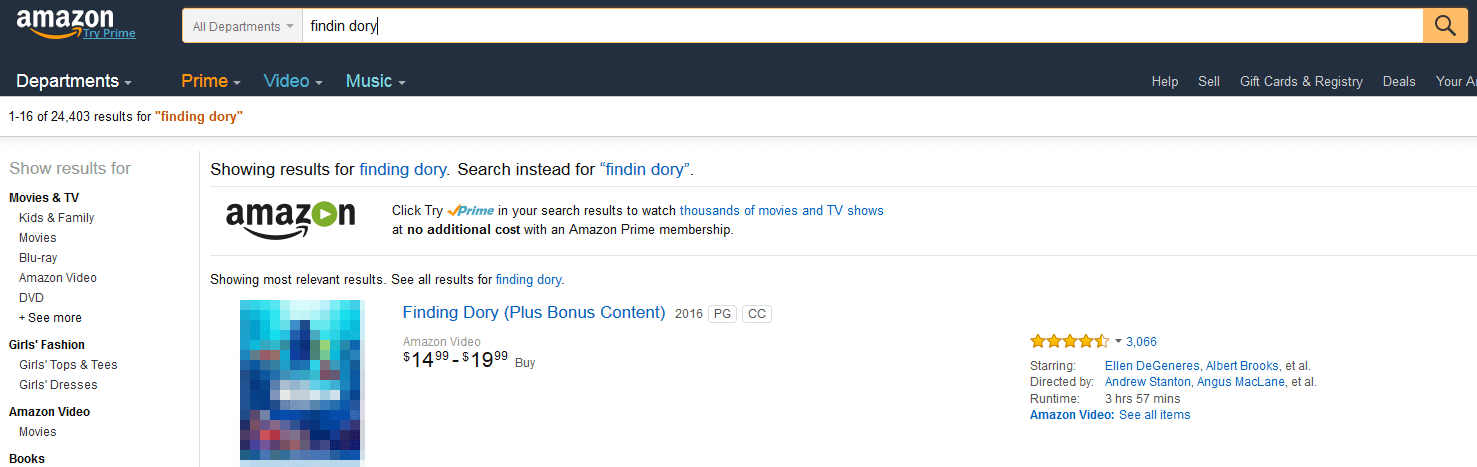
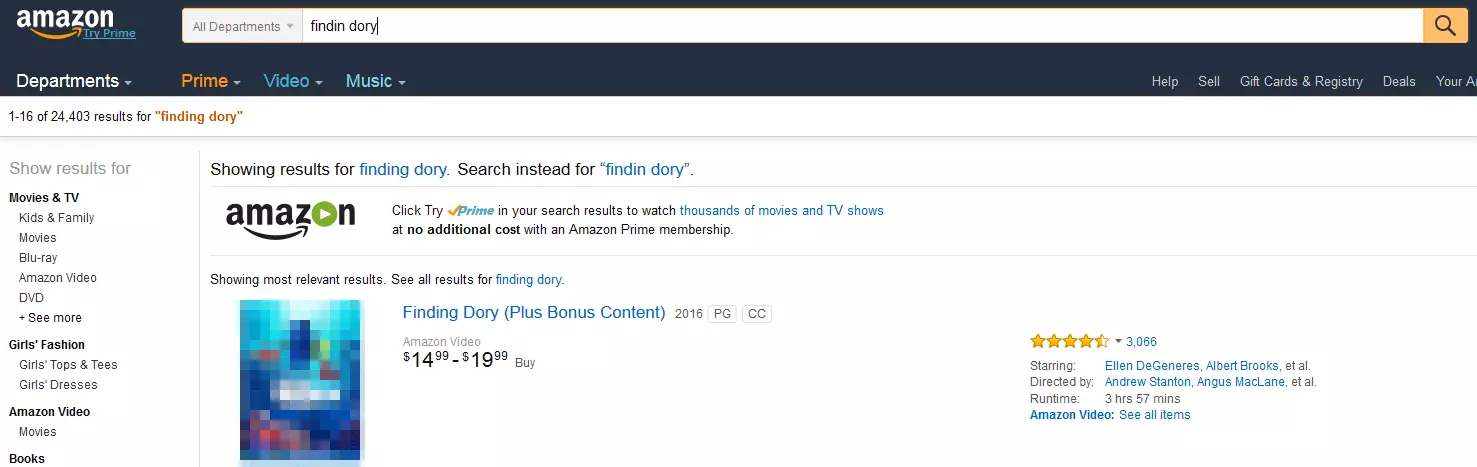
Mistakes as shown in the screenshot above can happen to even the most diehard fans of the film ‘Finding Dory‘. But thanks to the intelligent search function offered by Amazon, the customer was still brought to the page they were looking for.
Recognising synonyms, singular, and plural forms
Customers search for both ‘sweaters’ as well as ‘sweatshirts’. Both search requests refer to the same type of product and should lead to similar results. Equally important, then, is that the intelligent search can comprehend synonyms. ‘Computer games’ and ‘video games’ should lead to similar results, so that both terms lead to the same page of results. If the search function of your website does not register synonyms and plural forms then it is inevitable that a number of relevant search results will not be shown. It cannot be assumed that all consumers use the same vocabulary, so that the same terms won’t be entered in the search bar. It gets particularly problematic when it comes to searching for products that have names that vary from region to region. For example, in the USA they say ‘chips’ whereas in the UK the term is ‘crisps’. In turn, a person in the UK searching for ‘chips’ will actually be looking for what the Americans would call ‘French fries’.
Autocomplete
Minor typing errors are easily avoided if the search function already automatically offers suggestions based on the letters and/or words typed. This function is known as ‘autocomplete’. An intelligent search has the very handy feature of listing complete search terms underneath the search bar and automatically suggesting other relevant and fitting words.
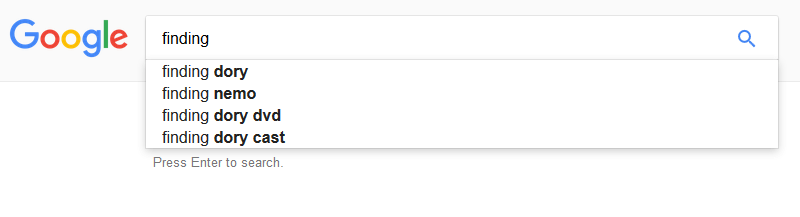
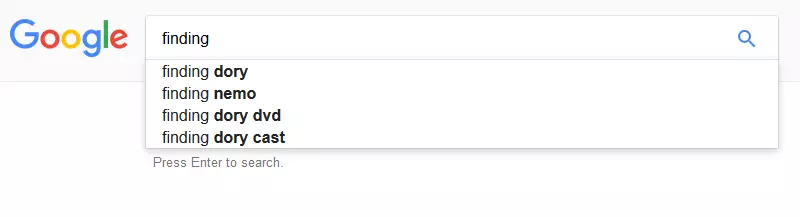
This function is practical in a number of ways. It allows you to find the actual search term quicker and also provides you with helpful, relevant search suggestions. In some cases, this makes the autocomplete feature a possible use for researching the so-called ‘snowball principle’. The above example of looking for the film ‘Finding Dory’ is offered as soon as one enters the word ‘finding’, as is the previous film in the series ‘Finding Nemo’. Another positive effect is that because longer search terms do not have to be fully typed out, the feature saves time; something which undoubtedly has a positive effect on search usability.
Offer multiple search possibilities with explanations
There are usually several possibilities for finding a particular product, and more often than not, those searching will only have limited information on a product and its exact description. Books are a good example of this. These can be found through the name of the author, the title, or even the ISBN number. But even genres, literary movements, or even eras, can also be relevant search terms.


The website BookDepository.com offers useful advice with regards to its onsite search functions. In the search box it is clearly outlined what information can be used for a search: keyword, title, author, and ISBN. This may give the user new possibilities for finding what he/she is looking for – possibilities that up until now, they may never have even considered.
Just how useful multiple search possibilities are can be seen in this example: If it is only possible to search for a title, then pupils or students, who are looking to order a book for their classes and have just taken note of the ISBN number, will not actually be able to find what it is that they are looking for. The same applies to someone, who after receiving a recommendation from a friend, only remembers the name of the author, and not the exact title of the book.
Correct placement of the search bar
The search bar can offer so many helpful functions – but if it is not visible on the website or even hard to find, then it won’t be able to contribute to the customer’s experience. In fact, it will have quite the opposite effect. For this reason, the search bar should always be very visible and immediately locatable – because nothing is more annoying than having to try and find the search function.


eBay is an example of doing it the correct way: large, central, as well as above the contents and categories – the search bar is the first thing that you see. Anyone who visits eBay’s website will usually already have a concrete idea of what they are looking for. It is features like this that can really make the difference for online shops and have an effect on the conversion rate, as well as on the customer’s overall experience.
Filters and categories of an intelligent onsite search
The eBay example leads to the next important feature. If an intelligent search offers the possibility of searching via categories and to narrow down results based on the relevant categories, then the number of redundant search results will be considerably reduced. This saves having to go through the results manually. On eBay, the corresponding menu can be found directly right of the search bar. This layout fits perfectly to the reading habits of countries in the western world: when searching in the user interface the viewer will move from left to right – beginning with the search bar, across the category menu, to the ‘Search’ button right next to it. The latter is in blue and therefore visible above all other aspects of the user interface.
Results displays with sorting options
This function should provide users with a better overview of the results of their search. It is not always the case that the product being searched for will immediately appear, meaning that the search process will be prolonged to a certain extent. When this happens, it is important that the user can sort through the results to help them find what they want more quickly.
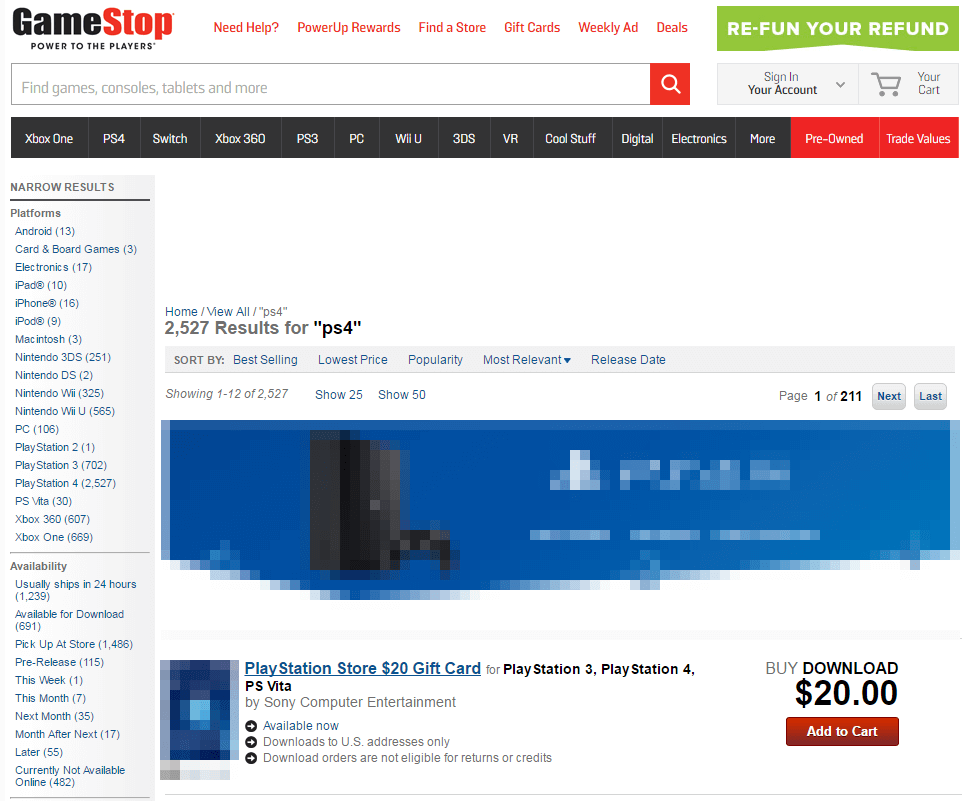
Source: https://www.gamestop.com/SearchResult/QuickSearch?q=ps4
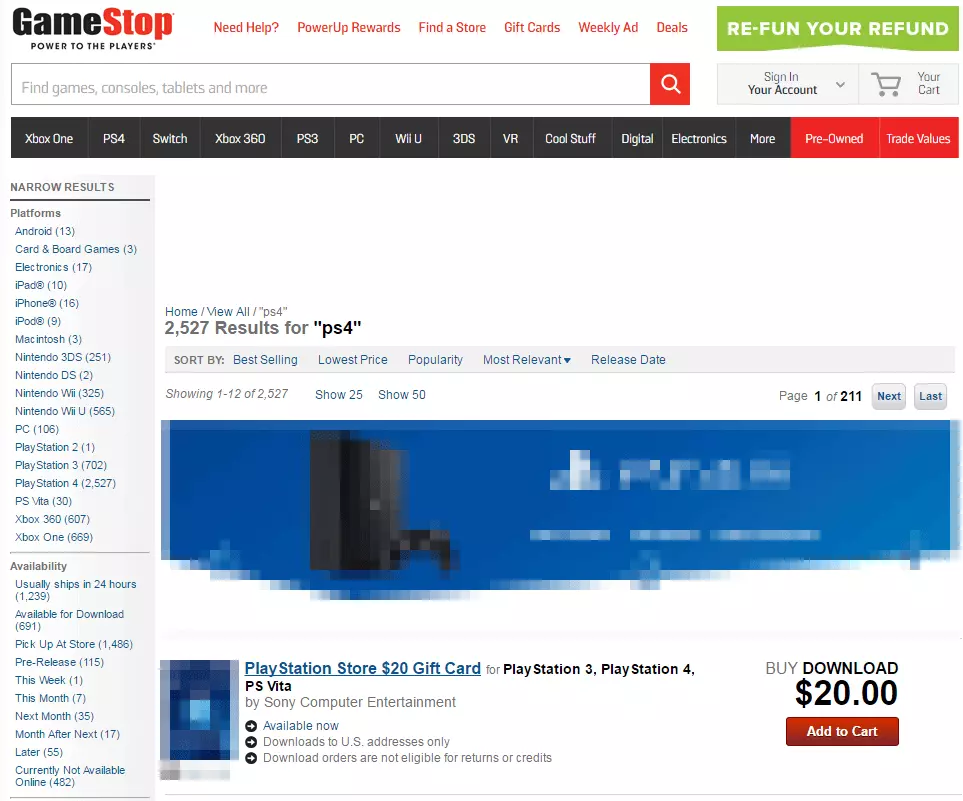
In quite an exemplary manner, Gamestop takes its users by the hand when it comes to searching. Search results can be sorted using nearly all the criteria one could possibly think of, and then can be further narrowed down with the use of the filters on the left-hand side. The choice of filters covers genres, platforms, price ranges, as well as release dates and availability. This demonstrates that Gamestop take usability and an effective search function very seriously.
Help with ‘No results‘
Even an intelligent search can, in some cases, be unsuccessful and display no results at all. It is also unavoidable that a shop cannot offer everything to a customer. ‘No results’ pages – maybe even one that offers alternatives - are a lot more pleasant and less frustrating for users than a blunt message informing you that no results matched your search.
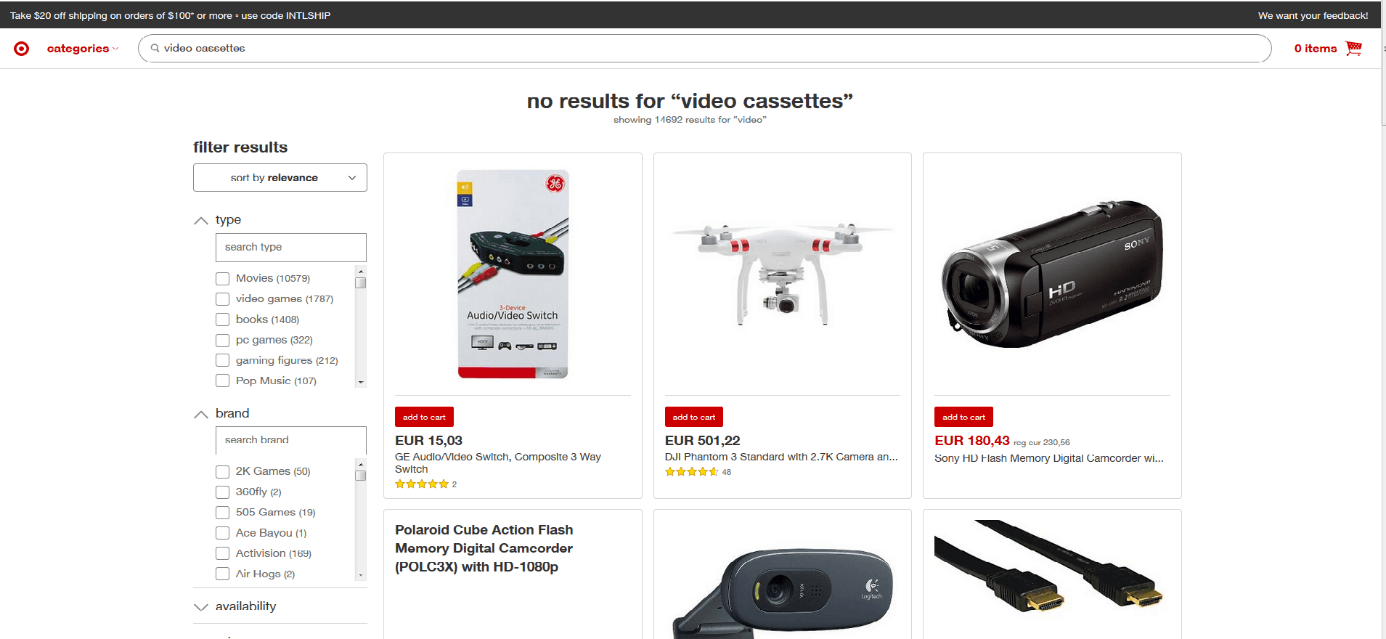
Source: http://intl.target.com/s?searchTerm=video%20cassettes
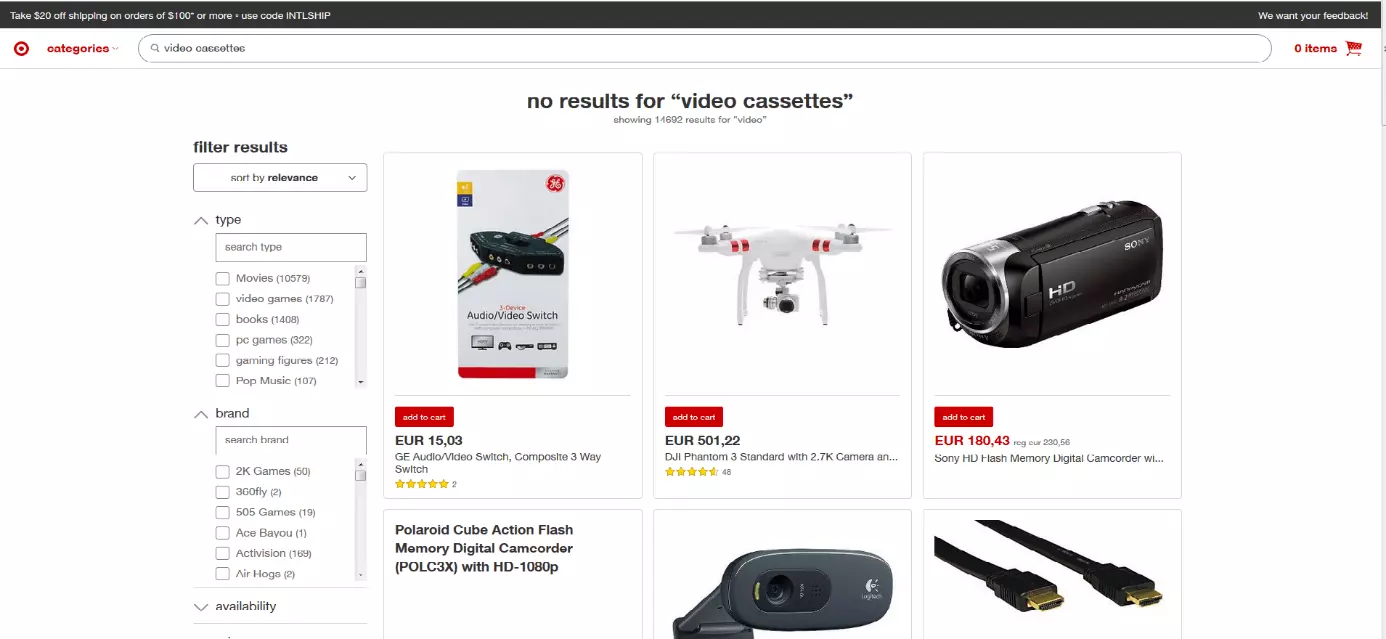
Searching for video cassettes in the 21st century has got a lot more difficult – in fact it is probably almost impossible these days, apart from maybe from used goods market places. Therefore, it is no surprise that an onsite search on Target’s website gives no results. But despite the search technically being unsuccessful, the search usability means that the user is not met with a blank web page. Instead, they are offered a list of products that are strongly linked to the word ‘video’. Users are also informed how many results there are related to this term – in this case, it is several thousand. At the bottom of the page then there is also the possibility of clicking on ‘related searches’, in this case, other terms that feature the word ‘video’, e.g. ‘video games’ appear.
User-friendly searches over mobile devices: what to be aware of?
It is happening more and more often that users are no longer using their desktop computer and its generously large keyboard that makes the entering of search terms so simple. Now, smartphones and tablets are more popular. This poses new challenges for website developers and online retailers. It is now expected that an intelligent search can be easily carried out by mobile users; be it on a native app or a mobile-optimised website.
Must haves: Autocomplete and an intuitive UI
Just like with an online shop: The faster and easier your customers can find their desired product, the better their customer experience will be. It goes without saying, then, that the intelligent search in your mobile app should offer the same useful features that your webpage onsite search does. This means that it must be just as tolerant of errors, as well as offer filters and categories for narrowing down search results. When it comes to mobile devices, there are two functions that are of particular importance. If someone is on a packed train and searching for an album by the ‘Red Hot Chili Peppers’ then they definitely do not want to manually enter the full name of the band. The search function needs to have an autocomplete function – and this is also undoubtedly more important for mobile users than for those searching on a desktop computer. In this case, as soon as ‘Red h’ has been typed, a list of relevant suggestions should be appearing underneath the search bar.
Furthermore, the user interface of the mobile app should meet all the requirements of a customer searching via a mobile device. The search bar must be immediately visible, and the magnifying glass, i.e. the search button, should be both easy to find and to press. These things are ideally placed directly next to the company logo, i.e. in the upper part of the homepage. The customer should not have to swipe down to find it.
Bonus: voice input and scanning function
These days there is very little that a smartphone or tablet cannot do – so why not use more of the devices’ interfaces to further improve users’ searching experience? Autocomplete is great because it makes typing that bit easier. But it would be even better if the mobile visitor to an online shop did not even have to type anything with the on-screen keyboard. This is now possible thanks to integrated microphones available with most smartphones. A so-called ‘voice user interface’ gives you the possibility of orally communicating with your device, and this makes searching even more intuitive and efficient. According to Search Engine Land, 2016 saw the number of voice searches go from 0 to 10 percent. As the number of voice searches increases, so too does the accuracy of the software; lack of accuracy is something that prevents many from choosing not to use the option of a voice search. Nowadays, nearly all major voice search providers, e.g. Google, Baidu, etc. all boast an accuracy rate of over 90 percent. According to ComScore, by 2020, 50 percent of all searches will be carried out by voice. This means that companies will need to adapt to suit the changing market landscape. And the feature which allows you to scan barcodes with your smartphone is also a very useful feature for shop apps. Given that their customers will most likely be visiting not just online shops but also brick and mortar shops in the city centre, it is becoming more important that they are provided with quick price and offer comparisons. In a recent survey conducted by Retail Drive, 39% of consumers stated that they would be more likely to visit a shopping center if they received alerts from shops relating to products that they are interested in purchasing. An ideal scenario for an online retailer would be if that as soon as a customer scans the barcode of a product with their app that they are then brought directly to the product page in your online store, where the price is in fact cheaper compared to the shop in which they are currently standing. Of course, this option only really makes sense with certain products, but if executed perfectly, then it could be the icing on the cake for the on-the-go intelligent search.
Reviewer

Melissa Senn
Melissa Senn has been with IONOS since 2016 and focuses on website, e-commerce, social media, and AI in the Digital Guide. As a digital strategist, she uses her extensive SEO and GEO experience to transform complex technological trends into practical content.