

The ultimate SEO guide for small businesses

For small businesses, SEO is about getting as many of the users, who are the most likely to buy their products and services, off the unpaid results of search engines like Google, to visit their website or store. This is also a key objective for larger businesses, but their starting point and key areas of focus often differ greatly from the SEO tactics that work best for small businesses. That is why we have put together this ultimate guide for SMBs looking to create an effective SEO strategy.
- Free website protection with SSL Wildcard included
- Free private registration for greater privacy
- Free Domain Connect for easy DNS setup
Why do small businesses need an SEO strategy
Most SMB owners know that SEO has something to do with search engines and that the most important search engine is Google, but they don’t necessarily understand the full value of what SEO can achieve for them. Some of these business owners may even consider their SEO strategy complete because their business can be found on Google when searchers type its name into the search results.
Admittedly, some small businesses haven’t even gotten this far yet, but making sure your business’s site can be found through your business name on Google is just checking that Google is able to find and crawl your site. It isn't optimising it so more customers can find your small business through search engines. Any business that can only be found on search engines this way has not come close to unleashing its online business potential with SEO for two reasons
-
Small businesses don’t have the brand recognition required to get searchers to them through search engines using only their name.
- Only customers who know the business’s name in the first place will find the business this way, meaning an SMB is not targeting any new customers, which is the main reason why many SMBs do SEO in the first place.

The essential foundation of a good SEO strategy
A small business owner looking to do SEO is much more likely to be in total control of their business’s marketing strategy. From creating the website to deciding what goes on it, SEO needs to be built into the foundations of a business’s website. The key areas for getting this right include:
Choosing an SEO compatible CMS
Easy to use website builders have made it possible for website owners to create an SEO-friendly website in a quick and cost-effective way. SEO compatible content management systems are the key to making this possible.
A small business owner needs to make sure they choose a CMS that creates an attractive user-friendly website that is well set up for SEO. WordPress and IONOS website builder are both great choices. If you are intending on implementing your own SEO strategy by paying someone else to build your website for you, make sure that they build your site with these considerations in mind.
- Stress-free, no matter your skill level with easy AI tools
- Full customisation with themes and plugins
- Hassle-free updates and less admin
Make your site mobile friendly
It’s also crucial that the website a small business has created is designed for site visitors on mobile devices such as smartphones and tablets, as well as PCs and Macs. This is known as making it mobile-friendly. Around half of all internet users are using a mobile device, so top search engines, including Google, have a mobile-first indexing policy. This means that pages that offer a poor user experience to mobile visitors cannot rank well on their results.
If you already have built a website that has this problem, you should consider installing plugins that will help to improve this experience such as the AMP plugin. If no such plugins exist for your type of website, most likely because it’s old, you may want to consider building a new one. On top of being good for SEO, mobile-friendly sites are vital for small businesses in town because customers searching for small businesses like yours are highly likely to be doing this on their mobile phones.
Follow image best practices
Images are an essential part of a modern website design, especially when creating appealing landing pages that visitors see after clicking on the page from Google results. This makes them especially important for small brick-and-mortar businesses as it is often the images of a store that convince potential customers to visit it. These images are also a vital tool for creating the customer engagement needed to increase conversions and the amount of time visitors spend on your website, two elements that are crucial parts of SEO and sales optimisation.
Conversely, images that are too large can negatively impact your SEO chances by slowing down your site’s load speed and Google’s ability to find and index your information. This is why you need to establish best practices for your images from the beginning.
You first need to pick the right file type. Most people tend to go for PNG or JPG images, GIF and LVG images are also well regarded. As a general rule of thumb, the main image on a page should be less than 300kb, all other images should be 100kb or less. Achieving this often requires image compression to make the file sizes smaller without having a significant impact on image quality.
The following tools are well regarded free tools for image compression
For more tips on optimising your images for SEO check out our article on image SEO.
Make sure your site is crawlable
All of the above factors will impact the speed at which Google can find and list your site’s information (known as indexing). If Google cannot crawl your site easily, its pages will not rank at all.
There are also additional things you can do, such as submitting a sitemap, which will ensure that Google is able to access your site and find all its pages easily. Working on all of these factors together is known as technical SEO. If you have already built your website, you should do a technical audit of your site to find the areas most in need of improvement.
rankingCoach is an affordable SEO app for small businesses looking to improve their website’s technical SEO themselves.The app scans your site and shows you with easy-to-follow step-by-step video tutorials, exactly how to improve its SEO.
Develop an SEO keyword strategy for your small business
If you are creating an SEO strategy for an existing website, this next crucial step of developing an SEO strategy will have to be implemented after the site’s creation, on the other hand, if you are working on an SEO strategy for a website that you are yet to build, you should do this research before you create the content of its pages.
This will ensure that your website’s keyword content is optimised from the very beginning. The sooner you optimise your website the better, as it can take weeks, or even months for your site to move up the rankings, as soon as it achieves those rankings you will start to see many new customers visiting your site.
What small businesses need to know about keywords and keyword research
Finding the best keywords for a small business website is all about identifying the best words and phrases that users may use in order to reach your website. One of the most valuable elements of search engines for marketers is that with the right keywords tools, like rankingCoach, marketers can actually see the number of customers who are using specific keywords phrases in their country or even neighbourhood.
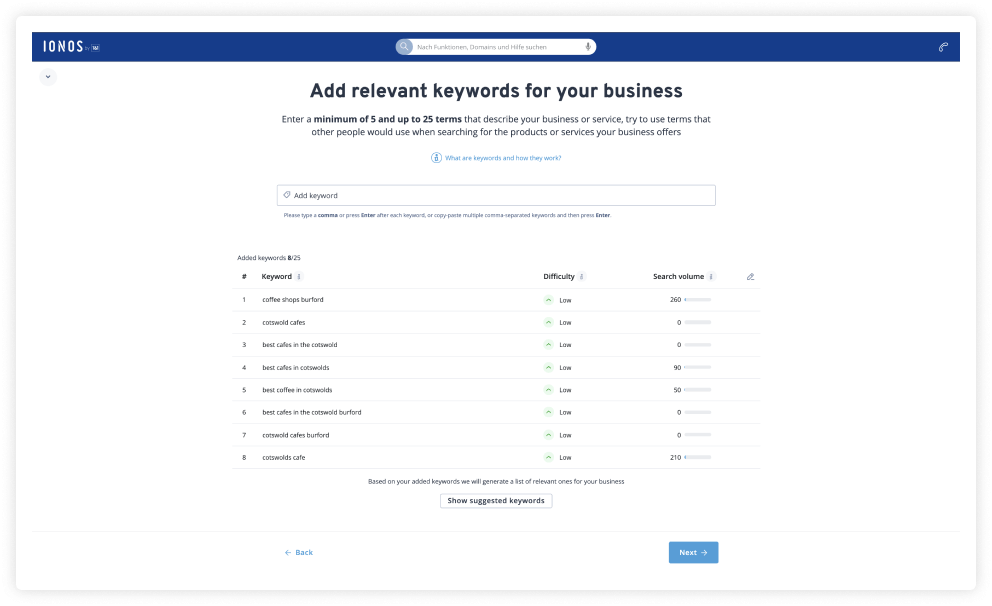
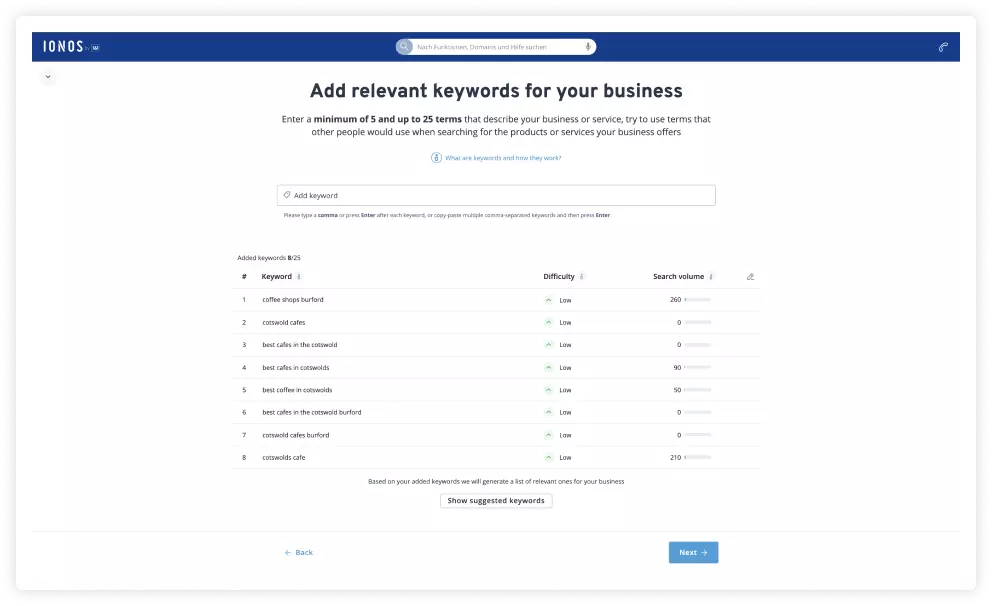
These keywords are excellent feedback on what your real customers are actually searching for. By targeting the right keywords and achieving top rankings, your small business can establish a long term low-cost source of customers. Remember that unlike ads on Google, the top organic result doesn’t pay Google a penny. This makes SEO excellent value marketing for small businesses.
Key SEO keywords groups for SMBs
SMBs need to use SEO tools to find the best value keywords for the following areas.
Keywords for store locations
Many small businesses owners have physical locations that they are trying to attract customers to. It’s important that these business owners cover more than just their address. Small businesses want to make sure they appear in the results for people looking for options in their area.
According to the rankingCoach keywords feature, on average 1600 in the UK type ‘places to eat near London bridge’, this would definitely be a good keyword phrase to target for a restaurant in the central London area located near London bridge. This phrase is a classic example of a so-called ‘near me’ search that is often conducted by consumers on their mobile devices. If you are a brick-and-mortar small business owner, you need to find the nearest landmark and searches used by people in your area for your industry. For example, if you are based in New York, ‘bars near Times Square’ may be relevant. Make sure to include such keywords in your site’s content for key pages like the home and how to find our pages. Local businesses looking to attract more customers from the results of Google Maps should also make sure they set up a Google My Business profile. This will give the business owner better control over their business’s listing on Google maps and on the search results page (SERP).
- Improve your Google ranking without paying an agency
- Reply to reviews and generate social media posts faster
- No SEO or online marketing skills needed
SEO keyword when looking for products
To maximise the number of customers who find their site, SMBs need to pay close attention to the words used to describe their products. Often, SMBs focus too much on the exact name of the products and fail to cover the more general names customers use to find them. Put yourself in the user’s shoes and aim for more general terms people are using on search engines.
Using words in your site’s content that people are actually typing into search engines will bring you more customers. Also, using more general terms will help to attract customers who haven’t decided exactly which products they want yet. For instance, someone searching for ‘pizza places near me’ definitely wants pizza but more people will be searching for ‘places to eat near me’ and some of them will want pizza too.
SEO keywords for questions related to products
After you have covered all the best keywords customers use to find the products you offer, you can then target topics and questions linked to your products. Small business owners often know their products better than anyone else, so use this to your advantage by providing this valuable content for your customers and other prospects.
Businesses often find that writing content based on questions linked to their products can attract a lot of traffic that is likely to be interested in buying their products or services. According to the rankingCoach keywords feature, on average there are 301K searches for things to do in London each month; many of these searches will be from people planning a trip to London. A hotel could take this keyword phrase and use it to create an article for their blog titled ‘The ten best things to do in London’ to help tourists to discover their business.
How SMBs can choose the right SEO keywords
There is likely to be hundreds of combinations of keywords for each of these different keyword groups. Many small business owners don’t have more than ten pages on their site; they can only choose a few from each category to place in the key locations on their page such as the page titles and meta descriptions.
This means that small businesses need to choose their words wisely. The search volume for keywords, that is the number of people searching for it, is only half of the information required to make the best choice. Small business owners also need to know how hard it might be to rank for a particular keyword phrase. If many larger websites are already targeting a phrase, it may be better for a smaller business to target keywords with lower search volume but less competition.
With the help of keyword tools like rankingCoach, find out how much search volume a particular keyword has and get an estimation of how challenging it may be to rank for that particular keyword, based on search volume and competition, making it easy for your business to find the best value keywords.
Continuous improvement with keyword monitoring
Once you have the best keywords and achieved top rankings, you will find many new customers coming to your site and visiting your store. To maintain this inflow of new customers you need to make sure that your business holds onto those top rankings. Keyword monitoring tools, like those found in rankingCoach monitor the rankings of your site and its competitors so you can see what’s working and what’s not and act accordingly.
The final takeaway for SMBs on SEO
If you are a small business owner who wants to do SEO well, you’ll need these 5 things:
- A new site with an easy to use, SEO-friendly CMS. Alternatively, you can conduct an SEO audit of your website to see how you can optimise it to ensure that Google can find, crawl and index its content easily.
- Your website needs to be built around the best value keywords for your store location, product name, and top questions and topics related to the products or services you offer.
- These keywords need to feature heavily in your site’s content. Doing this correctly will achieve top rankings for your business, which will bring many new customers to your store and site. However, remember that SEO is not just about keywords but also about other aspects such as mobile-friendliness, loading times and user experience.
- To hold onto these customers, you’ll have to continuously monitor and protect your rankings by ensuring that your content is up to date and by following Google’s SEO best practices.