

Facebook image sizes explained

Content alone is not enough to stand out from the social media crowd. Quality, method, and storytelling are also important elements. Particularly important here is the concept that visual content marketing comes first. As interesting and original as text may be, companies only have a fraction of a second to reach their audience. The brain processes visual content 60,000 times faster than text content. So that means nothing is as effective for social media marketing as a good visual impression. To achieve this, you’ll need to gather the best elements from your content and make sure your Facebook image sizes are ideal.
Why Facebook image sizes are important
First impressions count. What may sound trivial is still factual. We need between 0.3 and 7 seconds to form an impression of something we are looking at. First impressions determine friendships or job opportunities. Though they can still be corrected through human interaction, social media users have to be convinced within the first few seconds.
An essential factor for visual content is optimal dimensions and image sizes. Facebook images that are incorrectly sized or in the wrong format can appear distorted, pixelated, or cropped. Not only does this look unprofessional, but it also weakens your social media marketing and your company brand.
Optimal Facebook image sizes and types
In social media marketing, business profiles and fan pages on Facebook and Instagram are a must. Instagram image sizes and video formats are a topic in and of themselves, so this article will focus solely on Facebook image sizes. If you have your own Facebook page as Facebook marketing for your own business, remember that there are different types of images on Facebook, each with their own requirements:
- Profile pictures
- Cover pictures
- Event pictures
- Shared picture posts
- Carousel advertising
- Link images
For particularly large formats and high resolution, it may be necessary to compress images before uploading them. JPG, PNG, or GIF formats are most suitable for Facebook. PNG and GIF are more suitable for logos and other graphics, whereas JPGs are more suitable for photos.
In addition to different social media channels, a company also needs its own website. As such, why not optimise your online presence with an appealing, professional website? With the IONOS website builder, you can create your own online presence with an SSL certificate, your own domain, and an inbox.
The following overview will help you to find the perfect dimensions for the various types of images.
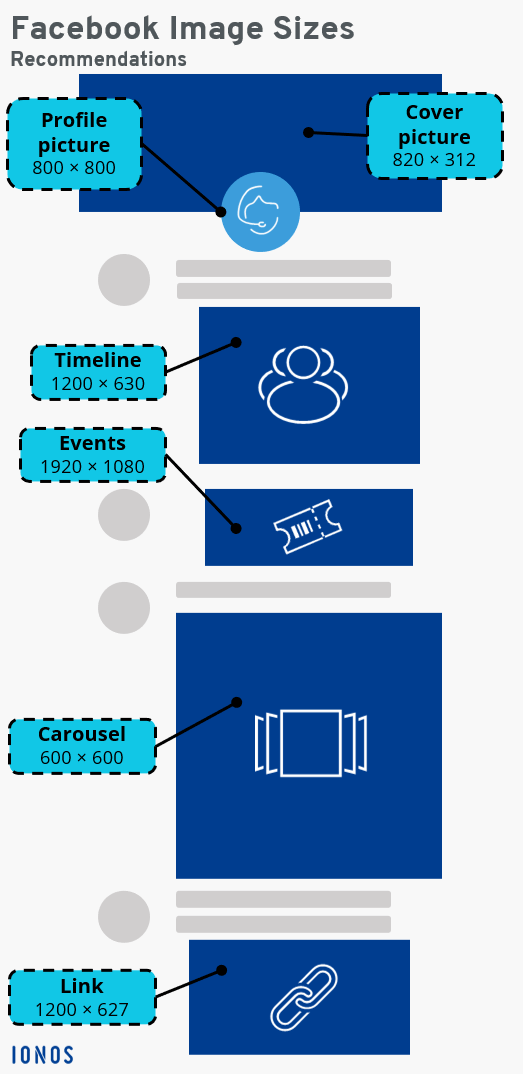
Facebook cover photos: Size
Whether for a private account, a business Facebook page, or a Facebook fan page, we recommend a Facebook cover image size of 820 x 312 pixels, since Facebook displays cover images on a desktop in this format. The file size should be less than 100 KB. For optimal display on mobile devices, the ideal aspect ratio has dimensions of 640 x 360 pixels.
For the size design of Facebook cover images, an ideal intermediate value of 820 x 360 pixels with the important components in the centre is sometimes also suitable, in order to avoid a clipped display.
Facebook profile picture: Size
For the size design of Facebook profile pictures, an image size of at least 170 x 170 pixels is recommended. The ideal medium for high-quality resolution is a picture that measures 800 x 800 pixels or 1200 x 1200, since profile images can be enlarged and should therefore have the highest resolution possible. Profile pictures are displayed on a desktop in 170 x 170 pixels, and on smartphones in 128 x 128 pixels. Keep in mind an image arrangement with a round format, according to the current profile picture standard.
Facebook timeline: Image size
If you want to post pictures on your timeline, a size of 1200 x 630 pixels is recommended. 1200 x 1500 pixels is a suitable size for portrait format images. The maximum aspect ratio is 1:1.5. Keep in mind that Facebook images with incorrect dimensions will be cropped or scaled. Since timeline images are like a chronicle of your activities and actions, you should pay particular attention to using the correct dimensions.
Facebook events: Photo size
Event photos in the header of a Facebook event appear particularly large. A size of 826 x 294 pixels is therefore recommended in this case. The feed is displayed on Facebook in 470 x 174 pixels, so a higher resolution of 1920 x 1080 pixels (aspect ratio 16:9) is advisable here. Since the display can vary depending on the device being used, you should arrange the most important details in the centre and keep any text short if necessary.
Facebook carousel advertising: Image size
Carousel advertisements, also known as carousel ads, are particularly useful for presenting up to ten images with their own URLs in one ad. The ideal image size here is 600 x 600 pixels and an aspect ratio of 1:1. There is space for 125 characters of text, 40 title characters, and 20 link label characters.
Facebook image size for shared links
If you want to share links, it makes sense to illustrate them. This will attract attention and generate feedback and interaction. With a Facebook display size of 500 x 261 pixels, an image size of 1200 x 627 pixels is recommended.
Do you need a company website in addition to your Facebook profile? Use the free domain check from IONOS to check the availability of your desired domain with a suitable ending.